- Home
- /
- SAS Viya
- /
- Visual Analytics
- /
- Re: Sorting in Data Explorer
- RSS Feed
- Mark Topic as New
- Mark Topic as Read
- Float this Topic for Current User
- Bookmark
- Subscribe
- Mute
- Printer Friendly Page


- Mark as New
- Bookmark
- Subscribe
- Mute
- RSS Feed
- Permalink
- Report Inappropriate Content
I am trying to do some exploration using the Data Explorer in VA. I know with report designer, you can use custom sort to have a customized sorting/fix sorting of a variable. Is it really not possible to do it while in Data explorer? Been trying to figure it out but I can't seem to find it.
Bar Chart
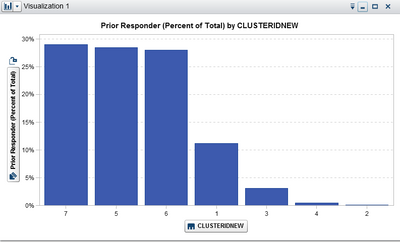
No Sort option when variable is right-clicked on.

By the way, version of VA I'm using is 7.3.
Sarah


- Mark as New
- Bookmark
- Subscribe
- Mute
- RSS Feed
- Permalink
- Report Inappropriate Content
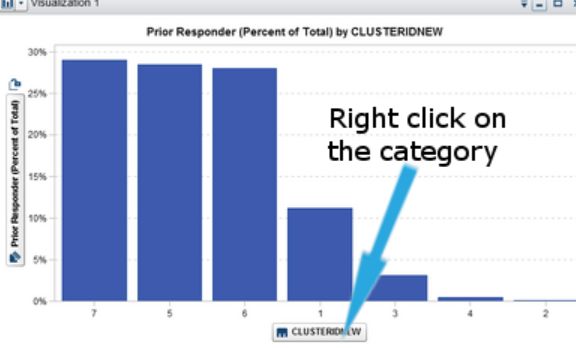
Right click on the category in the chart, and you have a sort option in there.
I'm not sure if custom sorts are available (in the same way as they are in the Designer).

- Mark as New
- Bookmark
- Subscribe
- Mute
- RSS Feed
- Permalink
- Report Inappropriate Content
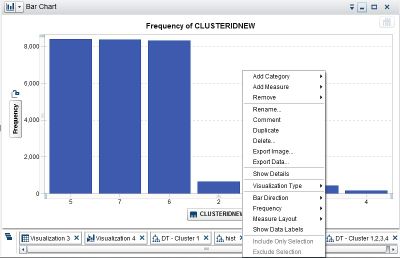
I don't have the same options as you have. Here is what's showing in mine.
- Mark as New
- Bookmark
- Subscribe
- Mute
- RSS Feed
- Permalink
- Report Inappropriate Content
I get the same menu as you if I right click on the chart background - you have to right click on the category box..On CLUSTERIDNEW

- Mark as New
- Bookmark
- Subscribe
- Mute
- RSS Feed
- Permalink
- Report Inappropriate Content
There might be something wrong with my VA as the right click option is the same as when I click on the background and when I click on the box as you have illlustrated.
- Mark as New
- Bookmark
- Subscribe
- Mute
- RSS Feed
- Permalink
- Report Inappropriate Content
Maybe it's different in 7.3 then - I'm in 7.4 and this different menu is displayed.
Maybe someone else with 7.3 knows another way, but in 7.4, you would simply right click your category. (Either way, you should think about upgrading to 7.4 already, as there are lots of bug fixes in this update).
- Mark as New
- Bookmark
- Subscribe
- Mute
- RSS Feed
- Permalink
- Report Inappropriate Content
Thanks Scott! I'll look into that. Would need to consult our team if an upgrade to 7.4 if feasible. If not, I hope someone with 7.3 could give me some enlightenment on this matter.
- Mark as New
- Bookmark
- Subscribe
- Mute
- RSS Feed
- Permalink
- Report Inappropriate Content
Cool - We've recently upgraded; our SAS dealer did it for us though. Didn't have any issues, and would recommend it.


- Mark as New
- Bookmark
- Subscribe
- Mute
- RSS Feed
- Permalink
- Report Inappropriate Content
Hello,
I did a quick test in 7.4 and 7.3 and there does not appear to be any difference in sorting between the two. (There are other good reasons to upgrade, however!)
In my test, the context menu with the Sort option does not appear if a lattice role is assigned, or if you right-click a data item that is assigned to the Group role.
But Sarah's screenshot doesn't seem to show either of those scenarios.
You might want to check with technical support to figure out just what is going on here. Are you using a browser other than IE, Chrome, or Firefox?
Thanks,
Sam
- Mark as New
- Bookmark
- Subscribe
- Mute
- RSS Feed
- Permalink
- Report Inappropriate Content
Sarah, can you check whether sorting is available under the same conditions in the report designer? There are some sorting differences between the explorer and designer.
Thanks,
Sam
- Mark as New
- Bookmark
- Subscribe
- Mute
- RSS Feed
- Permalink
- Report Inappropriate Content
Thanks for the input Sam. The variable wasn't used as lattice or group by so it isn't causing that. I did ask some colleagues of mine to do some testing. And it worked out fine for them. But apparently there were using Chrome. I was using IE. it seems the browser that was used caused it. Maybe there is a set up/options/properties if IE that is causing the malfunction. I just can't figure out what. So I'll use Chrome for now.
Thanks!
Sarah
- Mark as New
- Bookmark
- Subscribe
- Mute
- RSS Feed
- Permalink
- Report Inappropriate Content
Thanks for following up, and I'm glad it is working for you in Chrome. Generally Chrome is the browser that works best for VA.
Sam

Call for content now open!
It's your turn to help shape SAS Innovate 2027. Share your expertise and inspire the SAS community.
See how to use one filter for multiple data sources by mapping your data from SAS’ Alexandria McCall.

Find more tutorials on the SAS Users YouTube channel.
-
11 replies
-
07-05-2017 11:29 PM
-
6267 views
-
0 likes
-
3 in conversation
-


