- Home
- /
- Programming
- /
- Enterprise Guide
- /
- EG 4.3 autocomplete off by one
- RSS Feed
- Mark Topic as New
- Mark Topic as Read
- Float this Topic for Current User
- Bookmark
- Subscribe
- Mute
- Printer Friendly Page


- Mark as New
- Bookmark
- Subscribe
- Mute
- RSS Feed
- Permalink
- Report Inappropriate Content
Hi All,
I just noticed having an odd problem with EG code autocomplete. It seems to be off by one.
So if I type &file and hit space, it selects &extension, and replaces it.
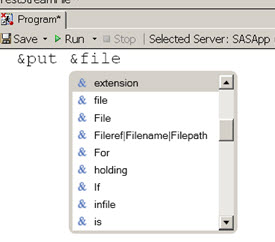
If I start to type &method , after I have typed &me it guesses I'm typing &just
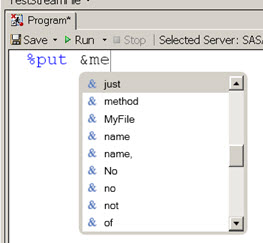
Any idea what could be going wrong? I have quit and restarted EG. And turned autocomplete off and on. Seems to be happening only in one program in the project.
Thanks,
--Q.
Register now at https://www.basug.org/events.
Accepted Solutions


- Mark as New
- Bookmark
- Subscribe
- Mute
- RSS Feed
- Permalink
- Report Inappropriate Content
Hi Quentin,
It looks like you have some "interesting" macro variables at least as far as EG detects (with "Fileref|Filename|Filepath"). Still could be an off-by-one issue in the editor, but perhaps only with your "special mix" of macro variables?
Chris
- Mark as New
- Bookmark
- Subscribe
- Mute
- RSS Feed
- Permalink
- Report Inappropriate Content
Hi Quentin,
It looks like you have some "interesting" macro variables at least as far as EG detects (with "Fileref|Filename|Filepath"). Still could be an off-by-one issue in the editor, but perhaps only with your "special mix" of macro variables?
Chris
- Mark as New
- Bookmark
- Subscribe
- Mute
- RSS Feed
- Permalink
- Report Inappropriate Content
You are right Chris. I should have paused to guess at why the autocomplete thought there were some odd macro vars. I'm in the habit of commenting my macro variables as below:
%global
  file /* Fileref|Filename|Filepath/filename */
  method
  ;
While SAS respects those comments, looks like EG autocomplete word scanner (?) thinks everything before the semicolon is the name of a macro var, as in below simple example.
Guess some of that junk was tripping up how it autcompletes, causing the off-by-one (not shown below). When I took out the comments, it started working again.
Thanks much!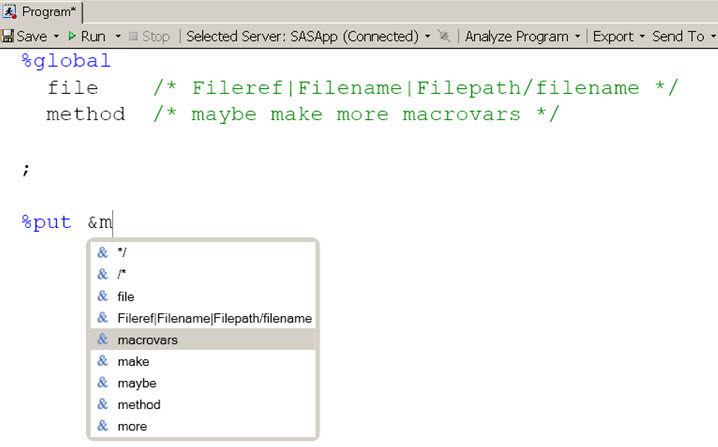
Register now at https://www.basug.org/events.
- Mark as New
- Bookmark
- Subscribe
- Mute
- RSS Feed
- Permalink
- Report Inappropriate Content
Thanks for confirming. I'll pass that on the EG development team so they can investigate.
Chris

Catch up on SAS Innovate 2026
Nearly 200 sessions are now available on demand with the SAS Innovate Digital Pass.
Explore Now →Check out this tutorial series to learn how to build your own steps in SAS Studio.

Find more tutorials on the SAS Users YouTube channel.
SAS Training: Just a Click Away
Ready to level-up your skills? Choose your own adventure.
-
3 replies
-
09-24-2012 11:39 AM
-
1706 views
-
0 likes
-
2 in conversation
-


