BookmarkSubscribeRSS Feed
🔒 This topic is solved and locked. Need further help from the community? Please sign in and ask a new question.
Jennyzhu2
Calcite | Level 5

When I ran the coding in section 1 to import excel data under EP101d01.sas, I got error message " The physical file was not found". The existing coding for path is "pro import datafile = "PATHFILE/storm.xlsx". I checked createdataPG1-oda.sas which I set up data in SAS studio, I found that "PATHFILE" doesn't exist at all. So I changed "DATAFILE" into "&Path/Storm.xlsx". It works now. Could you double check the coding under EP101d01.sas to see whether it is correct or not? Am I right to change the coding as above? I'm a new learner on SAS.

Thank you

1 ACCEPTED SOLUTION

Accepted Solutions
Cynthia_sas
Diamond | Level 26

Hi:
Yes, there is an issue with that program, thanks for pointing it out. We are reviewing it.

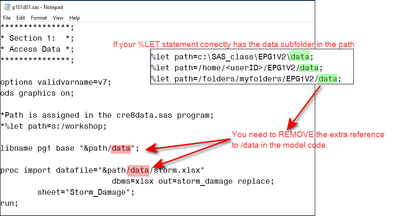
If your %LET statement in SETUP.SAS includes the data subfolder (which is correct for SAS OnDemand), then you needed to take the /data out of the datafile= part of the code.

Cynthia_sas_0-1589226668755.png


S:\workshop is the classroom path for the file and in that environment, we use a slightly different path for classroom students. However, for SAS OnDemand for Academics, you should make sure that your %LET statement includes the /data subfolder and that your model syntax does not have a second reference to /data.


Thanks for bringing this typo to our attention.
Cynthia

View solution in original post

4 REPLIES 4
Cynthia_sas
Diamond | Level 26

Hi:
Yes, there is an issue with that program, thanks for pointing it out. We are reviewing it.

If your %LET statement in SETUP.SAS includes the data subfolder (which is correct for SAS OnDemand), then you needed to take the /data out of the datafile= part of the code.

Cynthia_sas_0-1589226668755.png


S:\workshop is the classroom path for the file and in that environment, we use a slightly different path for classroom students. However, for SAS OnDemand for Academics, you should make sure that your %LET statement includes the /data subfolder and that your model syntax does not have a second reference to /data.


Thanks for bringing this typo to our attention.
Cynthia

Jennyzhu2
Calcite | Level 5
Thank you Cynthia for your speedy feedback. It seems section 3 and 4 have coding errors as well under EP101d01.SAS ( SAS OnDemand for Academics). Somebody saved different coding after lunch. Could you please check it?
Cynthia_sas
Diamond | Level 26

Hi, we are reviewing the code and making changes. I am testing that program after I do the setup. I show the file name as just P102d01.sas -- as shown below:

Cynthia_sas_0-1589235633172.png


It's probably better to watch the videos and wait for the class zip file and/or instructions to be corrected though. We'll need to re-check all the instructions, not just the OnDemand ones.
Thanks,
Cynthia

Jennyzhu2
Calcite | Level 5
Thank you so much Cynthia! I will wait for the fix to be done. Could you please let me know once it is done? Many Thanks.