- Home
- /
- SAS Viya
- /
- Visual Analytics
- /
- Re: Using Measures across rows and columns on Crosstabs
- RSS Feed
- Mark Topic as New
- Mark Topic as Read
- Float this Topic for Current User
- Bookmark
- Subscribe
- Mute
- Printer Friendly Page


- Mark as New
- Bookmark
- Subscribe
- Mute
- RSS Feed
- Permalink
- Report Inappropriate Content
Hi,
I am new to SAS VA and working on a requirement to create a report which looks something as follows :
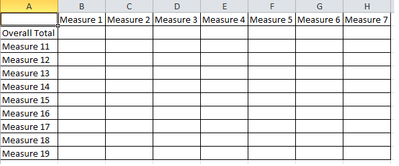
The problem I am facing is both the rows and columns will be measures. The column measures subtotals will be shown in the Overall total row. Each intersection of row measure should show the count/sum of the row measure value by the column measure values.
Following picture shows a sample subset what I would like to create :
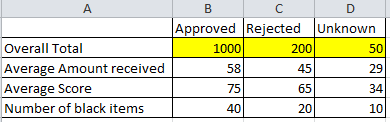
Its not that I have to do it on a crosstab. Any other solutions are welcome. Thanks.


- Mark as New
- Bookmark
- Subscribe
- Mute
- RSS Feed
- Permalink
- Report Inappropriate Content
I recognize that this is an old post, but it was never answered and I'm facing the same problem right now. Does anyone have a solution for this?


- Mark as New
- Bookmark
- Subscribe
- Mute
- RSS Feed
- Permalink
- Report Inappropriate Content
In Visual Analytics 8.2, it is possible to place measures in rows in a crosstab object (see the attached screenshot).
Grego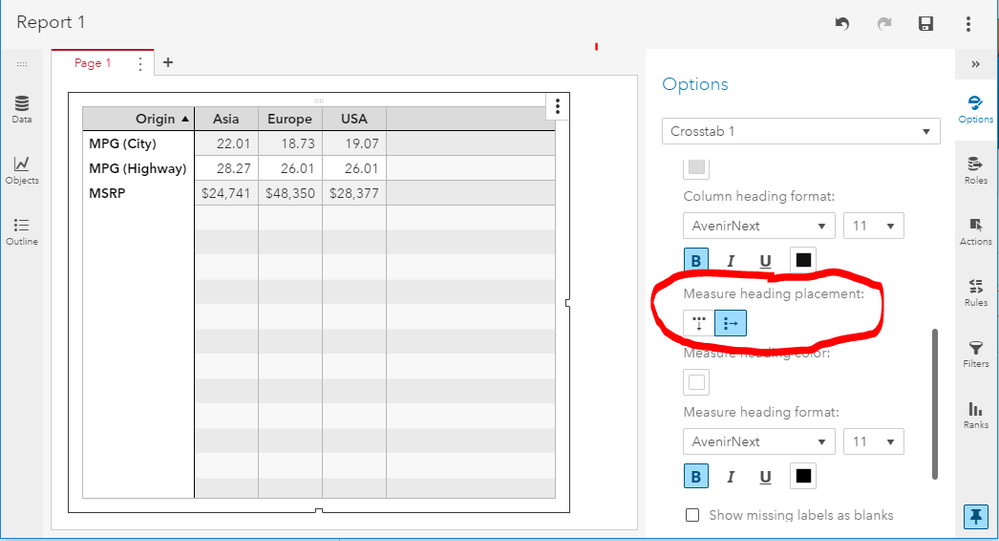
- Mark as New
- Bookmark
- Subscribe
- Mute
- RSS Feed
- Permalink
- Report Inappropriate Content
Thanks, Gregor. We're still on 7.4 at my office, but it's good to know that option is available in 8.2.

Catch up on SAS Innovate 2026
Nearly 200 sessions are now available on demand with the SAS Innovate Digital Pass.
Explore Now →See how to use one filter for multiple data sources by mapping your data from SAS’ Alexandria McCall.

Find more tutorials on the SAS Users YouTube channel.
-
3 replies
-
04-17-2017 03:22 AM
-
4130 views
-
2 likes
-
3 in conversation
-


