- Home
- /
- SAS Viya
- /
- Visual Analytics
- /
- Error in Visual Analytics Viewer
- RSS Feed
- Mark Topic as New
- Mark Topic as Read
- Float this Topic for Current User
- Bookmark
- Subscribe
- Mute
- Printer Friendly Page


- Mark as New
- Bookmark
- Subscribe
- Mute
- RSS Feed
- Permalink
- Report Inappropriate Content
Hi masters!
When i try to open a report in SAS VA i get the next error:
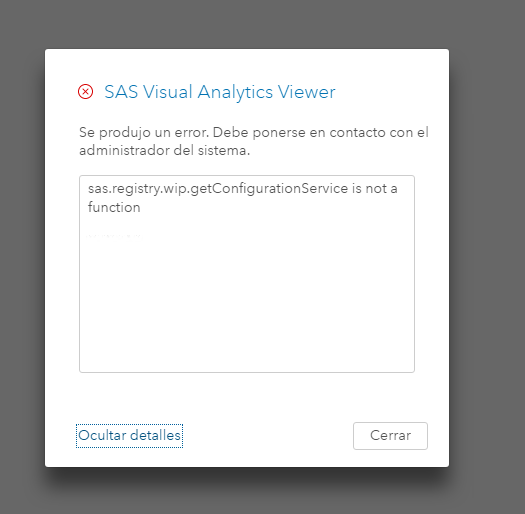
I get this error since i restarted the server.
kind regards


- Mark as New
- Bookmark
- Subscribe
- Mute
- RSS Feed
- Permalink
- Report Inappropriate Content
Go to the SAS Management Console and then Plug-Ins -> Configuration Manager -> right-click on SAS Application Infrastructure -> Properties -> Advanced:
Add, or update if they exist, the following parameters with the following values:
Settings Value
serviceUrl.PerformCheck false
sas.web.csrf.referers.performCheck false
sas.web.cdps.performCheck false
Do not forget to restart the web application server after that.
- Mark as New
- Bookmark
- Subscribe
- Mute
- RSS Feed
- Permalink
- Report Inappropriate Content
thanks @alexal
But this solution does not work, I get the same error and this button does not work too
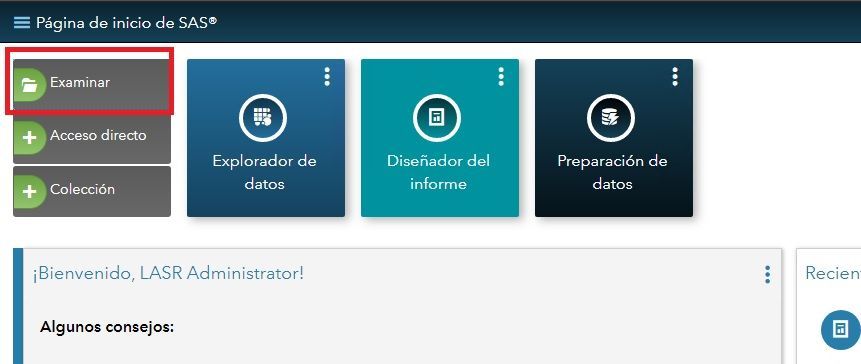
Kind regards
- Mark as New
- Bookmark
- Subscribe
- Mute
- RSS Feed
- Permalink
- Report Inappropriate Content

Call for content now open!
It's your turn to help shape SAS Innovate 2027. Share your expertise and inspire the SAS community.
See how to use one filter for multiple data sources by mapping your data from SAS’ Alexandria McCall.

Find more tutorials on the SAS Users YouTube channel.
-
3 replies
-
02-26-2018 12:33 PM
-
2159 views
-
1 like
-
2 in conversation
-


