- Home
- /
- Programming
- /
- Enterprise Guide
- /
- edit %enterpriseguide startup macro in 5.1
- RSS Feed
- Mark Topic as New
- Mark Topic as Read
- Float this Topic for Current User
- Bookmark
- Subscribe
- Mute
- Printer Friendly Page


- Mark as New
- Bookmark
- Subscribe
- Mute
- RSS Feed
- Permalink
- Report Inappropriate Content
Hi,
I'm connecting from EG 5.1 to a SAS 9.3 z/Os workspace server. In the workspace server log the macro %enterpriseguide is included and submitted.
In EG 4.1, this code was included in the egauto.sas.
But where can I find the source code of %enterpriseguide in 5.1?
Kind regards,
Ebele


- Mark as New
- Bookmark
- Subscribe
- Mute
- RSS Feed
- Permalink
- Report Inappropriate Content
If you select File->Export->Export All Code in Process Flow, you'll see a code preview that contains all of the macros that SAS Enterprise Guide defines.
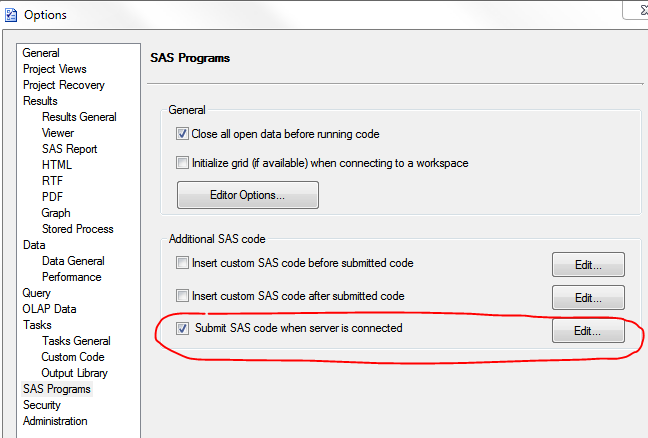
If you need to provide your own modifications to one of these macros, you can insert your own macro definition in Tools->Options->SAS Programs: Submit SAS code when server is connected.
Chris
- Mark as New
- Bookmark
- Subscribe
- Mute
- RSS Feed
- Permalink
- Report Inappropriate Content
Hi Chris,
Thanks. The export All Code provides me the wrapper code. In this wrapper code, I can find the %enterpriseguide. Thanks for that.
But when you add additional SAS code, for instance when a server is connected, this code is submitted after the wrapper code is submitted.
I'm looking for a way to edit the %enterpriseguide macro in the wrapper code (for every user in the company). There is filename allocation statement (egtmpdir) which I want to change.
Kind regards,
Ebele
- Mark as New
- Bookmark
- Subscribe
- Mute
- RSS Feed
- Permalink
- Report Inappropriate Content
Contacted support about this: in EG 5.1 you can still add a Enterpriseguide.sas to the install directory of EG 5.1.
In this file you can make modifications to the wrapper code. It overrides the default wrappercode.
Kind Regards,
Ebele

Catch up on SAS Innovate 2026
Nearly 200 sessions are now available on demand in the Innovate Hub.
Watch Now →Check out this tutorial series to learn how to build your own steps in SAS Studio.

Find more tutorials on the SAS Users YouTube channel.
SAS Training: Just a Click Away
Ready to level-up your skills? Choose your own adventure.
-
3 replies
-
06-17-2013 09:15 AM
-
3017 views
-
0 likes
-
2 in conversation
-


