- Home
- /
- Programming
- /
- ODS Reports
- /
- Re: The 'end'-horizontal line to be eliminated in listing after 'proc ...
- RSS Feed
- Mark Topic as New
- Mark Topic as Read
- Float this Topic for Current User
- Bookmark
- Subscribe
- Mute
- Printer Friendly Page


- Mark as New
- Bookmark
- Subscribe
- Mute
- RSS Feed
- Permalink
- Report Inappropriate Content
Hi all,
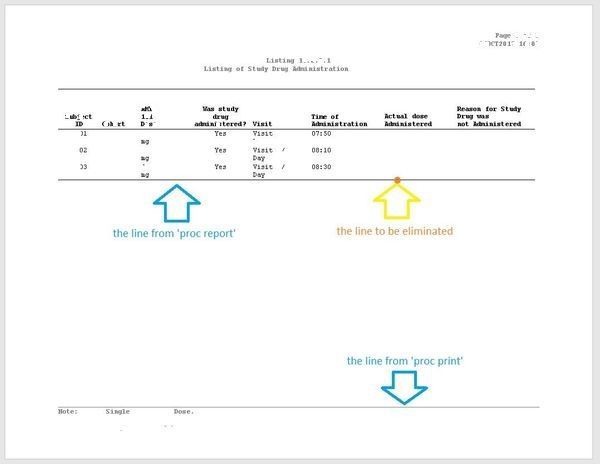
Could you please help in the following case. There is a line on each page when final listing is printed. Please see the picture below. Is there a method to eliminate the line?


- Mark as New
- Bookmark
- Subscribe
- Mute
- RSS Feed
- Permalink
- Report Inappropriate Content
Cynthia
- Mark as New
- Bookmark
- Subscribe
- Mute
- RSS Feed
- Permalink
- Report Inappropriate Content
Thank you, Cynthia. I'm using the code below. It think that the style is defined in system options before the block but I have not found it. Possibly they are in system macros.
- Mark as New
- Bookmark
- Subscribe
- Mute
- RSS Feed
- Permalink
- Report Inappropriate Content
cynthia
- Mark as New
- Bookmark
- Subscribe
- Mute
- RSS Feed
- Permalink
- Report Inappropriate Content
Thank you, Cynthia. In my understanding the style Journal is a default style of SAS and it is standard for clinical trials Listings and Tables. It means that even we use a %print it just calls for this template 'Journal' and does not modify it. Is it correct interpretation?
How could I access the template and modify it?

- Mark as New
- Bookmark
- Subscribe
- Mute
- RSS Feed
- Permalink
- Report Inappropriate Content
Use PROC TEMPLATE to see the style definition in the log.
proc template;
  source styles.journal;
run;
The code box below shows a portion of the Journal style. frame = HSIDES produces the borders at the top and bottom of the table. frame = ABOVE produces a border at the top of the table.
    style Output from Container /
       bordercolor = colors('fgA1')
       borderwidth = 1
       borderspacing = 0
       cellpadding = 7
       frame = HSIDES
       rules = GROUPS
       backgroundcolor = colors('bgA1')
       bordercollapse = separate
       borderstyle = solid;
Create a modified version of the template and then use it.
ODS PATH WORK.TEMPLAT(UPDATE) SASHELP.Tmplmst(READ);


proc template;
  define style styles.modified_Journal;
  parent=styles.Journal;
  style Output from Output /
    frame = ABOVE;
  end;
run;

ods rtf file="/folders/myfolders/SAS Communities/modified Journal style.rtf"
  style=modified_Journal;

proc report data=sashelp.class nowd;
  title 'SASHELP.class data set';
  title2 'This is a modified version of the Journal style that ships with SAS';
run;

ods rtf close;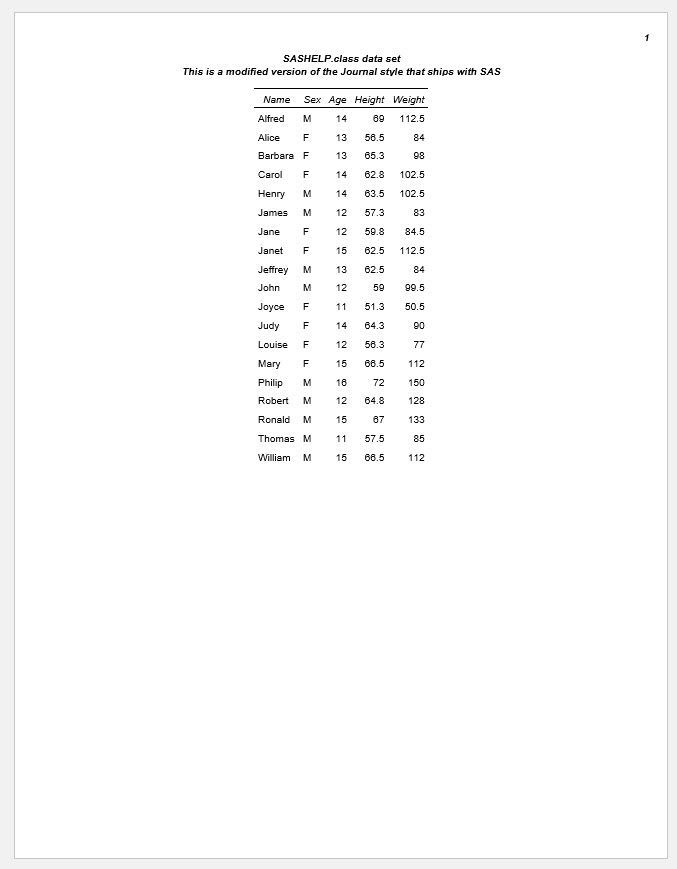
- Mark as New
- Bookmark
- Subscribe
- Mute
- RSS Feed
- Permalink
- Report Inappropriate Content

Catch up on SAS Innovate 2026
Nearly 200 sessions are now available on demand in the Innovate Hub.
Watch Now →Learn how use the CAT functions in SAS to join values from multiple variables into a single value.

Find more tutorials on the SAS Users YouTube channel.
SAS Training: Just a Click Away
Ready to level-up your skills? Choose your own adventure.
-
6 replies
-
10-08-2017 12:23 PM
-
40622 views
-
1 like
-
3 in conversation
-


