- Home
- /
- Programming
- /
- Graphics
- /
- Re: Proc SGPANEL color by subject
- RSS Feed
- Mark Topic as New
- Mark Topic as Read
- Float this Topic for Current User
- Bookmark
- Subscribe
- Mute
- Printer Friendly Page


- Mark as New
- Bookmark
- Subscribe
- Mute
- RSS Feed
- Permalink
- Report Inappropriate Content
Hi All,
I am trying to generate a figure plot using the below code. I am getting the output as in the attached screen shot.
proc sgpanel data=have ;
panelby SUBJID / layout=PANEL novarname columns=4 rows=2;
series x=x_axis_var y=aval /group=trt01p_ attrid=myid lineattrs=(pattern=mediumdash thickness=2);
scatter x=x_axis_var y=aval /group=trt01p_ attrid=myid markerattrs = (symbol=circlefilled size=8);
rowaxis integer grid values=(0,50,75,100) label="test";
colaxis integer grid values=(1 to 10 by 1) discreteorder=data label="Day";
run;
quit;
My query is how can we change the Blue color plots 'Green', Red color plots to 'Blue' and the bottom Legend with Green and Blue colors?
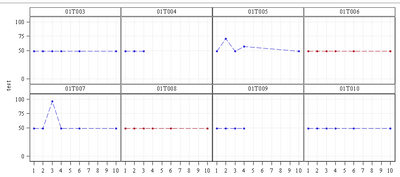
Thanks.
Accepted Solutions


- Mark as New
- Bookmark
- Subscribe
- Mute
- RSS Feed
- Permalink
- Report Inappropriate Content
Looks like duplicate of this solved one(?)
https://communities.sas.com/t5/Graphics-Programming/Proc-SGPANEL-color-by-subject/m-p/749650#M21676


- Mark as New
- Bookmark
- Subscribe
- Mute
- RSS Feed
- Permalink
- Report Inappropriate Content
Moved to Graphics community
- Mark as New
- Bookmark
- Subscribe
- Mute
- RSS Feed
- Permalink
- Report Inappropriate Content
Looks like duplicate of this solved one(?)
https://communities.sas.com/t5/Graphics-Programming/Proc-SGPANEL-color-by-subject/m-p/749650#M21676


- Mark as New
- Bookmark
- Subscribe
- Mute
- RSS Feed
- Permalink
- Report Inappropriate Content
Hi @csa,
Compared to the other thread, you inserted the attrid=myid option into the SERIES and SCATTER statements. However, without using the DATTRMAP= option in the SGPANEL statement there's nothing that "myid" refers to. So, in addition to this option you need an attribute map dataset, as described in Example: Create a Panel That Uses an Attribute Map:
data attrmap;
retain ID "myid";
input value markercolor $ linecolor $;
datalines;
1 green green
2 blue  blue
;

proc sgpanel data=have dattrmap=attrmap;
...
Note that most likely you will need to adapt the values of variable value above to your data, unless your variable trt01p_ happens to be numeric with values 1 and 2 (for the groups currently displayed in blue and red, respectively) and not formatted. If trt01p_ is character with values, say, "Active" and "Placebo" or formatted with these format labels, define value as a character variable (of sufficient length) in the DATA step above and replace 1 and 2 by Active and Placebo, resp., in the data lines.

Call for content now open!
It's your turn to help shape SAS Innovate 2027. Share your expertise and inspire the SAS community.
Learn how use the CAT functions in SAS to join values from multiple variables into a single value.

Find more tutorials on the SAS Users YouTube channel.
SAS Training: Just a Click Away
Ready to level-up your skills? Choose your own adventure.
-
3 replies
-
06-22-2021 01:12 PM
-
3734 views
-
6 likes
-
4 in conversation
-


