BookmarkSubscribeRSS Feed
jrheintz91
Calcite | Level 5

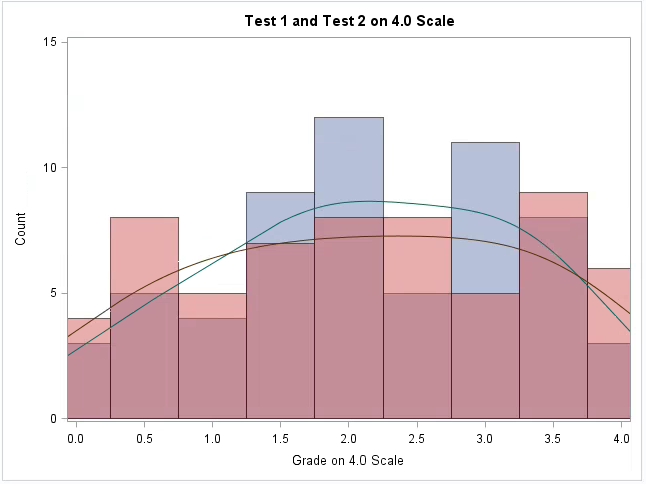
I am trying to create two histograms overlayed on one plot with their respective kernels. I want the variables in the legend, but I do NOT want the curve labels in the legend. I have tried using the KEYLEGEND feature, but when the commented out line is included, the entire legend is removed. Any help would be much appreciated.


PROC SGPLOT DATA=ALLFAKE;
HISTOGRAM GRADE1 / SCALE=COUNT BINSTART=0 BINWIDTH=0.5 TRANSPARENCY=0.5 LEGENDLABEL="Test 1";
HISTOGRAM GRADE2 / SCALE=COUNT BINSTART=0 BINWIDTH=0.5 TRANSPARENCY=0.5 LEGENDLABEL="Test 2";
DENSITY GRADE1 / TYPE=KERNEL ;
DENSITY GRADE2 / TYPE=KERNEL;
XAXIS label="Grade on 4.0 Scale" VALUES=(0 to 4 by 0.5);
YAXIS LABEL="Count" VALUES=(0 to 15 by 5);
Title "Test 1 and Test 2 on 4.0 Scale";
*KEYLEGEND "Grade1" "Grade2";
RUN;


graph.png
1 REPLY 1
PeterClemmensen
Tourmaline | Level 20

Add the NAME=option to the histogram options and specify that in the KEYLEGEND statement as below


proc sgplot data = sashelp.class;
	histogram height / group = sex transparency = 0.5 Name = "Histogram";
	density height / type = kernel group = sex;
	keylegend "Histogram" / position = NE location = inside across = 1;
run;

sas-innovate-2026-white.png


April 27 – 30 | Gaylord Texan | Grapevine, Texas

Registration is open

Walk in ready to learn. Walk out ready to deliver. This is the data and AI conference you can't afford to miss.
Register now and lock in 2025 pricing—just $495!

Register now

How to Concatenate Values

Learn how use the CAT functions in SAS to join values from multiple variables into a single value.

Find more tutorials on the SAS Users YouTube channel.

SAS Training: Just a Click Away

 Ready to level-up your skills? Choose your own adventure.

Browse our catalog!

Discussion stats
  • 1 reply
  • 1944 views
  • 0 likes
  • 2 in conversation