Turn on suggestions
Auto-suggest helps you quickly narrow down your search results by suggesting possible matches as you type.
Showing results for
- Home
- /
- Programming
- /
- Graphics
- /
- Fun With SAS ODS Graphics: Happy Halloween Ellipses Pumpkin
Options
- RSS Feed
- Mark Topic as New
- Mark Topic as Read
- Float this Topic for Current User
- Bookmark
- Subscribe
- Mute
- Printer Friendly Page


Lapis Lazuli | Level 10
- Mark as New
- Bookmark
- Subscribe
- Mute
- RSS Feed
- Permalink
- Report Inappropriate Content
Posted 10-30-2022 05:45 PM
(1530 views)

Another holiday, another SAS ODS Graphics "craft project". Happy Halloween, all!
* Fun w/SAS ODS Graphics: Happy Halloween Ellipses Pumpkin
  Inspired by neat craft project at itsmejd.com/easy-diy-halloween-cards-make-minimal-supplies;

data pumpkin;          * Need one "dummy" point to use ellipseparm statements;
retain x y 0;
                       * SAS ODS Graphics GTL Halloween greetings;
ods graphics on / reset antialias width=4in height=5.5in;
proc template;         * 5 ellipseparms + 2 drawrectangles + 1 drawtext (and 1 "dummy" scatterplot);
define statgraph pumpkin;
begingraph / backgroundcolor=black border=false pad=0in;
layout overlay / xaxisopts=(display=none linearopts=(viewmin=-1 viewmax=1) offsetmin=0 offsetmax=0)
                 yaxisopts=(display=none linearopts=(viewmin=-1 viewmax=1.1) offsetmin=.05 offsetmax=.15)
                 walldisplay=none border=false outerpad=0in;
scatterplot x=x y=y;    * "Dummy" plot - single point (x=0, y=0), needed for ellipseparm);
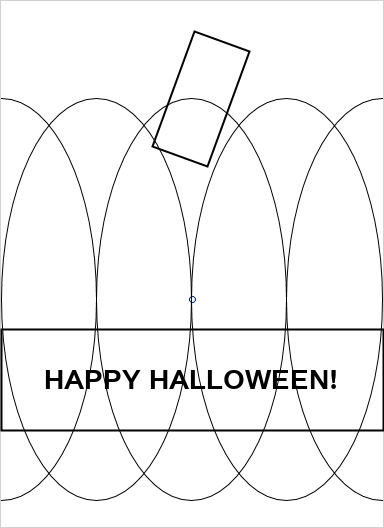
drawrectangle x=.05 y=1 width=.3 height=.6 / layer=back heightunit=data widthunit=data drawspace=datavalue rotate=-20 display=(fill) fillAttrs=(color=cx2EB62C); * Green "stem";
ellipseparm semiminor=.5 semimajor=1 xorigin=-1 yorigin=y slope=. / display=(fill outline) fillattrs=(color=cxFF7518) outlineattrs=(color=black); * Arranged to show desired outlines;
ellipseparm semiminor=.5 semimajor=1 xorigin=-.5 yorigin=y slope=. / display=(fill outline) fillattrs=(color=cxFF7518) outlineattrs=(color=black);
ellipseparm semiminor=.5 semimajor=1 xorigin=1 yorigin=y slope=. / display=(fill outline) fillattrs=(color=cxFF7518) outlineattrs=(color=black);
ellipseparm semiminor=.5 semimajor=1 xorigin=.5 yorigin=y slope=. / display=(fill outline) fillattrs=(color=cxFF7518) outlineattrs=(color=black);
ellipseparm semiminor=.5 semimajor=1 xorigin=0 yorigin=y slope=. / display=(fill outline) fillattrs=(color=cxFF7518) outlineattrs=(color=black);
drawrectangle x=0 y=-.15 width=2 height=.5 / anchor=top layer=front heightunit=data widthunit=data drawspace=datavalue display=(fill) fillAttrs=(color=black);
drawtext textattrs=(size=20pt weight=bold color=white) "HAPPY HALLOWEEN!" /
         layer=front anchor=center justify=center width=100 widthunit=percent xspace=datavalue yspace=datavalue x=0 y=-.4;
endlayout;
endgraph;
end;

proc sgrender data=pumpkin(obs=1) template=pumpkin; * Generate chart!;
run;
BEFORE COLORING
1 REPLY 1


Super User
- Mark as New
- Bookmark
- Subscribe
- Mute
- RSS Feed
- Permalink
- Report Inappropriate Content
/*
Since I have some time,
I would likt to replicate it by PROC SGPLOT .
*/


data have;
input x y x1 y1 text $40.;
cards;
0 -0.2 0 0.32 HAPPY HALLOWEEN!
;

ods graphics on / reset antialias width=4in height=5.5in noborder;
proc sgplot data=have noautolegend noborder;
styleattrs wallcolor=black;
symbolchar name=x char='00B4'x;
scatter x=x1 y=y1 / markerattrs=(symbol=x size=500 color=lightgreen);
ellipseparm semiminor=.5 semimajor=1 / xorigin=-1 yorigin=0  fill outline  fillattrs=(color=cxFF7518) lineattrs=(color=black);
ellipseparm semiminor=.5 semimajor=1 / xorigin=-.5 yorigin=0   fill outline fillattrs=(color=cxFF7518) lineattrs=(color=black);
ellipseparm semiminor=.5 semimajor=1 /xorigin=1 yorigin=0   fill outline fillattrs=(color=cxFF7518) lineattrs=(color=black);
ellipseparm semiminor=.5 semimajor=1 /xorigin=.5 yorigin=0   fill outline fillattrs=(color=cxFF7518) lineattrs=(color=black);
ellipseparm semiminor=.5 semimajor=1 /xorigin=0 yorigin=0  fill outline fillattrs=(color=cxFF7518) lineattrs=(color=black);
refline -0.2 /axis=y lineattrs=(color=black thickness=80);
text x=x y=y text=text/strip contributeoffsets=none textattrs=(color=white size=20 weight=bold);
xaxis display=none min=-1.5 max=1.5  offsetmin=0 offsetmax=0 valueshint ;
yaxis display=none offsetmin=0.05 offsetmax=0.15   ;
run;

Call for content now open!
It's your turn to help shape SAS Innovate 2027. Share your expertise and inspire the SAS community.
How to Concatenate Values
Learn how use the CAT functions in SAS to join values from multiple variables into a single value.

Find more tutorials on the SAS Users YouTube channel.
SAS Training: Just a Click Away
Ready to level-up your skills? Choose your own adventure.
Discussion stats
-
1 reply
-
10-30-2022 05:45 PM
-
1531 views
-
5 likes
-
2 in conversation
-

