Keep getting some kind of crash while opening SAS 9.4 (Windows 7 professional 32bit)
Installation didn't show any error sign but whenever i open SAS, the 'editor' appears to be in full black, colored black
i can write down codes and run (only few lines) which i can't see cuz the background is in black and can't erase or do something complecated
tools - options - enhanced editor... -->> ?? ?? ???? ?????. kind of message
when i open in different language it says smthing like ': internal application program error'
how can i solve this out?? ive reinstalled software many times and still getting this issue
In tools preferences there should be an option to customize editor, including background colour.
Also, you're using 64 bit SAS I assume?
In tools preferences there should be an option to customize editor, including background colour.
Also, you're using 64 bit SAS I assume?
Hi,
what SAS 9.4 maintenance release are you running, and what SP for Win 7?
Thanks
Anja
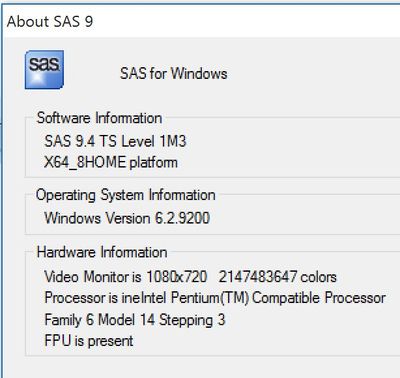
I would like to say that exactly the same situation takes place in the case of my instalation of SAS 9.4 on Lenovo MIIX 700 with Windows 10 64 bit. Fortunately, you can go to Tools->Options->Preferences->Edit and uncheck the box 'Use Enhanced Editor'. But this solution only partly solves the problem because in fact I want to use some features of Enhanced Editor. Below, the SAS info obtained from the help menu:
The SAS Users Group for Administrators (SUGA) is open to all SAS administrators and architects who install, update, manage or maintain a SAS deployment.
SAS technical trainer Erin Winters shows you how to explore assets, create new data discovery agents, schedule data discovery agents, and much more.

Find more tutorials on the SAS Users YouTube channel.