Turn on suggestions
Auto-suggest helps you quickly narrow down your search results by suggesting possible matches as you type.
Showing results for
- Home
- /
- SAS Viya
- /
- Visual Analytics
- /
- new caliculated column
Options
- RSS Feed
- Mark Topic as New
- Mark Topic as Read
- Float this Topic for Current User
- Bookmark
- Subscribe
- Mute
- Printer Friendly Page
🔒 This topic is solved and locked.
Need further help from the community? Please
sign in and ask a new question.


Fluorite | Level 6
- Mark as New
- Bookmark
- Subscribe
- Mute
- RSS Feed
- Permalink
- Report Inappropriate Content
Posted 05-03-2016 06:53 AM
(2850 views)
wanted to create new caliculate column like as follwos ,any one can guide me
X / Y * 200
Any one can guide me how to create in sas va designer creating caliculated item
1 ACCEPTED SOLUTION
Accepted Solutions
Fluorite | Level 6
- Mark as New
- Bookmark
- Subscribe
- Mute
- RSS Feed
- Permalink
- Report Inappropriate Content
Thank you very much Balraj ,Bruno
3 REPLIES 3


Meteorite | Level 14
- Mark as New
- Bookmark
- Subscribe
- Mute
- RSS Feed
- Permalink
- Report Inappropriate Content
Have a look at the SAS Visual Analytics Video Library
Go to SAS Visual Analytics Designer, Derive New Data Items
Bruno


Quartz | Level 8
- Mark as New
- Bookmark
- Subscribe
- Mute
- RSS Feed
- Permalink
- Report Inappropriate Content
Hi @Anly
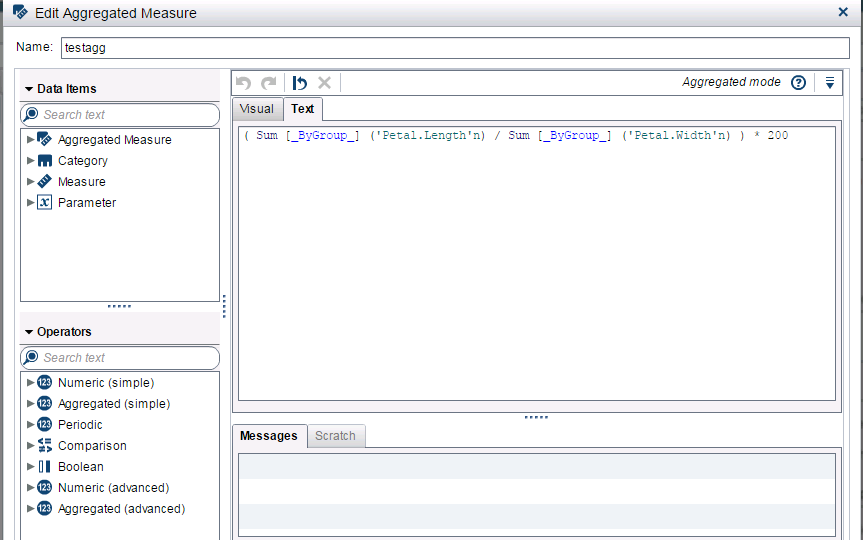
PFA, you can create an Aggregated Measure instead of calculated measure.
Petal.length and Petal.width would be your X and Y variables, keep the remaining syntax as it is.
PFA
Kind Regards,
Balraj P
Fluorite | Level 6
- Mark as New
- Bookmark
- Subscribe
- Mute
- RSS Feed
- Permalink
- Report Inappropriate Content
Thank you very much Balraj ,Bruno

Call for content now open!
It's your turn to help shape SAS Innovate 2027. Share your expertise and inspire the SAS community.
Tips for filtering data sources in SAS Visual Analytics
See how to use one filter for multiple data sources by mapping your data from SAS’ Alexandria McCall.

Find more tutorials on the SAS Users YouTube channel.
Discussion stats
-
3 replies
-
05-03-2016 06:53 AM
-
2851 views
-
0 likes
-
3 in conversation
-


