- Home
- /
- SAS Viya
- /
- Visual Analytics
- /
- ESRI Mapping and Visual Analytics
- RSS Feed
- Mark Topic as New
- Mark Topic as Read
- Float this Topic for Current User
- Bookmark
- Subscribe
- Mute
- Printer Friendly Page


- Mark as New
- Bookmark
- Subscribe
- Mute
- RSS Feed
- Permalink
- Report Inappropriate Content
I am considering implementing ARCGIS server from ESRI with Visual Analytics. I like the visual analytics SAS provides but I also prefer the true GIS environment ESRI provides. My goal is to get these two platforms to work together...Does anyone have any experience they are willing to share about configuring ESRI maps with SAS VA? Does the functionality of ARCGIS translate to the VA environment? Pitfalls?
Thanks for your help.

- Mark as New
- Bookmark
- Subscribe
- Mute
- RSS Feed
- Permalink
- Report Inappropriate Content
Hi I have same demand.....
Did you config successfully?
Many Thanks!
Roy
- Mark as New
- Bookmark
- Subscribe
- Mute
- RSS Feed
- Permalink
- Report Inappropriate Content
The short answer is no...I'm still exploring the capabilities and haven't purchased an ESRI ARCGIS server yet.
My request is to find someone else who has successfully implemented the SAS VA/ESRI combination and find out if it works before moving forward with ARCGIS server. It appears from the VA documentation VA connects to the ESRI server environment by changing the config settings from openstreet map to ESRI. Before pursuing the purchase of ARCGIS server, I'm interested in learning if the functionality of ESRI works in VA or if the ESRI server just displays a map with no ability to interact with the data. I have a license for ARCGIS Online, but there is not any indication SAS VA connects to ARCGIS online. .
Any thoughts are much appreciated.
- Mark as New
- Bookmark
- Subscribe
- Mute
- RSS Feed
- Permalink
- Report Inappropriate Content
Hi , I have configed it sucessfully.
I referenced public ArcGIS Online sample map services that do not require authentication.
Just Follow the step below:
STEP 1 On the Plug-ins tab in SAS Management Console, navigate to Application Management -->Configuration Manager --> SAS Application Infrastructure --> Visual Analytics 7.x. Right-click, and select Properties.
STEP 2 config your ERSI URL on the advanced tab ,and i used "http://services.arcgisonline.com/ArcGIS/rest/services" which is not require authentication. The URL should config in "va.SASGeomapEsriURL".
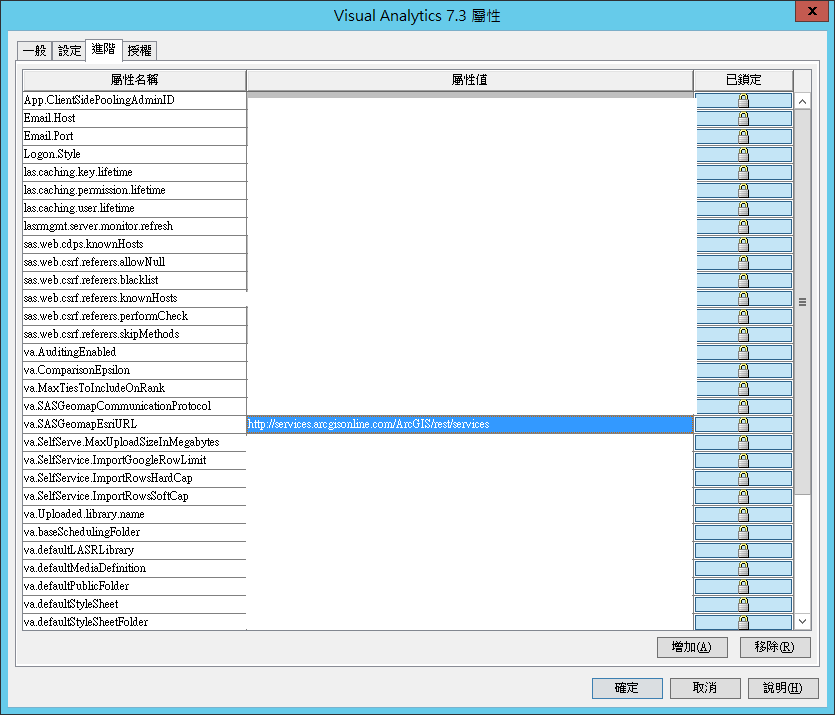
STEP 3
On the SAS Application Infrastructure node, update the advanced property sas.web.cdps.knownHosts to include the Esri URL.
STEP 4
Restart the web Application server.
In the VA report designer/ explorer ,you can select the map service you want.
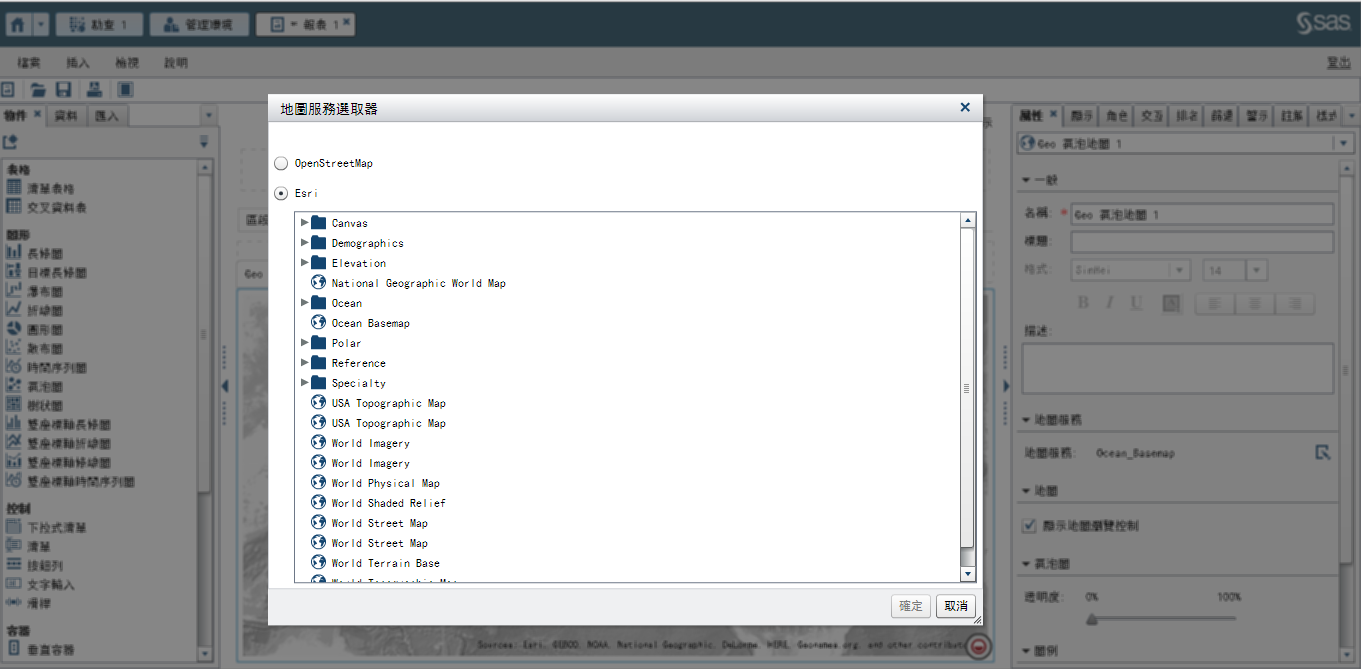
For more detailed configuration you can download the VA Administration Guide for your VA version.
https://support.sas.com/documentation/onlinedoc/va/
Good luck!
Roy


- Mark as New
- Bookmark
- Subscribe
- Mute
- RSS Feed
- Permalink
- Report Inappropriate Content
I didn't realize they had a "free" set of maps available. I'll be curious to hear any thoughts, reviews, or limitations that you encounter.
Thanks for sharing Roy.
Tricia Aanderud
Twitter: @taanderud - Follow me!


- Mark as New
- Bookmark
- Subscribe
- Mute
- RSS Feed
- Permalink
- Report Inappropriate Content
Hi Team,
Greetings.
We are currently working on the integration of ESRI Maps with SAS Visual Analytics in our environment. During the configuration, we are facing an issue related to cross-site request validation.
Specifically, we are unable to update or edit the sas.web.csrf.knownHosts parameter, which is required to whitelist the ESRI service URL / referring host for successful map rendering in SAS Visual Analytics.
Due to this limitation, we are unable to proceed with ESRI map configuration and visualization in SAS VA.
In this context, we request your guidance on the following:
The correct and supported approach to configure or update
sas.web.csrf.knownHostsin a SAS 9.4 environment.Whether this setting should be modified via:
SAS Management Console
Configuration files (e.g., web application properties)
SAS Environment Manager / configuration utilities
Any alternative or recommended method to enable ESRI Map integration if direct modification of
sas.web.csrf.knownHostsis restricted.Required restart sequence or validation steps after applying the configuration.
Your support will help us complete the ESRI Map integration securely and as per best practices.
Please let us know if any additional details are required from our side.
Note:
1. I have 2 url's . when i was opened in browser it is userid and password in that scanario how can i approach the ESRI map
2. How to edit the below path as mentioned in screen shot.

or else can we add like and delete sas.web.cdps.knowHosts1

Please suggest me how to approach in this scanario.
Thanks & Regards,
Sandhani


- Mark as New
- Bookmark
- Subscribe
- Mute
- RSS Feed
- Permalink
- Report Inappropriate Content
Hi,
If you are using Visual Analytics 8.1 or later, the following article helps you to better understand how to set it up:
I hope this article helps you.
- Mark as New
- Bookmark
- Subscribe
- Mute
- RSS Feed
- Permalink
- Report Inappropriate Content
Thanks for your response. I am using Visual Analytics 7.5. Can you please
share with me the related document if you have one? It will be really
helpful for me.
Regards
Sandhani
- Mark as New
- Bookmark
- Subscribe
- Mute
- RSS Feed
- Permalink
- Report Inappropriate Content
Hi, Sandhani.
Please refer to "Esri Server", Geo Map Server in SAS Visual Analytics 7.5: Administration:
https://go.documentation.sas.com/doc/en/vacdc/7.5/vaag/n1oaashorywocun10c5epp8z9r97.htm#n11i9fllwzrl...
I hope it helps you.

Call for content now open!
It's your turn to help shape SAS Innovate 2027. Share your expertise and inspire the SAS community.
See how to use one filter for multiple data sources by mapping your data from SAS’ Alexandria McCall.

Find more tutorials on the SAS Users YouTube channel.
-
8 replies
-
06-01-2016 12:35 PM
-
6689 views
-
1 like
-
5 in conversation
-


