BookmarkSubscribeRSS Feed
LMD
Calcite | Level 5 LMD
Calcite | Level 5

I am using SAS studio and the Task and Utilities button has disappeared. The tasks under that folder are no longer available when I open SAS studio. Does anyone know how to regain the Task and Utilities button? 

thanks

1 REPLY 1
jennifert
SAS Employee

Hi LMD,


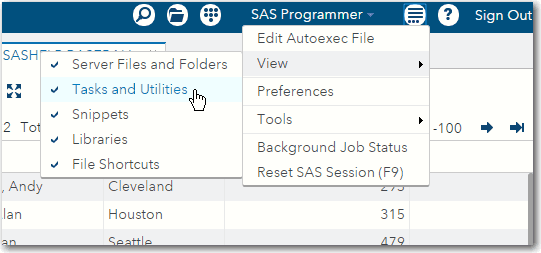
Check and see if you might have accidentally turned off the display of the Tasks and Utilities.  In the main SAS Studio toolbar, click the More application options button and click View.  Make sure that Tasks and Utilities is checked.


Viewoption.gif


Hope that helps!

thanks,

Jennifer


Catch the SAS Global Forum keynotes, announcements, and tech content!
sasglobalforum.com | #SASGF

sas-innovate-2026-white.png


April 27 – 30 | Gaylord Texan | Grapevine, Texas

Registration is open

Walk in ready to learn. Walk out ready to deliver. This is the data and AI conference you can't afford to miss.
Register now and lock in 2025 pricing—just $495!

Register now

Develop Code with SAS Studio

Get started using SAS Studio to write, run and debug your SAS programs.

Find more tutorials on the SAS Users YouTube channel.

SAS Training: Just a Click Away

 Ready to level-up your skills? Choose your own adventure.

Browse our catalog!

Discussion stats
  • 1 reply
  • 3401 views
  • 1 like
  • 2 in conversation