- Home
- /
- Programming
- /
- SAS Studio
- /
- SAS University Edition stopped working in Safari
- RSS Feed
- Mark Topic as New
- Mark Topic as Read
- Float this Topic for Current User
- Bookmark
- Subscribe
- Mute
- Printer Friendly Page


- Mark as New
- Bookmark
- Subscribe
- Mute
- RSS Feed
- Permalink
- Report Inappropriate Content
Hi:
I have been working on SAS University Edition for a year without any issue. Recently it has stopped working in Safari without any error message. It just don't show anyting! Please suggest a solution. Following are the technical details:
OS: MacBook Pro OS X Yesomite
SAS University Edition: Most recent one (I re-installed everything. Still no hope!)
VirtualBox: Oracle VM 5.0.16
Safari: Version 9.1
Thank you,
Mamun
- Tags:
- Safari
- sas studio


- Mark as New
- Bookmark
- Subscribe
- Mute
- RSS Feed
- Permalink
- Report Inappropriate Content
- Mark as New
- Bookmark
- Subscribe
- Mute
- RSS Feed
- Permalink
- Report Inappropriate Content
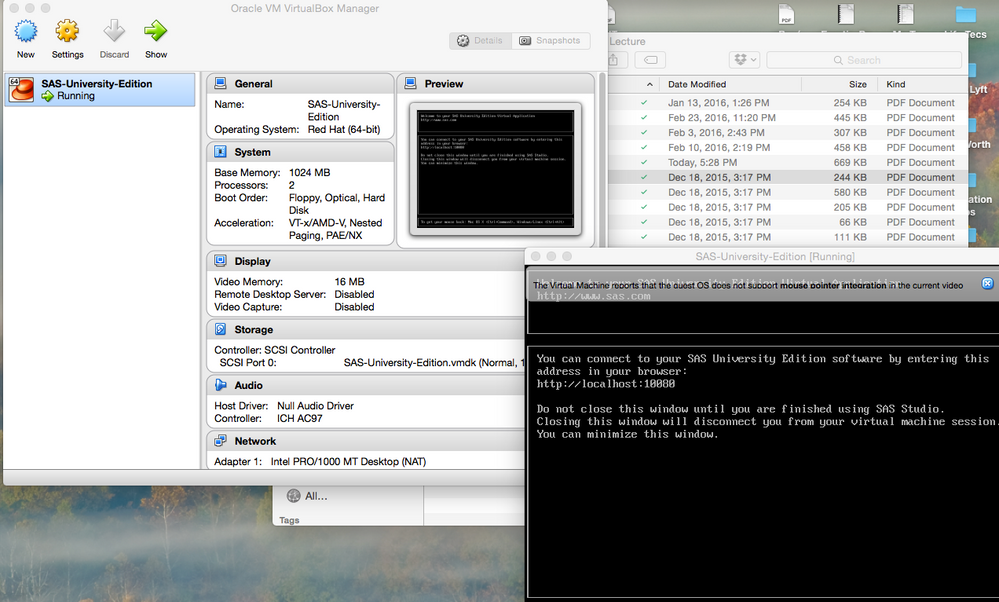
Here is a screen shot. Can you please guide me to shut down VM?
Thank you so much,
Mamun
- Mark as New
- Bookmark
- Subscribe
- Mute
- RSS Feed
- Permalink
- Report Inappropriate Content
Unfortunately I don't know how to do it in VirtualBox, I use VMWare and it works


- Mark as New
- Bookmark
- Subscribe
- Mute
- RSS Feed
- Permalink
- Report Inappropriate Content
Hi Mamun,
I use Windows and Chrome to run University Edition so my environment may not match your's.
The black box in your screen shot looks incomplete and I think shows a problem executing the VM.
When I right-click the blue box with the red hat, I get several choices including 'close'. Selecting that I get further choices including 'power off' or cntl-F. See if you have those choices and can shut down.
Good luck,
Paul
- Mark as New
- Bookmark
- Subscribe
- Mute
- RSS Feed
- Permalink
- Report Inappropriate Content
I tried to use Chrome brower and get the following error message:
- Mark as New
- Bookmark
- Subscribe
- Mute
- RSS Feed
- Permalink
- Report Inappropriate Content
Hi,
I got the 8591 port a couple of times. When I shut everything down and re-started UE it worked normally.
Paul

Catch up on SAS Innovate 2026
Nearly 200 sessions are now available on demand with the SAS Innovate Digital Pass.
Explore Now →Get started using SAS Studio to write, run and debug your SAS programs.

Find more tutorials on the SAS Users YouTube channel.
SAS Training: Just a Click Away
Ready to level-up your skills? Choose your own adventure.
-
6 replies
-
03-27-2016 05:56 PM
-
4633 views
-
1 like
-
3 in conversation
-


