- Home
- /
- Programming
- /
- SAS Studio
- /
- Merge Outputs
- RSS Feed
- Mark Topic as New
- Mark Topic as Read
- Float this Topic for Current User
- Bookmark
- Subscribe
- Mute
- Printer Friendly Page


- Mark as New
- Bookmark
- Subscribe
- Mute
- RSS Feed
- Permalink
- Report Inappropriate Content
Hey!
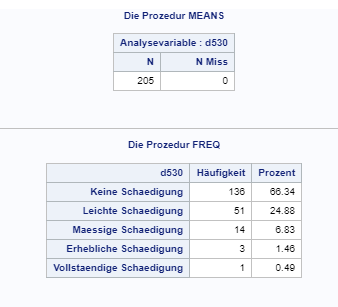
I'm writing a macro and my current output looks like this:
I'd like to merge those two so that my output looks like this:
This is what my code currently looks like:
The words macro counts the number of variables in vars_icf

%LET M=%WORDS(&vars_icf.);
%Do i=1 %TO &M.;
%Let var1 = %scan (&vars_icf., &i.);
ODS Output summary=output1 (Rename=(&var._N = N &var._NMISS = NMiss));
proc means data=&input. N NMISS;
var &var1.;
run;
ods output close;
ODS Output summary=test;
proc freq data=&input.;
tables &var1. / NOCUM;
run;
ods output close;
I am grateful for any help!


- Mark as New
- Bookmark
- Subscribe
- Mute
- RSS Feed
- Permalink
- Report Inappropriate Content
Please post your whole code. The macro definition (%macro and %mend, for %do to work) is missing, as the macro call that activates all this. And I see no %end for the %do.
- Mark as New
- Bookmark
- Subscribe
- Mute
- RSS Feed
- Permalink
- Report Inappropriate Content
Ok I added a bit.
%MACRO ICF(vars_icf=, vars_cor=, input=, output=);
%LET M=%WORDS(&vars_icf.);
%DO i=1 %TO &M.;
%Let var1 = %scan (&vars_icf., &i.);
%Let var2 = %scan(&vars_cor., &i.);
ODS Output summary=output1 (RENAME=(&var1._N = N &var1._NMISS = NMiss));
proc means data=&input. N NMISS;
var &var1.;
run;
ods output close;
data output 1_1;
set output1;
format variablenname $20.;
variablenname = "&vars_icf.";
run;
ods output summary=output2;
proc freq data=&input.;
tables &var1. / NOCUM;
run;
ods output close;
set output1;
ods output summary=test2;
proc corr data=&input. PEARSON NOMISS NOPROB NOSIMPLE;
var &var1.;
with &vars_cor.;
ods output close;
data output3_1;
set test2;
%END;
%MEND icf;


%icf(input=multiple_sclerosis, vars_cor=eq5d, vars_icf=d530);
I want to do the following with this macro:
The vars_icf all can be between 0 and 4. So each row stands for 1 variable (d530, d540...) and in the columns, for each var I want
N, NMiss, the absolute and relative frequency and the correlations with the variables of vars_cor.
- Mark as New
- Bookmark
- Subscribe
- Mute
- RSS Feed
- Permalink
- Report Inappropriate Content

This is how my preferred output should look like.

- Mark as New
- Bookmark
- Subscribe
- Mute
- RSS Feed
- Permalink
- Report Inappropriate Content
Is there a particular reason you're running one variable at a time through all these procedures? Why not do them all at once?
- Mark as New
- Bookmark
- Subscribe
- Mute
- RSS Feed
- Permalink
- Report Inappropriate Content
- Mark as New
- Bookmark
- Subscribe
- Mute
- RSS Feed
- Permalink
- Report Inappropriate Content
If you're new to SAS, I wouldn't start with macros. There's a lot of 'newer' ways to do things that are a lot more efficient. You can run all variables at once through proc means and proc freq.
- Mark as New
- Bookmark
- Subscribe
- Mute
- RSS Feed
- Permalink
- Report Inappropriate Content
It's a worksheet for university and we have to use a macro unfortunately

Catch up on SAS Innovate 2026
Nearly 200 sessions are now available on demand in the Innovate Hub.
Watch Now →Get started using SAS Studio to write, run and debug your SAS programs.

Find more tutorials on the SAS Users YouTube channel.
SAS Training: Just a Click Away
Ready to level-up your skills? Choose your own adventure.
-
7 replies
-
10-06-2017 02:08 PM
-
3675 views
-
0 likes
-
3 in conversation
-


