- Home
- /
- Programming
- /
- SAS Studio
- /
- Re: AMO integrated into SAS Studio
- RSS Feed
- Mark Topic as New
- Mark Topic as Read
- Float this Topic for Current User
- Bookmark
- Subscribe
- Mute
- Printer Friendly Page


- Mark as New
- Bookmark
- Subscribe
- Mute
- RSS Feed
- Permalink
- Report Inappropriate Content
I'm still mostly using EG but was curious to see how this could work with Studio 3.8 connecting to a Linux server.
The quickest adhoc way I could figure out was:
1. Export to Excel and store somewhere on the SAS compute side as documented here.
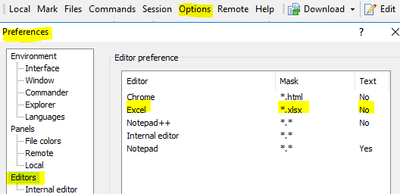
2. Open the Excel file out of a WinSCP session that's configured to open Excel's directly


- Mark as New
- Bookmark
- Subscribe
- Mute
- RSS Feed
- Permalink
- Report Inappropriate Content
@Patrick wrote:
I'm still mostly using EG but was curious to see how this could work with Studio 3.8 connecting to a Linux server.
The quickest adhoc way I could figure out was:
1. Export to Excel and store somewhere on the SAS compute side as documented here.
2. Open the Excel file out of a WinSCP session that's configured to open Excel's directly
Which is pretty much what people that run SAS on Unix have been doing for the past 20-30 years.
If you just mount the disks from both Unix and Windows you can use Windows Explorer instead of WinSCP.
- Mark as New
- Bookmark
- Subscribe
- Mute
- RSS Feed
- Permalink
- Report Inappropriate Content
@Tom wrote:
@Patrick wrote:
I'm still mostly using EG but was curious to see how this could work with Studio 3.8 connecting to a Linux server.
The quickest adhoc way I could figure out was:
1. Export to Excel and store somewhere on the SAS compute side as documented here.
2. Open the Excel file out of a WinSCP session that's configured to open Excel's directly
Which is pretty much what people that run SAS on Unix have been doing for the past 20-30 years.
If you just mount the disks from both Unix and Windows you can use Windows Explorer instead of WinSCP.
I know. It's in my experience often hard to get "IT" motivated to establish such a shared mount/access via smb or the like.
- « Previous
-
- 1
- 2
- Next »

Catch up on SAS Innovate 2026
Nearly 200 sessions are now available on demand with the SAS Innovate Digital Pass.
Explore Now →Get started using SAS Studio to write, run and debug your SAS programs.

Find more tutorials on the SAS Users YouTube channel.
SAS Training: Just a Click Away
Ready to level-up your skills? Choose your own adventure.
-
17 replies
-
01-30-2023 03:55 PM
-
8634 views
-
2 likes
-
6 in conversation
-


