BookmarkSubscribeRSS Feed
☑ This topic is solved. Need further help from the community? Please sign in and ask a new question.
PaulN
Obsidian | Level 7

SAS Studio usually has the following on the left side: Files and Folders; Tasks and Utilities; Snippets; Libraries; File Shortcuts.  However, Files and Folders no longer appears.  Any suggestions?

1 ACCEPTED SOLUTION

Accepted Solutions
PaulN
Obsidian | Level 7

Never mind.  I figured it out.  

View solution in original post

4 REPLIES 4
PaulN
Obsidian | Level 7

Never mind.  I figured it out.  

PaulN
Obsidian | Level 7

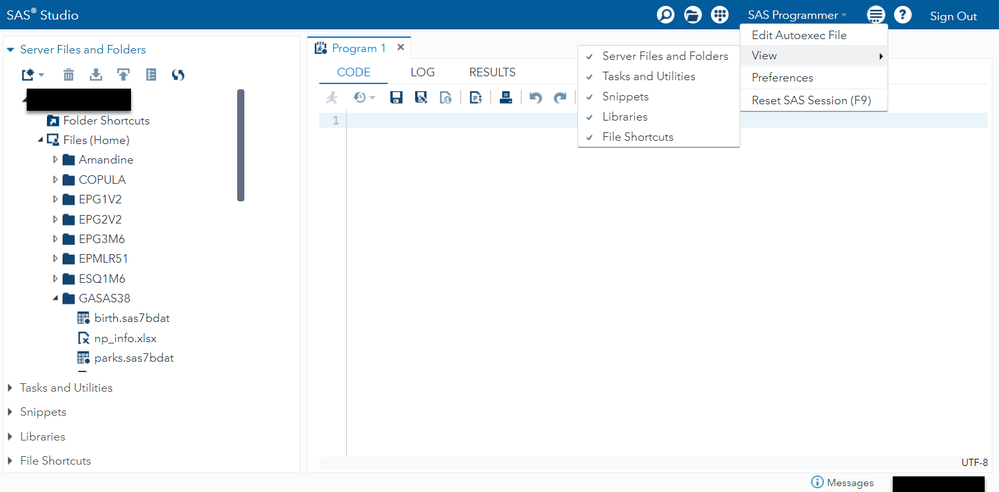
Someone asked me to provide the solution so here it is.  I made the mistake of deselecting (i.e., unchecking) the Server Files and Folders in the More Application Options.  I tried (1)  Reset SAS Session, (2) Sign Out of SAS session, (3) clear cookies and browser history, and (4) restart computer.  None of which helped.  I finally stumbled upon the solution by accident.  I must have gotten "click happy" with my mouse and didn't notice what I had done.


PaulN_0-1663793063786.png


PaigeMiller
Diamond | Level 26

@PaulN 

Please help us all by telling the solution.

--
Paige Miller
tom_grant
SAS Super FREQ

You can hide the left hand side tabs by selecting the "More Application Options" (i.e. hamburger icon) & then selecting View & then un-checking any tab (Server Files & Folders, Snippets, Tasks, ...)

tom_grant_0-1663705074147.png

To get them back - just go back & check them.

sas-innovate-2026-white.png


April 27 – 30 | Gaylord Texan | Grapevine, Texas

Registration is open

Walk in ready to learn. Walk out ready to deliver. This is the data and AI conference you can't afford to miss.
Register now and lock in 2025 pricing—just $495!

Register now

SAS Training: Just a Click Away

 Ready to level-up your skills? Choose your own adventure.

Browse our catalog!

Discussion stats
  • 4 replies
  • 2267 views
  • 2 likes
  • 3 in conversation