BookmarkSubscribeRSS Feed
☑ This topic is solved. Need further help from the community? Please sign in and ask a new question.
aanan1417
Quartz | Level 8

data have;

input policyno $    coverage $     premium $;

datalines;

p1    c1     100

p1    c2     100

p2    c1     100

;

run;


table want


policy_no  number of coverage     c1      c2       totalpremium

p1               2                                  1         1            200

p2               1                                  1         0            100


1 ACCEPTED SOLUTION

Accepted Solutions
Cynthia_sas
Diamond | Level 26

Hi:

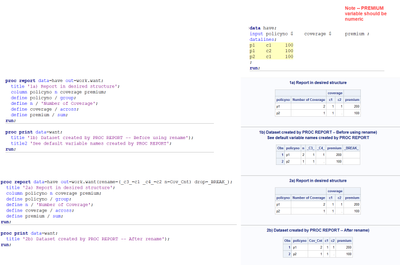
  In order to do what you want, the PREMIUM variable will need to be numeric. You can't add or summarize PREMIUM if it stays as a character variable as you show in your posted code.

  Also, it's not clear if you need a TABLE as output or if you just need a REPORT. If you just need a REPORT, then either PROC REPORT or PROC TABULATE or other procedures could generate the summarized information you show. I chose PROC REPORT because the structure of the output table created in the OUT= option will be the same structure in the output dataset.

  The only tricky part is that PROC REPORT will use absolute column numbers _C3_ and _C4_ for the COVERAGE columns in the output dataset, which required a RENAME, as shown in the second examples below:

Cynthia_sas_0-1664037233192.png

  Hope this helps you with your question.

Cynthia

View solution in original post

1 REPLY 1
Cynthia_sas
Diamond | Level 26

Hi:

  In order to do what you want, the PREMIUM variable will need to be numeric. You can't add or summarize PREMIUM if it stays as a character variable as you show in your posted code.

  Also, it's not clear if you need a TABLE as output or if you just need a REPORT. If you just need a REPORT, then either PROC REPORT or PROC TABULATE or other procedures could generate the summarized information you show. I chose PROC REPORT because the structure of the output table created in the OUT= option will be the same structure in the output dataset.

  The only tricky part is that PROC REPORT will use absolute column numbers _C3_ and _C4_ for the COVERAGE columns in the output dataset, which required a RENAME, as shown in the second examples below:

Cynthia_sas_0-1664037233192.png

  Hope this helps you with your question.

Cynthia

sas-innovate-2026-white.png


April 27 – 30 | Gaylord Texan | Grapevine, Texas

Registration is open

Walk in ready to learn. Walk out ready to deliver. This is the data and AI conference you can't afford to miss.
Register now and lock in 2025 pricing—just $495!

Register now

How to Concatenate Values

Learn how use the CAT functions in SAS to join values from multiple variables into a single value.

Find more tutorials on the SAS Users YouTube channel.

SAS Training: Just a Click Away

 Ready to level-up your skills? Choose your own adventure.

Browse our catalog!

Discussion stats
  • 1 reply
  • 744 views
  • 0 likes
  • 2 in conversation