- Home
- /
- Programming
- /
- Programming
- /
- Re: problem with importing csv file
- RSS Feed
- Mark Topic as New
- Mark Topic as Read
- Float this Topic for Current User
- Bookmark
- Subscribe
- Mute
- Printer Friendly Page


- Mark as New
- Bookmark
- Subscribe
- Mute
- RSS Feed
- Permalink
- Report Inappropriate Content
Hello, everyone
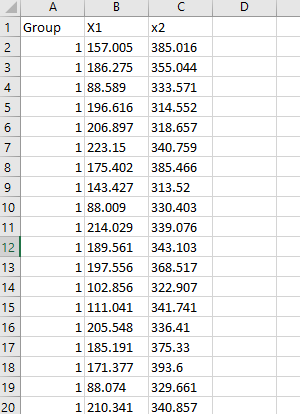
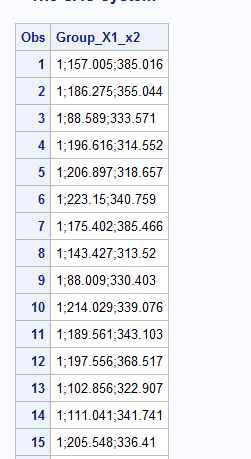
I am really struggling with importing a .csv file into SAS. The dataset has 3 variables, but when it imports, SAS says it has 1 variable. It puts 3 columns into 1. I tried putting in the data with a cards statement, but it gave me errors as there is had too many lines. I attached a picture of what the data looks like in Excel and what it looks like in SAS. The data originally had commas as decimals and I changed it to full stops but the problem still occurs. Please help me out. (I imported it by clicking "import data" in "file"). Thank you so much


- Mark as New
- Bookmark
- Subscribe
- Mute
- RSS Feed
- Permalink
- Report Inappropriate Content
The picture on the left is NOT a CSV file. It appears to be some type of spreadsheet software. A CSV file is just a text file.
But looking at the values in the SAS dataset is really looks like you do not have a "real" CSV (comma separated values) but instead a delimited file where the delimiter is a semi-colon.
The easiest solution is to just tell SAS that your delimiter is a semi-colon instead of a comma.
But for three columns it is even easier (and you will have complete control) if you just write the data step your self.
data want ;
  infile 'myfile.txt' dsd dlm=';' firstobs=2 truncover ;
  input group x1 x2 ;
run;
- Mark as New
- Bookmark
- Subscribe
- Mute
- RSS Feed
- Permalink
- Report Inappropriate Content
Try PROC IMPORT with GUESSINGROWS=MAX and set the delimiter to a semi colon.
It sounds like you had a french source file which uses a ; instead of comma, and a comma where a decimal would be instead.
As Tom mentioned to work with a CSV file you're best off opening it with a text editor, NOT Excel because Excel interprets the data to present it, not always correctly but it doesn't give you the correct information to import it.
This will take a bit longer to run than Tom's solution but should work as well.
proc import out=want datafile="path to csv" dbms=dlm replace;
delimiter=';'; guessingrows=max;
run;
@clarke wrote:
Hello, everyone
I am really struggling with importing a .csv file into SAS. The dataset has 3 variables, but when it imports, SAS says it has 1 variable. It puts 3 columns into 1. I tried putting in the data with a cards statement, but it gave me errors as there is had too many lines. I attached a picture of what the data looks like in Excel and what it looks like in SAS. The data originally had commas as decimals and I changed it to full stops but the problem still occurs. Please help me out. (I imported it by clicking "import data" in "file"). Thank you so much

- Mark as New
- Bookmark
- Subscribe
- Mute
- RSS Feed
- Permalink
- Report Inappropriate Content
In a data step, use the semicolon as a delimiter, and the commax. informat for the numeric variables.

Call for content now open!
It's your turn to help shape SAS Innovate 2027. Share your expertise and inspire the SAS community.
Learn how use the CAT functions in SAS to join values from multiple variables into a single value.

Find more tutorials on the SAS Users YouTube channel.
SAS Training: Just a Click Away
Ready to level-up your skills? Choose your own adventure.
-
3 replies
-
09-02-2018 12:26 PM
-
6394 views
-
0 likes
-
4 in conversation
-


