- Home
- /
- Programming
- /
- Programming
- /
- Re: how to delete all files in data step using fdelete function
- RSS Feed
- Mark Topic as New
- Mark Topic as Read
- Float this Topic for Current User
- Bookmark
- Subscribe
- Mute
- Printer Friendly Page


- Mark as New
- Bookmark
- Subscribe
- Mute
- RSS Feed
- Permalink
- Report Inappropriate Content
FILENAME spec "%sysfunc(pathname(fptotb,f))/have.rtf"  ;

  DATA _NULL_ ;
  rc = FDELETE('spec') ;
  RUN ;
Hi In my folder, there are rft, lst, log, 7bdat are created with same name during a data step which i need to delete. for example, the temp file are have.rtf, have.log, have.lst, have.7bdat. With above pgm I am able to delete only rtf. How to remove all in step. Please suggest. Thank you


- Mark as New
- Bookmark
- Subscribe
- Mute
- RSS Feed
- Permalink
- Report Inappropriate Content
Hi,
maybe if you do know files extensions in advance you can loop:
data _null_;
  fname="tempfile";
  length ext $ 20;
  do ext = "rtf", "lst", "log", "sas7bdat", "txt";

    rc=filename(fname, "%sysfunc(pathname(work))/have." !! strip(ext));
    if rc = 0 and fexist(fname) then
       rc=fdelete(fname);
    rc=filename(fname);
  end;
run;
all the best
Bart
Polish SAS Users Group: www.polsug.com and communities.sas.com/polsug
"SAS Packages: the way to share" at SGF2020 Proceedings (the latest version), GitHub Repository, and YouTube Video.
Hands-on-Workshop: "Share your code with SAS Packages"
"My First SAS Package: A How-To" at SGF2021 Proceedings
SAS Ballot Ideas: one: SPF in SAS, two, and three
SAS Documentation

- Mark as New
- Bookmark
- Subscribe
- Mute
- RSS Feed
- Permalink
- Report Inappropriate Content


- Mark as New
- Bookmark
- Subscribe
- Mute
- RSS Feed
- Permalink
- Report Inappropriate Content
If you must use function fdelete(), then this works:
%* create files;
data _null_;
 file "%sysfunc(pathname(work))/have.txt" ; put 'a';
 file "%sysfunc(pathname(work))/have.csv" ; put 'a';
run;

filename SPEC "%sysfunc(pathname(work))/have.*" ;

%* List files;
data FILENAMES;
  length _FILENAME $ 256;
  infile SPEC filename=_FILENAME;
  input ;
  FILENAME = _FILENAME;
run;
% Delete files;
data _null_;
  set FILENAMES;
  rc=filename ('TMPFREF',FILENAME);
  rc=fdelete  ('TMPFREF') ;
  rc=filename ('TMPFREF');
run;
- Mark as New
- Bookmark
- Subscribe
- Mute
- RSS Feed
- Permalink
- Report Inappropriate Content
If you needn't use function fdelete(), then this is easier:
data _null_;
 file "%sysfunc(pathname(work))/have.txt" ; put 'a';
 file "%sysfunc(pathname(work))/have.csv" ; put 'a';
run;

filename DEL pipe "del ""%sysfunc(pathname(work))\have.*"" " ;

data FILENAMES;
  infile DEL ;
  input ;
  put _infile_;
run;
Any error messages generated during deletion go to the log window here, feel free to keep them in a table instead.

- Mark as New
- Bookmark
- Subscribe
- Mute
- RSS Feed
- Permalink
- Report Inappropriate Content
You can get the all the file name by the following code ,and write CALL EXECUTE() to delete them one by one.
  DATA _NULL_ ;
  rc = filename('spec','c:\temp') ;
  did=dopen('spec');
  do i=1 to dnum(did);
   file_name=dread(did,i);
   put file_name= ;
  end;
  RUN ;
- Mark as New
- Bookmark
- Subscribe
- Mute
- RSS Feed
- Permalink
- Report Inappropriate Content
@Ksharp , I stumbled upon this post looking for an alternate way to delete files from my directory on a server than using the x command. Normally, if I use an x command with a wildcard to delete *.xlsx files it works, however, we are running into issues where it won't work for some reason.
Reading your reply, I got this syntax to work to generate a list of my files in that directory. Can you advise on how I would use the CALL EXECUTE() to delete the files now?
DATA _NULL_ ;
  rc = filename('spec','c:\temp') ;
  did=dopen('spec');
  do i=1 to dnum(did);
   file_name=dread(did,i);
   put file_name= ;
  end;
  RUN ;
- Mark as New
- Bookmark
- Subscribe
- Mute
- RSS Feed
- Permalink
- Report Inappropriate Content
- Mark as New
- Bookmark
- Subscribe
- Mute
- RSS Feed
- Permalink
- Report Inappropriate Content
That last program to help me cat the variables in the file name was great. Thank you for that.
- Mark as New
- Bookmark
- Subscribe
- Mute
- RSS Feed
- Permalink
- Report Inappropriate Content
- Mark as New
- Bookmark
- Subscribe
- Mute
- RSS Feed
- Permalink
- Report Inappropriate Content
I have tried a few ways and can't get it to work correctly.
I could only get the directory name working if I created a variable. I think that's probably an extra step but couldn't get it to work otherwise. If I run this code with the put fname uncommented, I see the complete path and file name in the SAS log.
%let directoryname = "/sae/aal_labapm/01/mortgage/msracq/DATA WAREHOUSE/DWACQ/REPORT FILES/MSR0028/";

DATA _NULL_ ;
  rc = filename('spec',"/sae/aal_labapm/01/mortgage/msracq/DATA WAREHOUSE/DWACQ/REPORT FILES/MSR0028/") ;
  did=dopen('spec');
  do i=1 to dnum(did);
   file_name=dread(did,i);
   /*put file_name= ;*/
   fname=cats(&directoryname,file_name);
   put fname;
   /*rc=fdelete(fname);*/
  end;
RUN ;
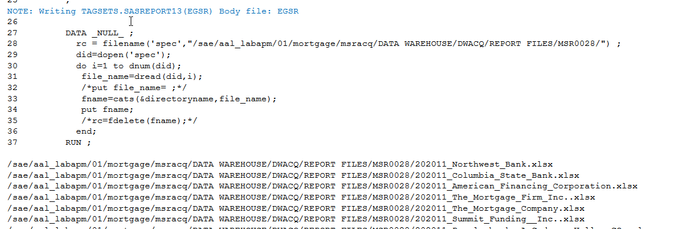
I am thinking, "OK, these are the files I need deleted, let's go".
I run the code with rc=fdelete(fname);
DATA _NULL_ ;
  rc = filename('spec',"/sae/aal_labapm/01/mortgage/msracq/DATA WAREHOUSE/DWACQ/REPORT FILES/MSR0028/") ;
  did=dopen('spec');
  do i=1 to dnum(did);
   file_name=dread(did,i);
   /*put file_name= ;*/
   fname=cats(&directoryname,file_name);
   /*put fname;*/
   rc=fdelete(fname);
  end;
RUN ;
I now get the following notes in the log and the files have not been deleted:
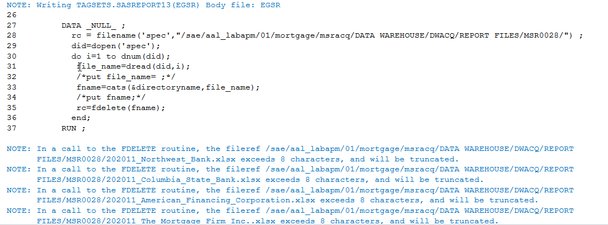
I have been referencing this documentation from SAS as well and just can't seem to put it all together.
- Mark as New
- Bookmark
- Subscribe
- Mute
- RSS Feed
- Permalink
- Report Inappropriate Content
- Mark as New
- Bookmark
- Subscribe
- Mute
- RSS Feed
- Permalink
- Report Inappropriate Content
I tried this according to the SAS documentation I found. I just can't put it all together.
%let directoryname = "/sae/aal_labapm/01/mortgage/msracq/DATA WAREHOUSE/DWACQ/REPORT FILES/MSR0028/";

DATA _NULL_ ;
  rc = filename('spec',"/sae/aal_labapm/01/mortgage/msracq/DATA WAREHOUSE/DWACQ/REPORT FILES/MSR0028/") ;
  did=dopen('spec');
  do i=1 to dnum(did);
    file_name=dread(did,i);
   /*put file_name= ;*/
   fname=cats(&directoryname,file_name);
   /*put fname;*/
   /*rc=fdelete(fname);*/
  end;
RUN ;


%macro test;
 %let filrf= "/sae/aal_labapm/01/mortgage/msracq/DATA WAREHOUSE/DWACQ/REPORT FILES/MSR0028/";
 %let rc=%sysfunc(filename(filrf, file_name=));
 %if &rc ne 0 %then %put %sysfunc(sysmsg());
 %let rc=%sysfunc(filename(filrf));
%mend test;
- Mark as New
- Bookmark
- Subscribe
- Mute
- RSS Feed
- Permalink
- Report Inappropriate Content
- Mark as New
- Bookmark
- Subscribe
- Mute
- RSS Feed
- Permalink
- Report Inappropriate Content
Sorry for all of the back and forth. I promise I am not someone who needs their homework answered, I have just been racking my brain on this one and the other regarding the excel export files for a week. I try not to post for help unless it is a last resort.
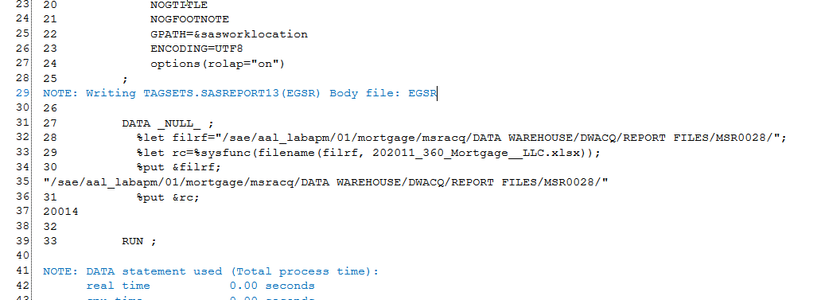
I am trying it with a single file in that directory. When I try what looks right (and probably isn't at this point), I can %put the filrf but when I %put rc it gives me what looks like a number in the log.
DATA _NULL_ ;
  %let filrf="/sae/aal_labapm/01/mortgage/msracq/DATA WAREHOUSE/DWACQ/REPORT FILES/MSR0028/";
  %let rc=%sysfunc(filename(filrf, 202011_360_Mortgage__LLC.xlsx));
  %put &filrf;
  %put &rc;
RUN ;

Call for content now open!
It's your turn to help shape SAS Innovate 2027. Share your expertise and inspire the SAS community.
Learn how use the CAT functions in SAS to join values from multiple variables into a single value.

Find more tutorials on the SAS Users YouTube channel.
SAS Training: Just a Click Away
Ready to level-up your skills? Choose your own adventure.
-
22 replies
-
04-15-2019 03:39 PM
-
14734 views
-
13 likes
-
8 in conversation
-


