- Home
- /
- Programming
- /
- Programming
- /
- extend variable label length
- RSS Feed
- Mark Topic as New
- Mark Topic as Read
- Float this Topic for Current User
- Bookmark
- Subscribe
- Mute
- Printer Friendly Page


- Mark as New
- Bookmark
- Subscribe
- Mute
- RSS Feed
- Permalink
- Report Inappropriate Content
I have created labels for my variables using the label statement in a data step. Some of my variable labels are longer than 256 characters are are cut off in the output and in graphs. How can I extend the length of the variable label?
data yikes; set pes.pes&version&sem&yr;
label &sem&yr.r113="The Iraqi government declared victory over the Islamic State in the battle for _________, which began in October 2016. Prime Minister Haider al-Abadi arrived in the city on July 9, 2017 to mark the formal end of a bloody campaign that killed thousands of people and displaced nearly a million more."
run;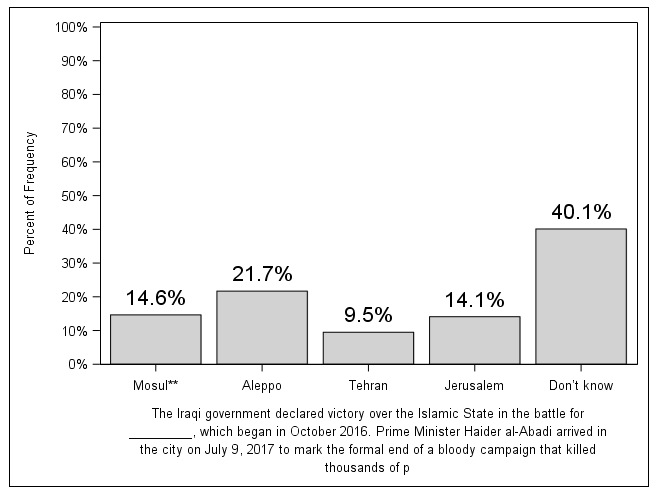
Accepted Solutions


- Mark as New
- Bookmark
- Subscribe
- Mute
- RSS Feed
- Permalink
- Report Inappropriate Content
Looking at your graph, you need the text below your graph. Why don't you try using "FOOTNOTE".
Suryakiran
- Mark as New
- Bookmark
- Subscribe
- Mute
- RSS Feed
- Permalink
- Report Inappropriate Content
Looking at your graph, you need the text below your graph. Why don't you try using "FOOTNOTE".
Suryakiran
- Mark as New
- Bookmark
- Subscribe
- Mute
- RSS Feed
- Permalink
- Report Inappropriate Content
Thanks Suryakiran! I decided to try it first by using item stem as the axis label and all is well now. I appreciate your help.


- Mark as New
- Bookmark
- Subscribe
- Mute
- RSS Feed
- Permalink
- Report Inappropriate Content
Labels are limited to 256 characters.

Call for content now open!
It's your turn to help shape SAS Innovate 2027. Share your expertise and inspire the SAS community.
Learn how use the CAT functions in SAS to join values from multiple variables into a single value.

Find more tutorials on the SAS Users YouTube channel.
SAS Training: Just a Click Away
Ready to level-up your skills? Choose your own adventure.
-
3 replies
-
04-17-2018 11:00 AM
-
5761 views
-
2 likes
-
3 in conversation
-


