BookmarkSubscribeRSS Feed
Phil_NZ
Barite | Level 11

Hi all,


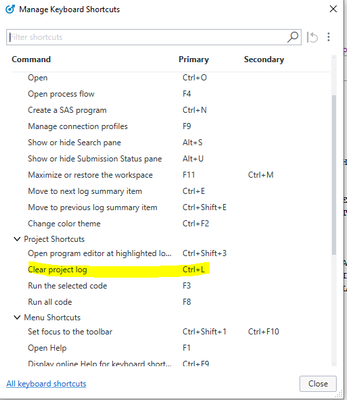
Today I spend time to know a bit about SAS EG hotkey to optimize my work. And when I go to Tools ->Manage keyboard shortcut, I found a Table of hotkey like below

My97_0-1613968684127.png

I am quite surprised because previously I posted a topic about how to delete the log but it is still there.


So I go back to the interface and press Ctr+L but nothing happening.


I am wondering if you can please explain it to me?


Warm regards.

Thank you for your help, have a fabulous and productive day! I am a novice today, but someday when I accumulate enough knowledge, I can help others in my capacity.
1 REPLY 1
andreas_lds
Jade | Level 19

Do you have activated the project log at all? Ctrl+L doesn't clear the log of individual programs.


EDIT: Well, it seems as if Ctrl+L doesn't work at all, even with project log enabled and the log open just nothing happens. Maybe a feature, or a bug.

sas-innovate-2026-white.png


April 27 – 30 | Gaylord Texan | Grapevine, Texas

Registration is open

Walk in ready to learn. Walk out ready to deliver. This is the data and AI conference you can't afford to miss.
Register now and lock in 2025 pricing—just $495!

Register now

How to Concatenate Values

Learn how use the CAT functions in SAS to join values from multiple variables into a single value.

Find more tutorials on the SAS Users YouTube channel.

SAS Training: Just a Click Away

 Ready to level-up your skills? Choose your own adventure.

Browse our catalog!

Discussion stats
  • 1 reply
  • 671 views
  • 1 like
  • 2 in conversation