- Home
- /
- Programming
- /
- Programming
- /
- Re: Using proc report
- RSS Feed
- Mark Topic as New
- Mark Topic as Read
- Float this Topic for Current User
- Bookmark
- Subscribe
- Mute
- Printer Friendly Page


- Mark as New
- Bookmark
- Subscribe
- Mute
- RSS Feed
- Permalink
- Report Inappropriate Content
Hello,
I need help. I am just learning proc report. I have created a demo of my data and desired output. Numb is the count of boys in table 2796 who are active. I would to use PROC REPORT to generate this output. Thanks
data test;
input serv$ 1-5	table$ 6-10	comp$ 11-18	numb 19-28;
datalines;
Boy	  2796	Active    41043
Boy	  2796	Reserve	  7024
Boy	  2796	missing   72
Boy   PHA	Active	  274220
Boy   PHA	Reserve   95291
Girl  2796	Active    3200
Girl  2796	Reserve	  1231
Girl  2796	missing	  5
Girl  PHA	Active	  121634
Girl  PHA	Reserve	  36043
Dad   2796	Active	  9915
Dad   2796	Reserve	  310
TOTAL 2796	Active	  77283
; run;
desire output
Comp | |||||||
Serv | Table | Active | Reserve | Missing | |||
N | % | N | % | N | % | ||
Boy | PHA | ||||||
2796 | |||||||
Girl | |||||||
PHA | |||||||
2796 | |||||||
Dad | |||||||
PHA | |||||||
2796 | |||||||
TOTAL | |||||||
PHA | |||||||
2796 |


- Mark as New
- Bookmark
- Subscribe
- Mute
- RSS Feed
- Permalink
- Report Inappropriate Content
Regarding the columns for %
To compute a percent, we need a numerator and a denominator. Please state clearly the numerator and denominator of this percent.
Also, your code does not work as shown. Please test your code before you post it. Testing is a good thing, and should be considered mandatory. The code shown needs to be fixed. By providing properly tested code, you won't be wasting our time and you will get faster answers.
Paige Miller
- Mark as New
- Bookmark
- Subscribe
- Mute
- RSS Feed
- Permalink
- Report Inappropriate Content
@PaigeMiller Thank you. I created the dummy code in sas, so I tested it. I just copied directly maybe there is something am not doing right, i will appreciate your guidance.
My numerator is each active, server and missing, while denominator is the total.
e.g (active/active_total)*100 as active_pct
I am trying to find the count of each group which i was able to do with proc freq but i dont know how to use proc report.
- Mark as New
- Bookmark
- Subscribe
- Mute
- RSS Feed
- Permalink
- Report Inappropriate Content
Your code produces a lot of missing values, I assume you don't want that. So it needs to be fixed.
My numerator is each active, server and missing, while denominator is the total.
e.g (active/active_total)*100 as active_pct
So for Boy PHA Active, the percent is Boy PHA Active N divided by Total PHA Active N?
Paige Miller
- Mark as New
- Bookmark
- Subscribe
- Mute
- RSS Feed
- Permalink
- Report Inappropriate Content
@PaigeMiller Yes that is correct.
Yes I will take care of the missing after I see how it impact the final output. Thanks
- Mark as New
- Bookmark
- Subscribe
- Mute
- RSS Feed
- Permalink
- Report Inappropriate Content
@CathyVI wrote:
@PaigeMiller Yes that is correct.
Okay, this doesn't seem to me to be something that can be done (easily) in PROC REPORT. What I typically do is calculate the percents in a DATA step or SQL before I run PROC REPORT. Once those calculations are done, then getting PROC REPORT to display the table you want is much easier.
Paige Miller
- Mark as New
- Bookmark
- Subscribe
- Mute
- RSS Feed
- Permalink
- Report Inappropriate Content
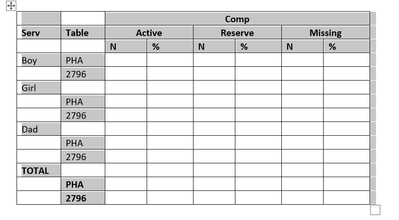
@PaigeMiller I think the table messed up when I copied into SAS. This is how table should look like.
- Mark as New
- Bookmark
- Subscribe
- Mute
- RSS Feed
- Permalink
- Report Inappropriate Content
@CathyVI wrote:
@PaigeMiller I think the table messed up when I copied into SAS. This is how table should look like.
That's good to know, but I still don't think PROC REPORT will do the calculations (easily). I still think you are better off doing the calculations of percent in a DATA step or SQL, and then use PROC REPORT to display the table.
Paige Miller

- Mark as New
- Bookmark
- Subscribe
- Mute
- RSS Feed
- Permalink
- Report Inappropriate Content
Hi:
When I tried to read your file, the issue I ran into was the tabs generated missing values with your type of input. This worked better for me.
data test;
length serv $5 table $5 comp $8;
infile datalines dlm=',' dsd;
input serv $ 	table $  comp $  	numb  ;
dataord = _n_;
datalines;
Boy,2796,Active,41043
Boy,2796,Reserve,7024
Boy,2796,missing,72
Boy,PHA,Active,274220
Boy,PHA,Reserve,95291
Girl,2796,Active,3200
Girl,2796,Reserve,1231
Girl,2796,missing,5
Girl,PHA,Active,121634
Girl,PHA,Reserve,36043
Dad,2796,Active,9915
Dad,2796,Reserve,310
TOTAL,2796,Active,77283
;
run;
I added a "DATAORD" variable to capture the original order of the variables, thinking it might help, but your input data is not in the order shown in your desired results, so I'm not sure it is useful.
However, without some direction or a helper variable, to assure the desired ordering, PROC REPORT would not be able to do the type of ordering you show. What PROC REPORT code have you tried?
Cynthia
- Mark as New
- Bookmark
- Subscribe
- Mute
- RSS Feed
- Permalink
- Report Inappropriate Content
I tried to transpose then calculated % i could have the desired table format- just as @PaigeMiller said. But I encountered an issue.
proc sort data= test ;
by serv table comp ; run;
proc transpose data= test out=trans (drop=_name_);
by serv table ;
id comp ;
var numb;
run;

proc sql;
create table test2 as
select a.*, b.Active as Active_total,
	(Active/Active_total)*100 as Active_pct

from test a
	left join trans1 (where=( service='TOTAL')) b
		on a.table=b.table;

quit;
First issue: With the transpose, how do I get a single column for Active, reserve and missing. i dont want them repeated.
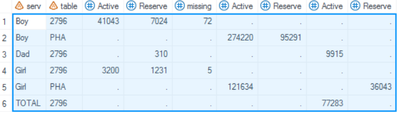
Second issue: How do I calculate the % with my suggested code. I encounter an error
ERROR: Ambiguous reference, column Active is in more than one table.
- Mark as New
- Bookmark
- Subscribe
- Mute
- RSS Feed
- Permalink
- Report Inappropriate Content
How can we know what you did wrong if you don't show us the code? How can we know what you did wrong if you don't show us the fixed code to read in the data? By the way, you seem to be calculating percents in your PROC SQL, but then your table doesn't show percents.
Also, If you get errors from running a PROC, you need to show us the log for that PROC — and we need to see every line in the log of that PROC, including code, errors, warnings and notes.
Paige Miller
- Mark as New
- Bookmark
- Subscribe
- Mute
- RSS Feed
- Permalink
- Report Inappropriate Content
@PaigeMiller @Cynthia_sas I posted the code here
proc sort data= test ;
by serv table comp ; run;
proc transpose data= test out=trans (drop=_name_);
by serv table ;
id comp ;
var numb;
run;

proc sql;
create table test2 as
select a.*, b.Active as Active_total,
	(Active/Active_total)*100 as Active_pct

from test a
	left join trans1 (where=( service='TOTAL')) b
		on a.table=b.table;

quit;

27
28 proc sql;
29 create table test2 as
30 select a.*, b.Active as Active_total,
31 (Active/Active_total)*100 as Active_pct
32
33 from trans1 a
34 left join trans1 (where=( service='TOTAL')) b
35 on a.table=b.table;
ERROR: Ambiguous reference, column Active is in more than one table.
NOTE: PROC SQL set option NOEXEC and will continue to check the syntax of statements.
36
37 quit;
NOTE: The SAS System stopped processing this step because of errors.
NOTE: PROCEDURE SQL used (Total process time):
real time 0.00 seconds
cpu time 0.00 seconds- Mark as New
- Bookmark
- Subscribe
- Mute
- RSS Feed
- Permalink
- Report Inappropriate Content
When you join two (or more) tables in SQL, and there is a variable (in this case ACTIVE) that exists in both tables that has the exact same name in each table, you have to refer to the variable as a.ACTIVE or b.ACTIVE so that SQL knows which one you mean. Referring to the variables as ACTIVE is ambiguous, SAS doesn't know which one you mean, and so you get this error message.
Paige Miller
- Mark as New
- Bookmark
- Subscribe
- Mute
- RSS Feed
- Permalink
- Report Inappropriate Content
I am getting an error here. please what am I doing incorrectly
proc sql;
create table test4 as
select a.*, b.Active as Active_total,
	(b.Active/Active_total)*100 as Active_pct

from test3 a
	left join test3 b
(where=( b.serv_ord='TOTAL'))
		and a.table=b.table;

quit;
NOTE: Writing HTML5(EGHTML) Body file: EGHTML
27
28 proc sql;
29 create table test4 as
30 select a.*, b.Active as Active_total,
31 (b.Active/Active_total)*100 as Active_pct
32
33 from test3 a
34 left join test3 b
35 (where=( b.serv_ord='TOTAL'))
_
73
76
ERROR 73-322: Expecting an ON.
ERROR 76-322: Syntax error, statement will be ignored.
36 and a.table=b.table;
NOTE: PROC SQL set option NOEXEC and will continue to check the syntax of statements.
37
38 quit;
NOTE: The SAS System stopped processing this step because of errors.
NOTE: PROCEDURE SQL used (Total process time):
real time 0.00 seconds
cpu time 0.00 seconds
Note:
- Mark as New
- Bookmark
- Subscribe
- Mute
- RSS Feed
- Permalink
- Report Inappropriate Content
You can't use
(where=( b.serv_ord='TOTAL'))
after the letter B. This is a DATA set option, it must go after the data set name. And since it is a DATA set option, you want the proper syntax here, which is
(where=(serv_ord='TOTAL')) Paige Miller

Call for content now open!
It's your turn to help shape SAS Innovate 2027. Share your expertise and inspire the SAS community.
Learn how use the CAT functions in SAS to join values from multiple variables into a single value.

Find more tutorials on the SAS Users YouTube channel.
SAS Training: Just a Click Away
Ready to level-up your skills? Choose your own adventure.
-
20 replies
-
04-12-2024 08:40 AM
-
8038 views
-
1 like
-
4 in conversation
-




