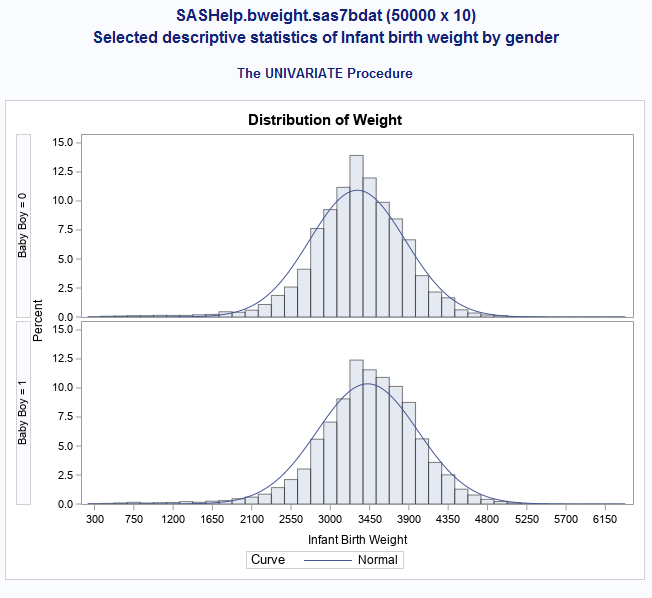
My goal is to make this:
I used this code, but I'm getting more outputs then I originally planned although I do get the graph:
proc univariate data=sashelp.bweight;
var weight;
class boy;
histogram weight / NORMAL;
An example of extra outputs that I get is this for boy=0 and boy=1. I just want the histogram not these extra outputs:
| The SAS System |
| Mu | 3427.252 |
| Sigma | 577.6727 |
| 0.052368 | <0.010 |
| 19.182203 | <0.005 |
| 129.781086 | <0.005 |
| 1559.00 | 2083.38 |
| 2495.00 | 2477.07 |
| 2778.00 | 2686.93 |
| 3119.00 | 3037.62 |
| 3459.00 | 3427.25 |
| 3799.00 | 3816.89 |
| 4082.00 | 4167.57 |
| 4281.00 | 4377.44 |
| 4678.00 | 4771.12 |
Simply add an ODS select statement :
proc univariate data=sashelp.bweight;
var weight;
class boy;
histogram weight / NORMAL;
ods select Histogram;
run;
To get the list of ODS outputs (Histogram is one of them), add the statement
ods trace on;
before running proc univariate and check the log.
Simply add an ODS select statement :
proc univariate data=sashelp.bweight;
var weight;
class boy;
histogram weight / NORMAL;
ods select Histogram;
run;
To get the list of ODS outputs (Histogram is one of them), add the statement
ods trace on;
before running proc univariate and check the log.
April 27 – 30 | Gaylord Texan | Grapevine, Texas
Walk in ready to learn. Walk out ready to deliver. This is the data and AI conference you can't afford to miss.
Register now and save with the early bird rate—just $795!
Learn how use the CAT functions in SAS to join values from multiple variables into a single value.

Find more tutorials on the SAS Users YouTube channel.
Ready to level-up your skills? Choose your own adventure.