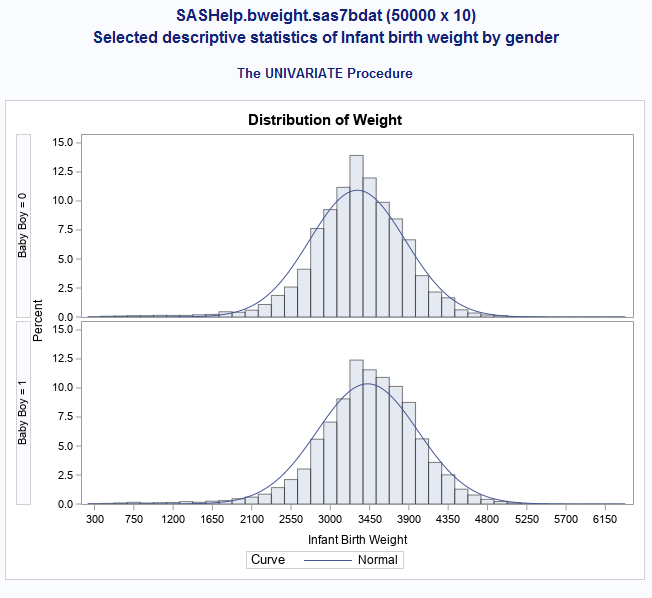
My goal is to make this:
I used this code, but I'm getting more outputs then I originally planned although I do get the graph:
proc univariate data=sashelp.bweight;
var weight;
class boy;
histogram weight / NORMAL;
An example of extra outputs that I get is this for boy=0 and boy=1. I just want the histogram not these extra outputs:
| The SAS System |
| Mu | 3427.252 |
| Sigma | 577.6727 |
| 0.052368 | <0.010 |
| 19.182203 | <0.005 |
| 129.781086 | <0.005 |
| 1559.00 | 2083.38 |
| 2495.00 | 2477.07 |
| 2778.00 | 2686.93 |
| 3119.00 | 3037.62 |
| 3459.00 | 3427.25 |
| 3799.00 | 3816.89 |
| 4082.00 | 4167.57 |
| 4281.00 | 4377.44 |
| 4678.00 | 4771.12 |
Simply add an ODS select statement :
proc univariate data=sashelp.bweight;
var weight;
class boy;
histogram weight / NORMAL;
ods select Histogram;
run;
To get the list of ODS outputs (Histogram is one of them), add the statement
ods trace on;
before running proc univariate and check the log.
Simply add an ODS select statement :
proc univariate data=sashelp.bweight;
var weight;
class boy;
histogram weight / NORMAL;
ods select Histogram;
run;
To get the list of ODS outputs (Histogram is one of them), add the statement
ods trace on;
before running proc univariate and check the log.
April 27 – 30 | Gaylord Texan | Grapevine, Texas
Walk in ready to learn. Walk out ready to deliver. This is the data and AI conference you can't afford to miss.
Register now and lock in 2025 pricing—just $495!
Learn how use the CAT functions in SAS to join values from multiple variables into a single value.

Find more tutorials on the SAS Users YouTube channel.
Ready to level-up your skills? Choose your own adventure.