- Home
- /
- Programming
- /
- Programming
- /
- Re: PROC REPORT:Column HEADSKIP
- RSS Feed
- Mark Topic as New
- Mark Topic as Read
- Float this Topic for Current User
- Bookmark
- Subscribe
- Mute
- Printer Friendly Page

- Mark as New
- Bookmark
- Subscribe
- Mute
- RSS Feed
- Permalink
- Report Inappropriate Content
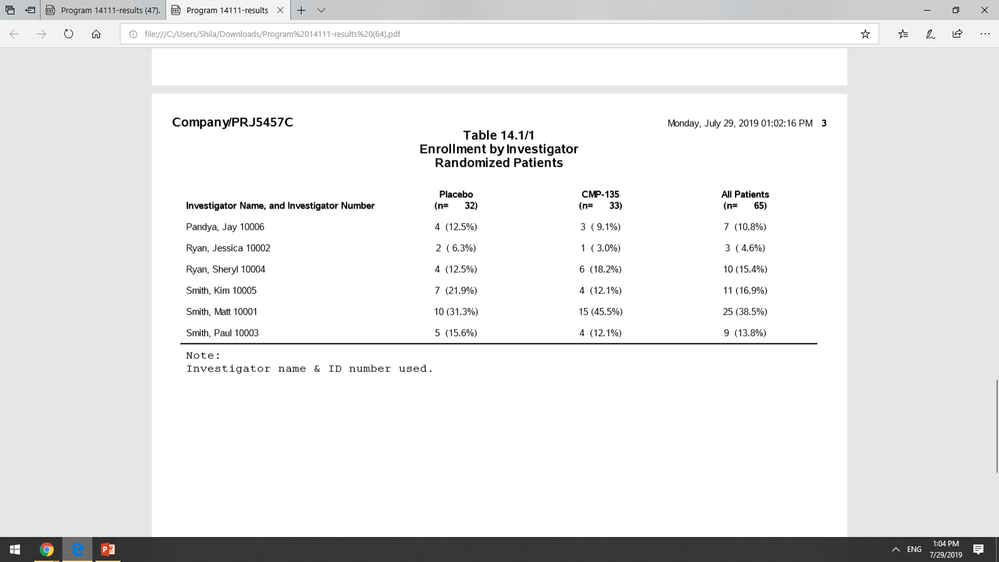
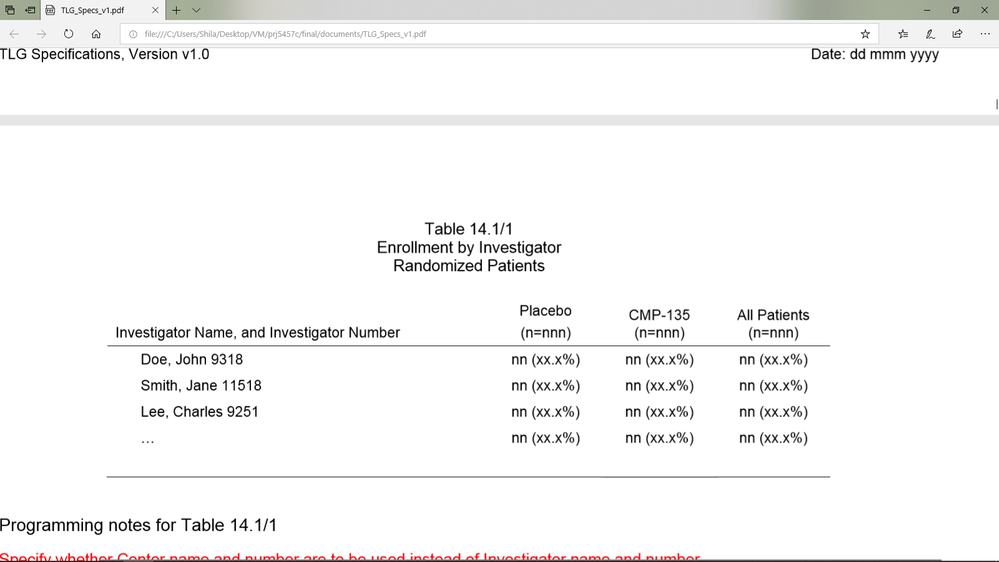
I'm trying to put a line underneath my column headings (one continuous line). It's not showing up even when
I added 'headline headskip' to the proc report line.
I know my rules=NONE option may be messing with this but I literally can't have any horizontal grid lines except 2: 1) immediately
after the column headings 2) immediately after all the data rows.
ods pdf style=tmplts.MyStyle;

proc report data=counts3 nowindows split="*" style(report)={rules=NONE frame=void}
headline headskip;
	columns (invnid coli2 coli1 coli3);
	define invnid /order style={cellwidth=31% asis=on just=l}
	"Investigator Name, and Investigator Number";
	define coli2 /display style={cellwidth=22% just=c} spacing=3 order order=data flow "Placebo*(n=&n2)" left;
	define coli1 /display style={cellwidth=22% just=c} spacing=3 order order=data flow "CMP-135 * (n=&n1)" left;
	define coli3 /display style={cellwidth=22% just=c} spacing=3 order order=data flow "All Patients * (n=&n3)" left;
	break after invnid/skip;
	compute after _page_/style={just=l font_face='Courier New' font_size=10pt bordertopcolor=black bordertopwidth=0.25};
line "Note:";
line "Investigator name & ID number used.";
endcomp;
	title1 j=l 'Company/PRJ5457C';
	title2 j=c 'Table 14.1/1';
	title3 j=c 'Enrollment by Investigator';
	title4 j=c 'Randomized Patients';
run;
Accepted Solutions


- Mark as New
- Bookmark
- Subscribe
- Mute
- RSS Feed
- Permalink
- Report Inappropriate Content
The headline and headskip options only affect LISTING output.
Instead of using rules=none for the style of the report, have you tried rules=groups?
ods pdf file='/folders/myfolders/ODS PDF/Journal_style.pdf';


%let n1=17;
%let n2=49;
%let n3=99;

* headline and headskip options only affect LISTING output!  ;

proc report data=sashelp.class nowindows split="*" style(report)={rules=groups frame=void}
headline headskip;
	columns (name sex age height weight);
	define name /order style={cellwidth=31% asis=on just=l}
	"Investigator Name, and Investigator Number";
	define sex /display style={cellwidth=22% just=c} spacing=3 order order=data flow "Placebo*(n=&n2)" left;
	define age /display style={cellwidth=22% just=c} spacing=3 order order=data flow "CMP-135 * (n=&n1)" left;
	define height /display style={cellwidth=11% just=c} spacing=3 order order=data flow "All Patients * (n=&n3)" left;
    define weight /display style={cellwidth=11% just=c} spacing=3 order order=data flow "All Patients * (n=&n3)" left;
/* 	break after invnid/skip; */
	compute after _page_/style={just=l font_face='Courier New' font_size=10pt bordertopcolor=black bordertopwidth=0.25};
line "Note:";
line "Investigator name & ID number used.";
endcomp;
	title1 j=l 'Company/PRJ5457C';
	title2 j=c 'Table 14.1/1';
	title3 j=c 'Enrollment by Investigator';
	title4 j=c 'Randomized Patients';
run;

ods pdf close;
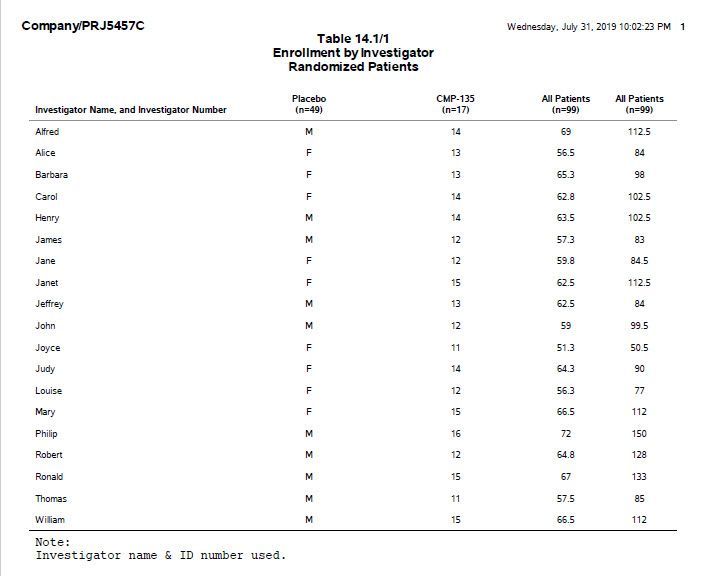
Below is a screen shot of the output. I used SASHELP.CLASS since you didn't provide example data.
You may find this PROC REPORT Tutorial by @Cynthia_sas helpful.
- Mark as New
- Bookmark
- Subscribe
- Mute
- RSS Feed
- Permalink
- Report Inappropriate Content
The headline and headskip options only affect LISTING output.
Instead of using rules=none for the style of the report, have you tried rules=groups?
ods pdf file='/folders/myfolders/ODS PDF/Journal_style.pdf';


%let n1=17;
%let n2=49;
%let n3=99;

* headline and headskip options only affect LISTING output!  ;

proc report data=sashelp.class nowindows split="*" style(report)={rules=groups frame=void}
headline headskip;
	columns (name sex age height weight);
	define name /order style={cellwidth=31% asis=on just=l}
	"Investigator Name, and Investigator Number";
	define sex /display style={cellwidth=22% just=c} spacing=3 order order=data flow "Placebo*(n=&n2)" left;
	define age /display style={cellwidth=22% just=c} spacing=3 order order=data flow "CMP-135 * (n=&n1)" left;
	define height /display style={cellwidth=11% just=c} spacing=3 order order=data flow "All Patients * (n=&n3)" left;
    define weight /display style={cellwidth=11% just=c} spacing=3 order order=data flow "All Patients * (n=&n3)" left;
/* 	break after invnid/skip; */
	compute after _page_/style={just=l font_face='Courier New' font_size=10pt bordertopcolor=black bordertopwidth=0.25};
line "Note:";
line "Investigator name & ID number used.";
endcomp;
	title1 j=l 'Company/PRJ5457C';
	title2 j=c 'Table 14.1/1';
	title3 j=c 'Enrollment by Investigator';
	title4 j=c 'Randomized Patients';
run;

ods pdf close;
Below is a screen shot of the output. I used SASHELP.CLASS since you didn't provide example data.
You may find this PROC REPORT Tutorial by @Cynthia_sas helpful.
- Mark as New
- Bookmark
- Subscribe
- Mute
- RSS Feed
- Permalink
- Report Inappropriate Content
Thank you so much Suzanne! This code worked. I'm going to review different proc report options for each type of output.
You're amazing! Thank you!!! 

Call for content now open!
It's your turn to help shape SAS Innovate 2027. Share your expertise and inspire the SAS community.
Learn how use the CAT functions in SAS to join values from multiple variables into a single value.

Find more tutorials on the SAS Users YouTube channel.
SAS Training: Just a Click Away
Ready to level-up your skills? Choose your own adventure.
-
2 replies
-
07-29-2019 01:08 PM
-
5202 views
-
2 likes
-
2 in conversation
-

