- Home
- /
- Programming
- /
- Programming
- /
- PROC COMPARE Warning.
- RSS Feed
- Mark Topic as New
- Mark Topic as Read
- Float this Topic for Current User
- Bookmark
- Subscribe
- Mute
- Printer Friendly Page


- Mark as New
- Bookmark
- Subscribe
- Mute
- RSS Feed
- Permalink
- Report Inappropriate Content
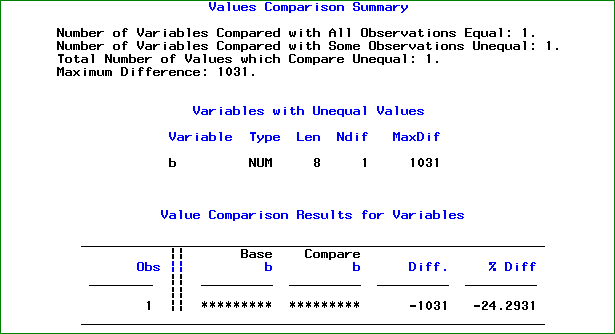
Hi I am getting the below error message when i compare two dataset using proc compare. WARNING: The requested format could not be applied successfully because the Value Comparison Results report restricts the variable's column width to 9 and this format requires a larger minimum width. please help me to solve this. CODE: data a; b=4244; format a b is8601da.; run; data b; b=3213; format a b is8601da.; run; proc compare base=a comp=b maxprint=(30,20); run; PLs find the attached output.


- Mark as New
- Bookmark
- Subscribe
- Mute
- RSS Feed
- Permalink
- Report Inappropriate Content
Interesting. Looks like the format you used is too wide to fit in the PROC COMPARE output. I would have thought SAS would automatically change to use a best. format instead, but apparently it doesn't. Probably the easiest thing to do would just be to "un-format" the variable in your PROC COMPARE step.
proc compare .... ;
format a b; * Clear problematic formats. Can also use format _all_ ;
run;
That should allow the step to run.
Register now at https://www.basug.org/events.
- Mark as New
- Bookmark
- Subscribe
- Mute
- RSS Feed
- Permalink
- Report Inappropriate Content
Hi there, Thanks, but i would like to compare the data with formats applied. Is there anyother options (in PROC COMPARE) or method to compare the formatted datasets. Thanks

Call for content now open!
It's your turn to help shape SAS Innovate 2027. Share your expertise and inspire the SAS community.
Learn how use the CAT functions in SAS to join values from multiple variables into a single value.

Find more tutorials on the SAS Users YouTube channel.
SAS Training: Just a Click Away
Ready to level-up your skills? Choose your own adventure.
-
2 replies
-
01-22-2014 01:39 AM
-
9723 views
-
0 likes
-
2 in conversation
-


