- Home
- /
- Programming
- /
- Programming
- /
- Re: Multiple horizontal bar charts in one SAS graph
- RSS Feed
- Mark Topic as New
- Mark Topic as Read
- Float this Topic for Current User
- Bookmark
- Subscribe
- Mute
- Printer Friendly Page


- Mark as New
- Bookmark
- Subscribe
- Mute
- RSS Feed
- Permalink
- Report Inappropriate Content
Hello,
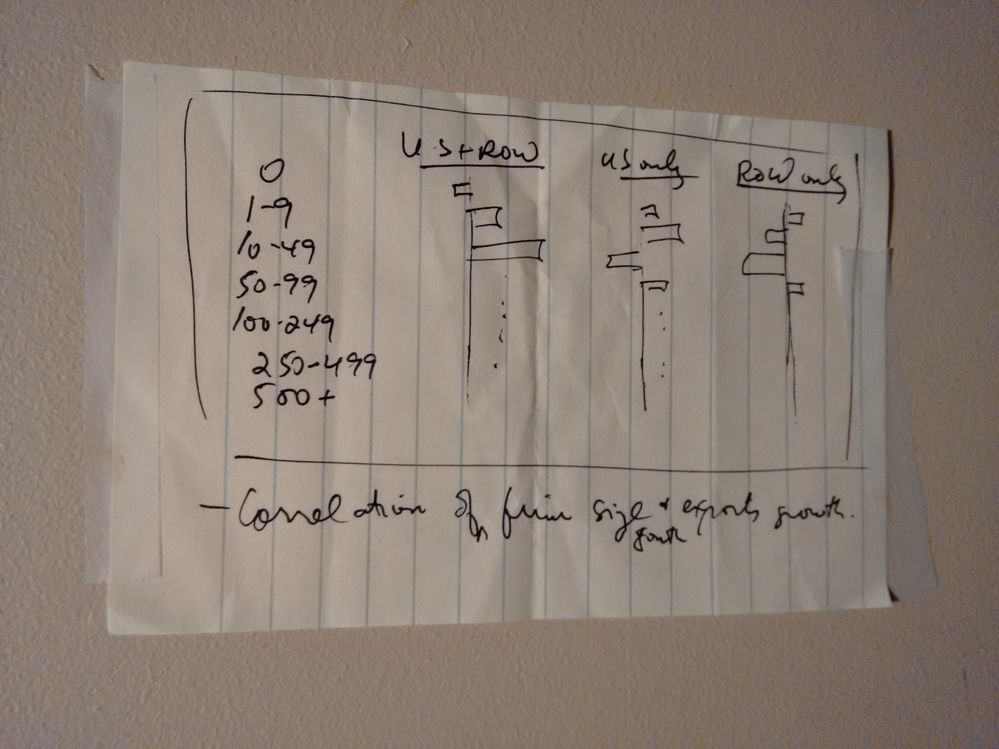
I am trying to create a SAS graph where I have 3 horizontal bar charts that use the same vertical axis (firm size by employee count) representing 3 groups (here I am looking at exports growth from Canada by firm size for three trade lanes: (1) to the US and rest-of-world, (2) to the US only and (3) to the ROW only as compiled from Statistics Canada data).
Here is the data:
firm_size_num_employees	   US_plus_ROW	     ROW_only  US_Only
0	                    -28.1	       45.2	  11.0
1-9	                    19.4	      -10.6	 -39.0
10-49	                    65.4	      -27.4	 -18.8
50-99	                    -26.5	       19.3	 -19.3
100-249	                    18.9	      -44.2	 18.5
250-499	                   15.8	               62.9	 35.0
500+	                   17.9	              67.2	 10.1
I attached the graph I want to create (I drew it by hand since I can't find what a compariable online).
How do I do this either using (a) SAS code or (b) in SAS EG via pulldown menus?
Any help appreciated.
Thanks
Jack
Accepted Solutions


- Mark as New
- Bookmark
- Subscribe
- Mute
- RSS Feed
- Permalink
- Report Inappropriate Content
SGPANEL is what you want to do here, I think. You can do this easily with a first transpose to get your US/ROW/both into a variable, then PANELBY that variable.
Play with the options some to get headers/etc. exactly what you want them to be. http://support.sas.com/documentation/cdl/en/grstatproc/69716/HTML/default/viewer.htm#n0wqazuv6959fnn... for starters.
data have;
input firm_size_num_employees	 $  US_plus_ROW	     ROW_only  US_Only;
datalines;
0	                    -28.1	       45.2	  11.0
1-9	                    19.4	      -10.6	 -39.0
10-49	                    65.4	      -27.4	 -18.8
50-99	                    -26.5	       19.3	 -19.3
100-249	                    18.9	      -44.2	 18.5
250-499	                   15.8	               62.9	 35.0
500+	                   17.9	              67.2	 10.1
;;;;
run;

proc transpose data=have out=have_t;
  var _numeric_;
  by firm_Size_num_employees notsorted;
run;


proc sgpanel data=have_t;
  label _name_ =" ";
  panelby _name_/columns=3 nowall noborder sort=data;
  hbarparm category=firm_Size_num_employees response=col1/ group=_name_;
run;
- Mark as New
- Bookmark
- Subscribe
- Mute
- RSS Feed
- Permalink
- Report Inappropriate Content
SGPANEL is what you want to do here, I think. You can do this easily with a first transpose to get your US/ROW/both into a variable, then PANELBY that variable.
Play with the options some to get headers/etc. exactly what you want them to be. http://support.sas.com/documentation/cdl/en/grstatproc/69716/HTML/default/viewer.htm#n0wqazuv6959fnn... for starters.
data have;
input firm_size_num_employees	 $  US_plus_ROW	     ROW_only  US_Only;
datalines;
0	                    -28.1	       45.2	  11.0
1-9	                    19.4	      -10.6	 -39.0
10-49	                    65.4	      -27.4	 -18.8
50-99	                    -26.5	       19.3	 -19.3
100-249	                    18.9	      -44.2	 18.5
250-499	                   15.8	               62.9	 35.0
500+	                   17.9	              67.2	 10.1
;;;;
run;

proc transpose data=have out=have_t;
  var _numeric_;
  by firm_Size_num_employees notsorted;
run;


proc sgpanel data=have_t;
  label _name_ =" ";
  panelby _name_/columns=3 nowall noborder sort=data;
  hbarparm category=firm_Size_num_employees response=col1/ group=_name_;
run;
- Mark as New
- Bookmark
- Subscribe
- Mute
- RSS Feed
- Permalink
- Report Inappropriate Content
Excellent! I some additonal modifications and got the graph as I wanted! Thanks so much.
Jack

Call for content now open!
It's your turn to help shape SAS Innovate 2027. Share your expertise and inspire the SAS community.
Learn how use the CAT functions in SAS to join values from multiple variables into a single value.

Find more tutorials on the SAS Users YouTube channel.
SAS Training: Just a Click Away
Ready to level-up your skills? Choose your own adventure.
-
2 replies
-
12-20-2016 10:00 AM
-
2731 views
-
1 like
-
2 in conversation
-


