- Home
- /
- Programming
- /
- Programming
- /
- Re: How to create binary variable from existing categorical variable a...
- RSS Feed
- Mark Topic as New
- Mark Topic as Read
- Float this Topic for Current User
- Bookmark
- Subscribe
- Mute
- Printer Friendly Page


- Mark as New
- Bookmark
- Subscribe
- Mute
- RSS Feed
- Permalink
- Report Inappropriate Content
Hi,
I'm a new user of SAS 9.4 program and I am working with a data of my research. I have this character column which looks like:
Var1
XY_001
XY_021
XY_001
XY_000
XY_015 .......etc
it is around 633 obsrvations and have also 577 missings! All observations are 1210
and if I run a proc freq for this variable the frequencies of the readings are different ranging from 1 to 38 and the missings
Now I want to create a new variable called Var2 I want to make it binary (0/1). for those categories who have 1 as a frequency to be 0
and those categories who have frequency more or equal than 2 to be 1. and the missings as missing
and to call 0: not group
and 1: group
How can I create the program??
thank you
Accepted Solutions


- Mark as New
- Bookmark
- Subscribe
- Mute
- RSS Feed
- Permalink
- Report Inappropriate Content
Let's start by extending the PROC FREQ that you ran, so it also creates an output data set:
proc freq data=have;
 tables var1 / out=counts (keep=var1 count);
run;
Next, sort your original data set:
proc sort data=have;
 by var1;
run;
Finally, merge the PROC FREQ results with your data:
data want;
merge have
      counts (where=(var1 > ' '));
by var1;
if count=1 then flag=0;
else if count > 1 then flag=1;
drop count;
run;
- Mark as New
- Bookmark
- Subscribe
- Mute
- RSS Feed
- Permalink
- Report Inappropriate Content
Let's start by extending the PROC FREQ that you ran, so it also creates an output data set:
proc freq data=have;
 tables var1 / out=counts (keep=var1 count);
run;
Next, sort your original data set:
proc sort data=have;
 by var1;
run;
Finally, merge the PROC FREQ results with your data:
data want;
merge have
      counts (where=(var1 > ' '));
by var1;
if count=1 then flag=0;
else if count > 1 then flag=1;
drop count;
run;
- Mark as New
- Bookmark
- Subscribe
- Mute
- RSS Feed
- Permalink
- Report Inappropriate Content
Hi Astounding,
Thank you for your reply I have an issue:
I run this code:
/* to create new cluster status variable*/
proc freq data=genotyped_1210;
tables clustername / out=counts (keep=clustername count);
run;

/*Next, sort your original data set:*/

Proc sort data= genotyped_1210;
by clustername;
run;
The 1st part wet well, the sorting part gave me this error:
80 Proc sort data= genotyped_1210;
81 by clustername;
82 run;
ERROR: You cannot open WORK.GENOTYPED_1210.DATA for output access with member-level control because
WORK.GENOTYPED_1210.DATA is in use by you in resource environment SORT.
NOTE: The SAS System stopped processing this step because of errors.
NOTE: PROCEDURE SORT used (Total process time):
real time 0.00 seconds
cpu time 0.00 seconds
What do you suggest?
Thank you


- Mark as New
- Bookmark
- Subscribe
- Mute
- RSS Feed
- Permalink
- Report Inappropriate Content
You probably have the original data set open in a data viewer (EG? Check Tools->View Open Data Sets.)
To avoid, you can work from a copy by sorting the original into another file and work forward from there -- or else just make sure all data grid views are closed before running the next step.
/* to create new cluster status variable*/
proc freq data=genotyped_1210;
tables clustername / out=counts (keep=clustername count);
run;

/*Next, sort your original data set:*/

Proc sort data= genotyped_1210 out=sorted_genotyped;
by clustername;
run;- Mark as New
- Bookmark
- Subscribe
- Mute
- RSS Feed
- Permalink
- Report Inappropriate Content
Thank you ChrisHemedinger,
I closed all the data viewer and it worked!
However, when doing the next program as follows
/*Finally, merge the PROC FREQ results with your data:*/

data TB;
merge sorted_genotyped
       counts (where=(clustername > ' '));
by clustername;
if count=1 then unique=0;
else if count > 1 then cluster=1;
drop count;
run;
The following error was:
58 data TB;
59 merge sorted_genotyped
60 counts (where=(clustername > ' '));
ERROR: The value is not a valid SAS name.
61 by clustername;
62 if count=1 then unique=0;
63 else if count > 1 then cluster=1;
64 drop count;
65 run;
NOTE: The SAS System stopped processing this step because of errors.
WARNING: The data set WORK.TB may be incomplete. When this step was stopped there were 0
observations and 239 variables.
WARNING: Data set WORK.TB was not replaced because this step was stopped.
NOTE: DATA statement used (Total process time):
real time 0.01 seconds
cpu time 0.01 seconds
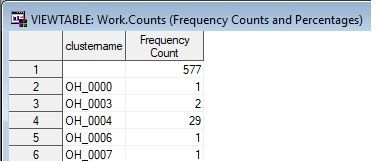
attached picture of example of the character values of the variable: clustername
- Mark as New
- Bookmark
- Subscribe
- Mute
- RSS Feed
- Permalink
- Report Inappropriate Content
This won't explain the error, but it is a small required fix. You now have:
if count=1 then unique=0;
else if count > 1 then cluster=1;
That needs to become:
if count=1 then unique=0;
else if count > 1 then unique=1;
The error message itself it not really explainable. You can try changing the WHERE condition from this:
(where=(clustername > ' '))
to this:
(where=(clustername ne ' '))
Also make sure the quotes around the blank space are really quotes ... you can try deleting them, then typing them back in again. It shouldn't make a difference, but you never know.
- Mark as New
- Bookmark
- Subscribe
- Mute
- RSS Feed
- Permalink
- Report Inappropriate Content
Thanks all for your help
The problem still didn't solve it could be because I have an ID numbers in the original file thatcouldaffect the merge step ?!
I will try to use R instead to see if this could solve the problem!
I appreciatr all your suggestions and programs you provided I tried them all and it didn't work.
Thank you so much


- Mark as New
- Bookmark
- Subscribe
- Mute
- RSS Feed
- Permalink
- Report Inappropriate Content
What is it that you want as your output?
data have ;
  length Var1 $10;
  input Var1 @@ ;
cards;
XY_001 XY_021 . XY_001 . XY_000 . XY_015 .
;

proc sql noprint ;
  create table want as
    select var1,count(*) as nobs
         , (calculated nobs > 1) as var2
    from have
    group by 1
  ;
quit;

proc print; run;
Obs Var1 nobs var2 1 4 1 2 XY_000 1 0 3 XY_001 2 1 4 XY_015 1 0 5 XY_021 1 0
- Mark as New
- Bookmark
- Subscribe
- Mute
- RSS Feed
- Permalink
- Report Inappropriate Content
Thank you for your all contributions the problem is solved by R!


- Mark as New
- Bookmark
- Subscribe
- Mute
- RSS Feed
- Permalink
- Report Inappropriate Content
i have three categorical variables in my data set:
1. alcohol (current=1, other=0)
2. smk (current=1, other=0)
3.drug (current=1, other=0)
now i want to creat a variable that only includes level1 of these variables:
here is what I wrote:
if alcohol=1 & smk=1 & drug=1 then (new variable name)= 1; else (new variable)=0;
however this is not showing in my proc freq.
any advice is appreciated.
Thanks

Call for content now open!
It's your turn to help shape SAS Innovate 2027. Share your expertise and inspire the SAS community.
Learn how use the CAT functions in SAS to join values from multiple variables into a single value.

Find more tutorials on the SAS Users YouTube channel.
SAS Training: Just a Click Away
Ready to level-up your skills? Choose your own adventure.
-
9 replies
-
09-12-2017 02:27 PM
-
9732 views
-
3 likes
-
5 in conversation
-


