Turn on suggestions
Auto-suggest helps you quickly narrow down your search results by suggesting possible matches as you type.
Showing results for
- Home
- /
- Programming
- /
- Programming
- /
- Formatting the scree plot x-axis in proc factor
Options
- RSS Feed
- Mark Topic as New
- Mark Topic as Read
- Float this Topic for Current User
- Bookmark
- Subscribe
- Mute
- Printer Friendly Page
☑ This topic is solved.
Need further help from the community? Please
sign in and ask a new question.


Fluorite | Level 6
- Mark as New
- Bookmark
- Subscribe
- Mute
- RSS Feed
- Permalink
- Report Inappropriate Content
Posted 04-04-2024 03:14 PM
(3572 views)
I want to produce a scree plot that I can easily paste into a word document that has an x-axis with only 15 factors. I have tried multiple methods to do this. When I tried ODS RTF, the files were blank. I finally settled on using ODS HTML, but I have not been able to adjust the x-axis on my plot. I tried using a template, but I don't think it is being applied in PROC FACTOR. I tried using SGRENDER, but the images were blank. When I do produce an image, with the code below, the x-axis shows 60 factors, so it is difficult to see where the elbow is. Any help would be greatly appreciated!
PROC TEMPLATE;
PROC TEMPLATE;
DEFINE STATGRAPH SCREEPLOT;
NOTES "SCREE PLOT FOR EXTRACTED EIGENVALUES";
BEGINGRAPH / DESIGNWIDTH=DEFAULTDESIGNHEIGHT;
ENTRYTITLE "EIGENVALUE ((*ESC*){UNICODE LAMBDA}) PLOT";
LAYOUT OVERLAY / YAXISOPTS=(LABEL="(*ESC*){UNICODE LAMBDA}")
XAXISOPTS=(LABEL="FACTOR NUMBER"
LINEAROPTS=(TICKVALUELIST=(1 2 3 4 5 6 7 8 9 10)));
SERIESPLOT Y=EIGENVALUE X=NUMBER / DISPLAY=ALL;
ENDLAYOUT; ENDGRAPH; END; RUN;
ODS GRAPHICS ON ;
%LET OUTDIR=[PATH] ;
ODS HTML PATH="&OUTDIR" (URL=NONE)
BODY='BODY2.HTML'
/*CONTENTS='CONTENTS2.HTML'
FRAME='FRAME2.HTML' */ ;
PROC FACTOR DATA = DATA METHOD=PRINCIPAL PRIORS=SMC RESIDUAL
ROTATE=VARIMAX OUTSTAT=OUTSTAT
PLOTS(UNPACK)=SCREE REORDER ;
VAR &VARS ;
RUN;
ODS HTML CLOSE ;
1 ACCEPTED SOLUTION
Accepted Solutions


Super User
- Mark as New
- Bookmark
- Subscribe
- Mute
- RSS Feed
- Permalink
- Report Inappropriate Content
You could save these data firstly ,afterwards polt it by PROC SGPLOT.
ods select none;
ods output ScreePlot=ScreePlot;
PROC FACTOR DATA = sashelp.heart METHOD=PRINCIPAL PRIORS=SMC RESIDUAL
ROTATE=VARIMAX OUTSTAT=OUTSTAT
PLOTS(UNPACK)=SCREE REORDER  ;
  VAR _numeric_ ;
RUN;
ods select all;


%let n=6;  /*the number of factors you want to display*/
proc sgplot data=ScreePlot(where=(number<=&n.));
series x=number y=Eigenvalue/markers;
run;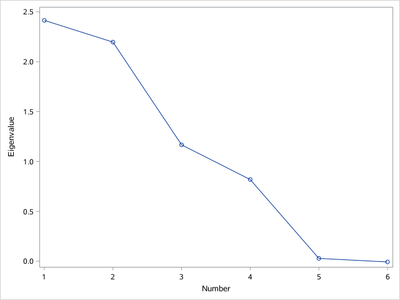
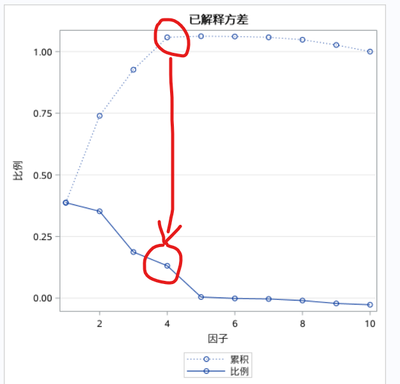
Or you could check the next graph "the explained variance" to find elbow point ?
3 REPLIES 3

Super User
- Mark as New
- Bookmark
- Subscribe
- Mute
- RSS Feed
- Permalink
- Report Inappropriate Content
Did you look at the Proc Factor option NPLOTS= to limit the number of factors plotted?
Super User
- Mark as New
- Bookmark
- Subscribe
- Mute
- RSS Feed
- Permalink
- Report Inappropriate Content
You could save these data firstly ,afterwards polt it by PROC SGPLOT.
ods select none;
ods output ScreePlot=ScreePlot;
PROC FACTOR DATA = sashelp.heart METHOD=PRINCIPAL PRIORS=SMC RESIDUAL
ROTATE=VARIMAX OUTSTAT=OUTSTAT
PLOTS(UNPACK)=SCREE REORDER  ;
  VAR _numeric_ ;
RUN;
ods select all;


%let n=6;  /*the number of factors you want to display*/
proc sgplot data=ScreePlot(where=(number<=&n.));
series x=number y=Eigenvalue/markers;
run;
Or you could check the next graph "the explained variance" to find elbow point ?
Fluorite | Level 6
- Mark as New
- Bookmark
- Subscribe
- Mute
- RSS Feed
- Permalink
- Report Inappropriate Content
This worked! Thank you!

Call for content now open!
It's your turn to help shape SAS Innovate 2027. Share your expertise and inspire the SAS community.
How to Concatenate Values
Learn how use the CAT functions in SAS to join values from multiple variables into a single value.

Find more tutorials on the SAS Users YouTube channel.
SAS Training: Just a Click Away
Ready to level-up your skills? Choose your own adventure.
Discussion stats
-
3 replies
-
04-04-2024 03:14 PM
-
3573 views
-
2 likes
-
3 in conversation
-

