- Home
- /
- Programming
- /
- Programming
- /
- Re: Format not found or could not be loaded
- RSS Feed
- Mark Topic as New
- Mark Topic as Read
- Float this Topic for Current User
- Bookmark
- Subscribe
- Mute
- Printer Friendly Page


- Mark as New
- Bookmark
- Subscribe
- Mute
- RSS Feed
- Permalink
- Report Inappropriate Content
I have .sas7bcat format catalog. when i run the proc catalog the output is as below.
output:
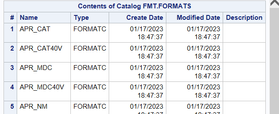
I want to make it to .sas7bdat and what to see the data inside how can i do that?


- Mark as New
- Bookmark
- Subscribe
- Mute
- RSS Feed
- Permalink
- Report Inappropriate Content
We can't help if we don't see entire log printout. Also from the proc.
Bart
Polish SAS Users Group: www.polsug.com and communities.sas.com/polsug
"SAS Packages: the way to share" at SGF2020 Proceedings (the latest version), GitHub Repository, and YouTube Video.
Hands-on-Workshop: "Share your code with SAS Packages"
"My First SAS Package: A How-To" at SGF2021 Proceedings
SAS Ballot Ideas: one: SPF in SAS, two, and three
SAS Documentation
- Mark as New
- Bookmark
- Subscribe
- Mute
- RSS Feed
- Permalink
- Report Inappropriate Content
Run the following:
options fmtsearch = (FMT);

proc catalog c=FMT.formats; contents; run;quit;

data _null_;
  ASD_orig = "test";
  APR_name_orig=put(ASD_orig, $APR_NM.);
run;
and share the log. BTW. proc catalog ends with "QUIT;"
Bart
Polish SAS Users Group: www.polsug.com and communities.sas.com/polsug
"SAS Packages: the way to share" at SGF2020 Proceedings (the latest version), GitHub Repository, and YouTube Video.
Hands-on-Workshop: "Share your code with SAS Packages"
"My First SAS Package: A How-To" at SGF2021 Proceedings
SAS Ballot Ideas: one: SPF in SAS, two, and three
SAS Documentation


- Mark as New
- Bookmark
- Subscribe
- Mute
- RSS Feed
- Permalink
- Report Inappropriate Content
Generic idea is to use Proc Format to point to the location and use CNTLOUT option to create a data set.
That would require a libname where the format catalog resides
The basic code would look like
Proc format library=YOURLIB cntlout=yourdatasetgoeshere;
run;
Caution: Catalogs can be a bit version specific, SAS release and operating system, but if proc contents isn't complaining then you may be good to go.

Call for content now open!
It's your turn to help shape SAS Innovate 2027. Share your expertise and inspire the SAS community.
Learn how use the CAT functions in SAS to join values from multiple variables into a single value.

Find more tutorials on the SAS Users YouTube channel.
SAS Training: Just a Click Away
Ready to level-up your skills? Choose your own adventure.
-
3 replies
-
09-08-2023 07:07 AM
-
1942 views
-
0 likes
-
3 in conversation
-


