- Home
- /
- Programming
- /
- Programming
- /
- Re: Compute formula with sum of log and two loops
- RSS Feed
- Mark Topic as New
- Mark Topic as Read
- Float this Topic for Current User
- Bookmark
- Subscribe
- Mute
- Printer Friendly Page


- Mark as New
- Bookmark
- Subscribe
- Mute
- RSS Feed
- Permalink
- Report Inappropriate Content
I want to apply the following formula to an input of the numbers 1 to 9 (=d) and n=2 (so k = 0 to 9):
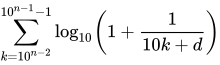
I am almost there, but I figure I need to add a second step somewhere to loop over the k. I currently use two do loops, for k and d, but I don't see how to get one loop within the sum, and one loop applied to the sum. I get the expected for each combination of digits, but I still need the sum of the 'expected' where D remains the same. If I could also add a conversion from n to k, meaning I do "%let n=2" and then SAS computes the range of k, that would be even better.
my attempt:
data EXPECTED_D2;
 FORMAT EXPECTED 8.3;
 DO D = 0 TO 9;
 DO K = 1 TO 9;
 EXPECTED=sum(LOG10(1+(1/((10*K)+D))));
 OUTPUT;
 END;
 END;
run;
desired result:
data EXPECTED_D;
 input D EXPECTED;
 datalines;
 0 11.97
 1 11.39
 2 10.88
 3 10.43
 4 10.03
 5 9.67
 6 9.34
 7 9.04
 8 8.76
 9 8.50
;
run;
Accepted Solutions


- Mark as New
- Bookmark
- Subscribe
- Mute
- RSS Feed
- Permalink
- Report Inappropriate Content
@SarahDew wrote:
I want to apply the following formula to an input of the numbers 1 to 9 (=d) and n=2 (so k = 0 to 9):
I am almost there, but I figure I need to add a second step somewhere to loop over the k. I currently use two do loops, for k and d, but I don't see how to get one loop within the sum, and one loop applied to the sum. I get the expected for each combination of digits, but I still need the sum of the 'expected' where D remains the same. If I could also add a conversion from n to k, meaning I do "%let n=2" and then SAS computes the range of k, that would be even better.
Stay away from macro variables here. They are of no help in this situation.
Try this:
data EXPECTED_D2;
 FORMAT EXPECTED 8.3;
 DO D = 0 TO 9;
 expected=0;
 DO K = 1 TO 9;
 EXPECTED=expected+LOG10(1+(1/((10+K)+D)));
 END;
  OUTPUT;
 END;
 drop k;
run;
This doesn't give the same answers you provided, I don't know why, since it uses the exact same formula for EXPECTED that you are using.
Paige Miller
- Mark as New
- Bookmark
- Subscribe
- Mute
- RSS Feed
- Permalink
- Report Inappropriate Content
@SarahDew wrote:
I want to apply the following formula to an input of the numbers 1 to 9 (=d) and n=2 (so k = 0 to 9):
I am almost there, but I figure I need to add a second step somewhere to loop over the k. I currently use two do loops, for k and d, but I don't see how to get one loop within the sum, and one loop applied to the sum. I get the expected for each combination of digits, but I still need the sum of the 'expected' where D remains the same. If I could also add a conversion from n to k, meaning I do "%let n=2" and then SAS computes the range of k, that would be even better.
Stay away from macro variables here. They are of no help in this situation.
Try this:
data EXPECTED_D2;
 FORMAT EXPECTED 8.3;
 DO D = 0 TO 9;
 expected=0;
 DO K = 1 TO 9;
 EXPECTED=expected+LOG10(1+(1/((10+K)+D)));
 END;
  OUTPUT;
 END;
 drop k;
run;
This doesn't give the same answers you provided, I don't know why, since it uses the exact same formula for EXPECTED that you are using.
Paige Miller
- Mark as New
- Bookmark
- Subscribe
- Mute
- RSS Feed
- Permalink
- Report Inappropriate Content
That does work, only I mistakenly did 10+k instead of 10*K, maybe we should both edit this. And I forgot to mention I multiply the expected probabilities by 100.


- Mark as New
- Bookmark
- Subscribe
- Mute
- RSS Feed
- Permalink
- Report Inappropriate Content
Hi @SarahDew,
10k is 10*k, not 10+k. So, very similar to @PaigeMiller's code:
data expected_d2(drop=k);
do d = 0 to 9;
  expected=0;
  do k = 1 to 9;
    expected+log10(1+(1/(10*k+d)));
  end;
  output;
end;
format expected percent8.2;
run;
Catch up on SAS Innovate 2026
Nearly 200 sessions are now available on demand with the SAS Innovate Digital Pass.
Explore Now →Learn how use the CAT functions in SAS to join values from multiple variables into a single value.

Find more tutorials on the SAS Users YouTube channel.
SAS Training: Just a Click Away
Ready to level-up your skills? Choose your own adventure.
-
3 replies
-
10-01-2019 09:37 AM
-
1984 views
-
1 like
-
3 in conversation
-


