- Home
- /
- Programming
- /
- SAS Procedures
- /
- Re: Report transposition
- RSS Feed
- Mark Topic as New
- Mark Topic as Read
- Float this Topic for Current User
- Bookmark
- Subscribe
- Mute
- Printer Friendly Page


- Mark as New
- Bookmark
- Subscribe
- Mute
- RSS Feed
- Permalink
- Report Inappropriate Content
Hi,
Hope someone can help with the following reporting issue. I've been thinking about it for a while and cant come up with a plan on how to process it. Any help would be much appreciated.
I have data collected in a dataset as follows:
| Study | Datetime | Category | Value |
|---|---|---|---|
| x | 01Jan13 | Category1 | 10 |
| x | 01Jan13 | Category2 | 20 |
| x | 01Jan13 | Category3 | 30 |
| x | 01Jan13 | Category4 | 40 |
| ...... | |||
| x | 07Jan13 | Category1 | 20 |
| x | 07Jan13 | Category3 | 40 |
| ........ | |||
| x | 14Jan13 | Category2 | 27 |
| ....... |
and I need to transpose and report as
| Study | Category | 01an13 | 07Jan13 | 14Jan13 |
|---|---|---|---|---|
| x | Category1 | 10 | 20 | null |
| x | Category2 | 20 | null | .27 |
| x | Category3 | 30 | 40 | ... |
| x | Category4 | 40 | ... |
There can be any number of dates to transpose (1-n) and specific "CategoryX" values may be missing in the base dataset (see "null" examples above.) Can this be done via a proc transpose?


- Mark as New
- Bookmark
- Subscribe
- Mute
- RSS Feed
- Permalink
- Report Inappropriate Content
Please try the below code
data have;
input study$ date : date7. category $10. value$;
format date date7.;
cards;
x 01Jan13 Category1 10
x 01Jan13 Category2 20
x 01Jan13 Category3 30
x 01Jan13 Category4 40
x 07Jan13 Category1 20
x 07Jan13 Category3 40
x 14Jan13 Category2 27
;
proc sort data=have ;
by study category ;
run;
proc transpose data=have out=want(drop=_name_) prefix=_;
by study category ;
id date;
var value;
run;
data want_;
set want;
array x(*) _:;
do i = 1 to dim(x);
if x(i)='' then x(i)='Null';
end;
drop i;
run;
Thanks,
Jagadish
Jag


- Mark as New
- Bookmark
- Subscribe
- Mute
- RSS Feed
- Permalink
- Report Inappropriate Content
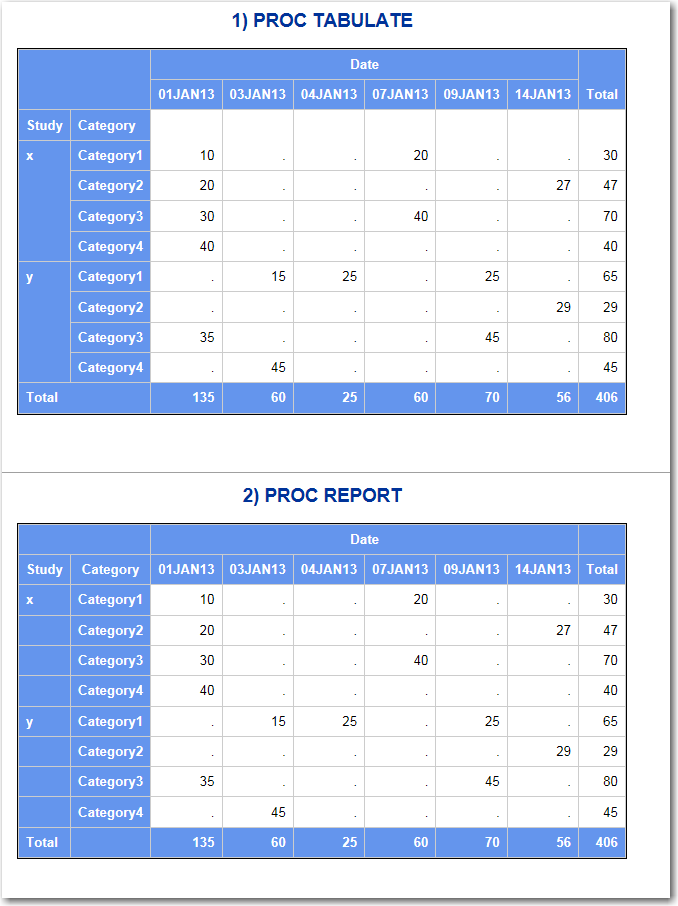
Hi, if this is truly a "reporting" issue, then either PROC TABULATE or PROC REPORT could produce the report as you show, without needing PROC TRANSPOSE. See attached screen shot.
cynthia
- Mark as New
- Bookmark
- Subscribe
- Mute
- RSS Feed
- Permalink
- Report Inappropriate Content
Thanks Cynthia for the screenshot. Could you please attach the code used to generate the output? It would save me some time in researching the options. Thankyou.


- Mark as New
- Bookmark
- Subscribe
- Mute
- RSS Feed
- Permalink
- Report Inappropriate Content
hi Cynthia,
just wonder,how you got the "total" column in your proc report.Did you use compute blocks maybe,can you pls explain?
- Mark as New
- Bookmark
- Subscribe
- Mute
- RSS Feed
- Permalink
- Report Inappropriate Content
Hi:
I am not at my computer right now. But I will post the code when I get back. To get the grand total line in PROC TABULATE, I used the ALL universal class variable in the Row dimension. To get the grand total column in PROC TABULATE, I used the ALL keyword in the Column dimension. For PROC REPORT, I used the RBREAK statement to get the grand total row. I used VALUE 2 time in a COLUMN statement...one time for nesting underneath each date value and one time for the grand total column.
cynthia
- Mark as New
- Bookmark
- Subscribe
- Mute
- RSS Feed
- Permalink
- Report Inappropriate Content
thanks!
completely forgot that u can use variables more then once in the "column" statement 
- Mark as New
- Bookmark
- Subscribe
- Mute
- RSS Feed
- Permalink
- Report Inappropriate Content
Hi,
Here's the code I used (and the fake data).
Cynthia
data have;
length Study $5 Category $9;
infile datalines;
input study $ datetime : date7. category $ value;
return;
datalines;
x 01Jan13 Category1 10
x 01Jan13 Category2 20
x 01Jan13 Category3 30
x 01Jan13 Category4 40
x 07Jan13 Category1 20
x 07Jan13 Category3 40
x 14Jan13 Category2 27
y 03Jan13 Category1 15
y 04Jan13 Category1 25
y 01Jan13 Category3 35
y 03Jan13 Category4 45
y 09Jan13 Category1 25
y 09Jan13 Category3 45
y 14Jan13 Category2 29
;
run;
ods _all_ close;
title; footnote;
ods html file='c:\temp\want_report.html' style=sasweb;
proc tabulate data=have f=comma6.;
title '1) PROC TABULATE';
class study datetime category;
var value;
table study*Category all*{style=Header},
datetime='Date'*value=' ' all*value=' ';
keylabel sum=' '
all='Total';
keyword all / style={vjust=b};
format datetime date7.;
run;
proc report data=have nowd
style(summary)=Header;
title '2) PROC REPORT';
column study category value,datetime value=tot;
define study / group style(column)=Header;
define category / group style(column)=Header;
define datetime /across order=internal f=date7. 'Date';
define value / analysis sum f=comma6. ' ';
define tot / analysis sum 'Total' f=comma6. ;
rbreak after / summarize;
compute after;
study='Total';
endcomp;
run;
ods html close;
- Mark as New
- Bookmark
- Subscribe
- Mute
- RSS Feed
- Permalink
- Report Inappropriate Content
thank you Cynthia


- Mark as New
- Bookmark
- Subscribe
- Mute
- RSS Feed
- Permalink
- Report Inappropriate Content
Such question could simply be solved by this .
I have a paper at SGF2015 about this skill . If you want to listen .
Quad room, Apr 28, Peter.E will present it for me .
data have;
  length Study $5 Category $9;
  infile datalines;
  input study $ datetime : date7. category $ value;
  format datetime date7.;
return;
datalines;
x 01Jan13 Category1 10
x 01Jan13 Category2 20
x 01Jan13 Category3 30
x 01Jan13 Category4 40
x 07Jan13 Category1 20
x 07Jan13 Category3 40
x 14Jan13 Category2 27
y 03Jan13 Category1 15
y 04Jan13 Category1 25
y 01Jan13 Category3 35
y 03Jan13 Category4 45
y 09Jan13 Category1 25
y 09Jan13 Category3 45
y 14Jan13 Category2 29
;
run;
proc sql;
 select distinct catt('have(where=(study="',study,'" and category="',category,'" and datetime=',datetime,')  rename=(value=_',put(datetime,date7. -l),'))')
                    into : list separated by ' '
  from have;
quit;
%put &list ;
data want;
 merge &list ;
 by study category;
 drop datetime;
run;
Xia Keshan

Call for content now open!
It's your turn to help shape SAS Innovate 2027. Share your expertise and inspire the SAS community.
Learn the difference between classical and Bayesian statistical approaches and see a few PROC examples to perform Bayesian analysis in this video.

Find more tutorials on the SAS Users YouTube channel.
SAS Training: Just a Click Away
Ready to level-up your skills? Choose your own adventure.
-
9 replies
-
11-27-2013 07:02 AM
-
6047 views
-
2 likes
-
5 in conversation
-


