- Home
- /
- Programming
- /
- SAS Procedures
- /
- Re: Proc Gplot: Axis values
- RSS Feed
- Mark Topic as New
- Mark Topic as Read
- Float this Topic for Current User
- Bookmark
- Subscribe
- Mute
- Printer Friendly Page


- Mark as New
- Bookmark
- Subscribe
- Mute
- RSS Feed
- Permalink
- Report Inappropriate Content
Hello!
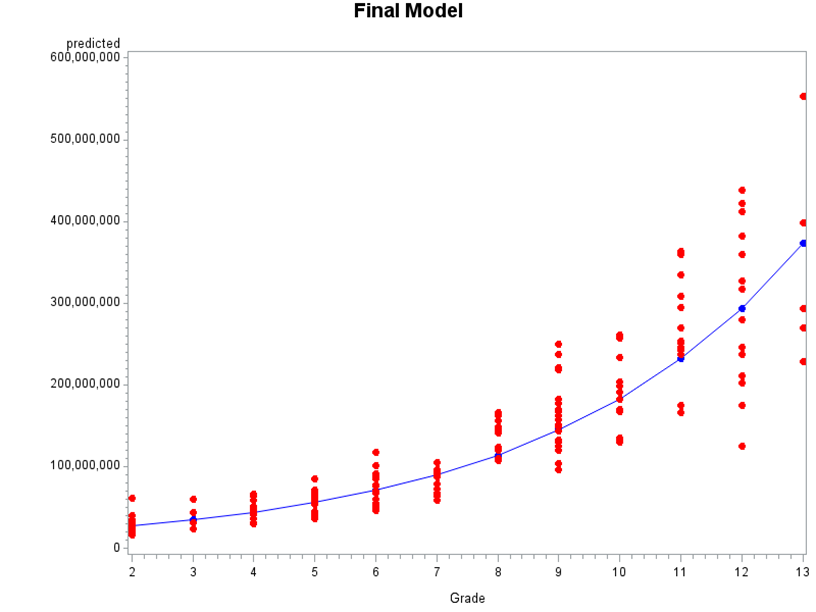
Does anybody know how to change the axes values? I am plotting a series of scatterplots and when the numbers get too big sometimes they appear in scientific notation. How can I change that?
Unwanted Y-axis:

Desired Y-Axis
Accepted Solutions


- Mark as New
- Bookmark
- Subscribe
- Mute
- RSS Feed
- Permalink
- Report Inappropriate Content
Hi,
Without any sample data/code, I created something...
DATA HAVE;
DO I = 5000000 TO 25000000 BY 5000000;
REVENUE = I;
PROFIT = I/20;
OUTPUT;
END;
DROP I;
RUN;
PROC FORMAT;
VALUE BIG 5000000 = "5,000,000"
10000000 = "10,000,000"
15000000 = "15,000,000"
20000000 = "20,000,000"
25000000 = "25,000,000"
;
QUIT;
GOPTIONS RESET = ALL;
AXIS1 LABEL = (F = ARIAL H = 2 A = 90 "REVENUE" )
ORDER = (5000000 TO 25000000 BY 5000000) V = (F = ARIAL H = 1.5);
PROC GPLOT DATA = HAVE;
PLOT REVENUE * PROFIT/VAXIS = AXIS1;
FORMAT REVENUE BIG.;
RUN;QUIT;
Bascially, I think you may need to use some format.
Good luck!
Anca.
- Mark as New
- Bookmark
- Subscribe
- Mute
- RSS Feed
- Permalink
- Report Inappropriate Content
Hi,
Without any sample data/code, I created something...
DATA HAVE;
DO I = 5000000 TO 25000000 BY 5000000;
REVENUE = I;
PROFIT = I/20;
OUTPUT;
END;
DROP I;
RUN;
PROC FORMAT;
VALUE BIG 5000000 = "5,000,000"
10000000 = "10,000,000"
15000000 = "15,000,000"
20000000 = "20,000,000"
25000000 = "25,000,000"
;
QUIT;
GOPTIONS RESET = ALL;
AXIS1 LABEL = (F = ARIAL H = 2 A = 90 "REVENUE" )
ORDER = (5000000 TO 25000000 BY 5000000) V = (F = ARIAL H = 1.5);
PROC GPLOT DATA = HAVE;
PLOT REVENUE * PROFIT/VAXIS = AXIS1;
FORMAT REVENUE BIG.;
RUN;QUIT;
Bascially, I think you may need to use some format.
Good luck!
Anca.


- Mark as New
- Bookmark
- Subscribe
- Mute
- RSS Feed
- Permalink
- Report Inappropriate Content
I'm guessing the the likely current format for your predicted variable is BEST8. You don't need a custom format COMMA12. should work for your displayed example.
If you aren't interested in the level of control an AXIS statement gives add statements similar to:
Format minsalary comma12.;
label minsalary = 'Predicted';
to the proc statements.
- Mark as New
- Bookmark
- Subscribe
- Mute
- RSS Feed
- Permalink
- Report Inappropriate Content
Formatting worked! 
Thank you all very much!

Call for content now open!
It's your turn to help shape SAS Innovate 2027. Share your expertise and inspire the SAS community.
Learn the difference between classical and Bayesian statistical approaches and see a few PROC examples to perform Bayesian analysis in this video.

Find more tutorials on the SAS Users YouTube channel.
SAS Training: Just a Click Away
Ready to level-up your skills? Choose your own adventure.
-
3 replies
-
08-05-2013 11:13 AM
-
5843 views
-
4 likes
-
3 in conversation
-

