- Home
- /
- Programming
- /
- SAS Procedures
- /
- Re: LSmeans multiple control levels
- RSS Feed
- Mark Topic as New
- Mark Topic as Read
- Float this Topic for Current User
- Bookmark
- Subscribe
- Mute
- Printer Friendly Page


- Mark as New
- Bookmark
- Subscribe
- Mute
- RSS Feed
- Permalink
- Report Inappropriate Content
Ok. This might be a ridiculously stupid question easily solved by experienced users.
SAS PROC mixed documentation states the following.
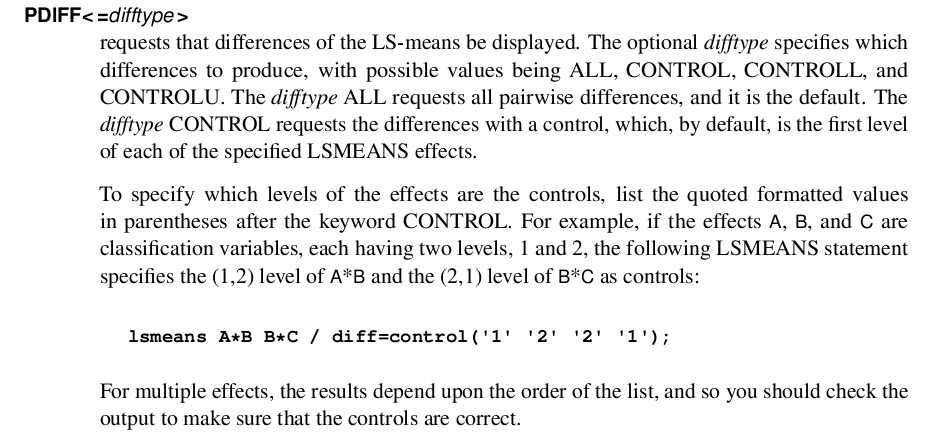
For the life of me I can't seem to get that statement to work in proc mixed. My variables have a similar lay-out. I am able to specify only A*B and the appropriate controls in the LSmeans statement (without B*C in there). When I add the B*C and specify control levels as in the SAS documentation, I get the error "Wrong number of control levels for A*B" and "Wrong number of control levels for B*C". Am I missing something???
Accepted Solutions


- Mark as New
- Bookmark
- Subscribe
- Mute
- RSS Feed
- Permalink
- Report Inappropriate Content
I was able to get the error, and I came up with a solution.
First, the levels in the quotes have to be the formatted values in the dataset. For instance, in my test case, when I had control('1' '1') it failed, as my levels for a were 'Female' and 'Male', so control('Female' '1') works.
Second, when multiple factors are present, the separate parts have to be separated by a comma:
This works for me:
lsmeans sex*group group*week/diff=control('Female' '1' , '1' '1');
This does not:
lsmeans sex*group group*week/diff=control('Female' '1' '1' '1');
That comma does not appear in the documentation, and is clearly needed.
Steve Denham
- Mark as New
- Bookmark
- Subscribe
- Mute
- RSS Feed
- Permalink
- Report Inappropriate Content
Can you share your PROC MIXED code?
This does make a really good case for the use of the LSMESTIMATE statement, though...
Steve Denham
- Mark as New
- Bookmark
- Subscribe
- Mute
- RSS Feed
- Permalink
- Report Inappropriate Content
Hello SteveDenham,
The code is really simplified because I wanted to try it out:
proc mixed data=test.testdata;
class a b c;
model y = a b c a*b a*c;
lsmeans a b / pdiff=control('1' '1');
run;
The same problem occurs with the lsmeans statement:
lsmeans a*b b*c/ pdiff=control('1' '1' '1' '1');
I get output from (each separately):
lsmeans a*b / pdiff=control('1' '1');
or
lsmeans a / pdiff=control('1');
or
lsmeans b*c / pdiff=control('1' '1');
or
lsmeans b / pdiff=control('1');
Once I try to add a factor in the same line as SAS suggests (i.e. lsmeans a*b b*c/ pdiff=control('1' '1' '1' '1');) , it doesn't work.
If I use :
lsmeans a*b b*c/ pdiff=control('1' '1');
or
lsmeans a b / pdiff=control('1');
I only get output for a*b or a but not for b*c or b.
It's not a major problem as I of course can specify it separately, but as SAS indicates it is a possibility I wondered why it is not working for me.
- Mark as New
- Bookmark
- Subscribe
- Mute
- RSS Feed
- Permalink
- Report Inappropriate Content
I was able to get the error, and I came up with a solution.
First, the levels in the quotes have to be the formatted values in the dataset. For instance, in my test case, when I had control('1' '1') it failed, as my levels for a were 'Female' and 'Male', so control('Female' '1') works.
Second, when multiple factors are present, the separate parts have to be separated by a comma:
This works for me:
lsmeans sex*group group*week/diff=control('Female' '1' , '1' '1');
This does not:
lsmeans sex*group group*week/diff=control('Female' '1' '1' '1');
That comma does not appear in the documentation, and is clearly needed.
Steve Denham
- Mark as New
- Bookmark
- Subscribe
- Mute
- RSS Feed
- Permalink
- Report Inappropriate Content
Aha! Thanks Steve!!!! With the comma in there I now can get it to work.

Call for content now open!
It's your turn to help shape SAS Innovate 2027. Share your expertise and inspire the SAS community.
Learn the difference between classical and Bayesian statistical approaches and see a few PROC examples to perform Bayesian analysis in this video.

Find more tutorials on the SAS Users YouTube channel.
SAS Training: Just a Click Away
Ready to level-up your skills? Choose your own adventure.
-
4 replies
-
04-23-2015 09:06 AM
-
5636 views
-
0 likes
-
2 in conversation
-

