- Home
- /
- Programming
- /
- SAS Procedures
- /
- Re: How to label certain points in a scatter plot?
- RSS Feed
- Mark Topic as New
- Mark Topic as Read
- Float this Topic for Current User
- Bookmark
- Subscribe
- Mute
- Printer Friendly Page


- Mark as New
- Bookmark
- Subscribe
- Mute
- RSS Feed
- Permalink
- Report Inappropriate Content
I want to create a scatterplot with certain points being labelled.
To be specific, I have dataset like the following:
ID x y
1 0.5 0.7
2 1.2 0.8
3 3.1 2.2
...
20 1.4 2.2
With proc gplot, I can get a scatter plot of y*x. While at the same time, I want to mark the points with ID whose x values are greater than 3.0.
Can someone help? Thanks
Accepted Solutions

- Mark as New
- Bookmark
- Subscribe
- Mute
- RSS Feed
- Permalink
- Report Inappropriate Content
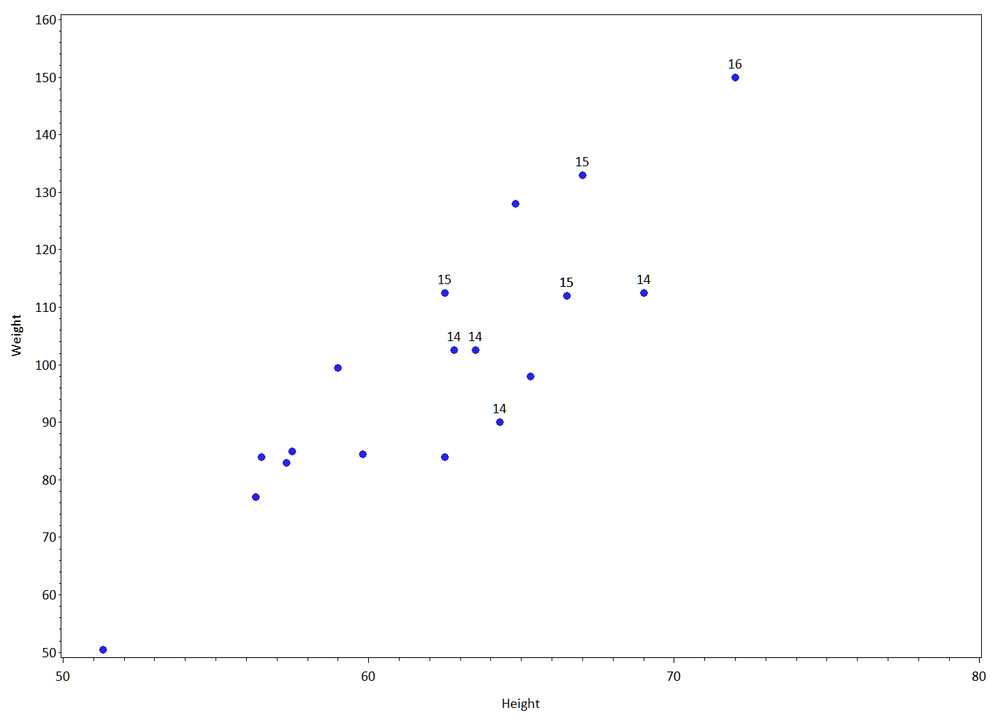
Hi ... here's one way. Just change the data step that labels points with AGE to one that labels points with an ID.
* mark all points with age ge 14;
data labels;
length text $2;
retain xsys ysys '2' hsys '3' function 'label' position '2' style '"calibri"';
set sashelp.class (rename=(height=x weight=y));
where age ge 14;
text = cat(age);
run;
goptions reset=all gunit=pct ftext='calibri' htext=2;
symbol v=dot h=2;
axis1 label=(a=90) order=50 to 160 by 10;
proc gplot data=sashelp.class anno=labels;
plot weight*height / vaxis=axis1;
run;
quit;
ps You might get faster answers on graphics questions in the graphics section of SAS Community.
- Mark as New
- Bookmark
- Subscribe
- Mute
- RSS Feed
- Permalink
- Report Inappropriate Content
Hi ... here's one way. Just change the data step that labels points with AGE to one that labels points with an ID.
* mark all points with age ge 14;
data labels;
length text $2;
retain xsys ysys '2' hsys '3' function 'label' position '2' style '"calibri"';
set sashelp.class (rename=(height=x weight=y));
where age ge 14;
text = cat(age);
run;
goptions reset=all gunit=pct ftext='calibri' htext=2;
symbol v=dot h=2;
axis1 label=(a=90) order=50 to 160 by 10;
proc gplot data=sashelp.class anno=labels;
plot weight*height / vaxis=axis1;
run;
quit;
ps You might get faster answers on graphics questions in the graphics section of SAS Community.
- Mark as New
- Bookmark
- Subscribe
- Mute
- RSS Feed
- Permalink
- Report Inappropriate Content
Mikezdeb, thanks a lot. it works!


- Mark as New
- Bookmark
- Subscribe
- Mute
- RSS Feed
- Permalink
- Report Inappropriate Content
Hi:
In the interest of completeness, if you have SAS 9.2, you can generate your scatter plot and label the points you want using the SGPLOT procedure -- and you do not need an ANNOTATE step. Instead, you do need to "massage" the data to create your label variable, but in the program below, there are 3 steps, one labels the points with an ID variable; one labels the points with the NAME variable and another labels the points with the AGE variable.
cynthia
** Use the SGPLOT procedure and the DATALABEL option;
** to label with NAME, ID and AGE;
data label_class;
length name $10;
keep id height weight labelid labelage labelname;
set sashelp.class;
id = _n_;
if age ge 14 then do;
labelid=id;
labelage = age;
labelname = name;
end;
else if age lt 14 then do;
labelid = .;
labelage=.;
labelname = ' ';
end;
run;
ods listing;
proc print data=label_class noobs;
var id height weight labelid labelage labelname;
title 'What does data look like?';
run;
ods listing style=analysis sge=off;
proc sgplot data=work.label_class;
title 'Label with NAME if age ge 14';
scatter x=height y=weight/
datalabel=labelname;
yaxis values=(50 to 160 by 10);
run;
quit;
proc sgplot data=work.label_class;
title 'Label with ID if age ge 14';
scatter x=height y=weight/
datalabel=labelid;
yaxis values=(50 to 160 by 10);
run;
quit;
proc sgplot data=work.label_class;
title 'Label with AGE if age ge 14';
scatter x=height y=weight/
datalabel=labelage;
yaxis values=(50 to 160 by 10);
run;
quit;
title;
- Mark as New
- Bookmark
- Subscribe
- Mute
- RSS Feed
- Permalink
- Report Inappropriate Content
Hi Cynthia, I just tried your method. it works well.
Thank you very much, I think this is a very smart solution!

Call for content now open!
It's your turn to help shape SAS Innovate 2027. Share your expertise and inspire the SAS community.
Learn the difference between classical and Bayesian statistical approaches and see a few PROC examples to perform Bayesian analysis in this video.

Find more tutorials on the SAS Users YouTube channel.
SAS Training: Just a Click Away
Ready to level-up your skills? Choose your own adventure.
-
4 replies
-
08-04-2011 09:55 PM
-
12395 views
-
3 likes
-
3 in conversation
-


