- Home
- /
- Programming
- /
- Enterprise Guide
- /
- sas code for multiple prompt value
- RSS Feed
- Mark Topic as New
- Mark Topic as Read
- Float this Topic for Current User
- Bookmark
- Subscribe
- Mute
- Printer Friendly Page


- Mark as New
- Bookmark
- Subscribe
- Mute
- RSS Feed
- Permalink
- Report Inappropriate Content
I had a problem with writing the sas code in stored process.
Value IN (&integermultiplevalueprompt);
Is that true? And why it takes only the first variable and not all the integer list.
Regards


- Mark as New
- Bookmark
- Subscribe
- Mute
- RSS Feed
- Permalink
- Report Inappropriate Content
%macro example()/ minoperator;
%mend;


- Mark as New
- Bookmark
- Subscribe
- Mute
- RSS Feed
- Permalink
- Report Inappropriate Content
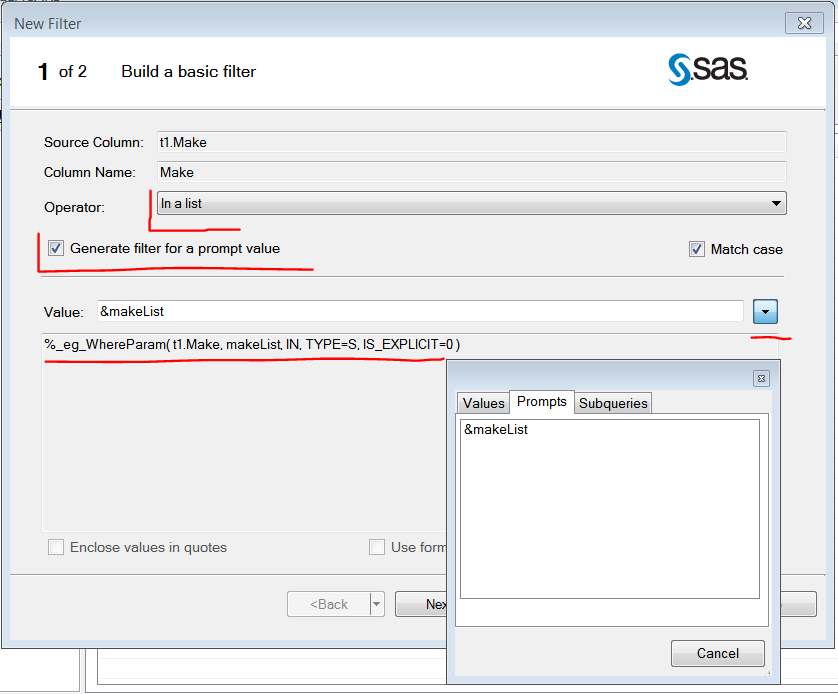
In case you have SAS Enterprise Guide available you can use the query builder to create a query that will subset the data based on your prompt. See Screenshot below. I have marked the relevant things when building a filter for a prompt.
A multiple value prompt will create more than one macro variable. Find more information on this topic in the doc here http://support.sas.com/documentation/cdl/en/stpug/68399/HTML/default/viewer.htm#n1ffjd8bu6we10n1neag...


- Mark as New
- Bookmark
- Subscribe
- Mute
- RSS Feed
- Permalink
- Report Inappropriate Content
As @BrunoMueller mentioned, the key point is that multiple value prompts create multiple macro variables, not a single variable holding a list of values. I use a macro to create the list I want, something like:
%macro ConcatenateSelectionList
  (prompt
  ,dlm=%str( )
  );

%local i return ;

%if &&&prompt._Count >= 2 %then %do i = 1 %to &&&prompt._Count ;
  %if &i=1 %then %let return=&&&prompt&i ;
  %else          %let return=&return&dlm&&&prompt&i ;
%end ;
%else %if &&&prompt._Count = 1 %then %do ;
  %let return=&&&prompt ;
%end ;
%else %if &&&prompt._Count = 0 %then %do ;
  %let return= ; %*null ;
%end ;
%else %put ER%str()ROR: USER &=&prompt._Count;

&return

%mend ConcatenateSelectionList;
I blogged about over at bi-notes.com: http://bi-notes.com/2013/08/sas-stored-process-taming-selection-list-prompts/
Register now at https://www.basug.org/events.

Call for content now open!
It's your turn to help shape SAS Innovate 2027. Share your expertise and inspire the SAS community.
Check out this tutorial series to learn how to build your own steps in SAS Studio.

Find more tutorials on the SAS Users YouTube channel.
SAS Training: Just a Click Away
Ready to level-up your skills? Choose your own adventure.
-
3 replies
-
09-11-2015 09:54 AM
-
4948 views
-
0 likes
-
4 in conversation
-


