- Home
- /
- Programming
- /
- Enterprise Guide
- /
- Save values from prompts in a SAS EG project
- RSS Feed
- Mark Topic as New
- Mark Topic as Read
- Float this Topic for Current User
- Bookmark
- Subscribe
- Mute
- Printer Friendly Page


- Mark as New
- Bookmark
- Subscribe
- Mute
- RSS Feed
- Permalink
- Report Inappropriate Content
Hi all,
I have a SAS EG project where some of parameteres are defined through the prompt mask. So, if starting this project the user have to select values for these parameters, using the prompt mask. What I want is to save the selected prompt values in some file (text, html, SAS - this does'n matter) at the end of the process, so that the user would be able to see afterwards, which values he(she) selected for this particular run. Is there some easy possibility to do this?
Thanks in advance,
Denis
Accepted Solutions


- Mark as New
- Bookmark
- Subscribe
- Mute
- RSS Feed
- Permalink
- Report Inappropriate Content
When you define the prompt, be sure to check the box "Use prompt value throughout project". See the screenshot:
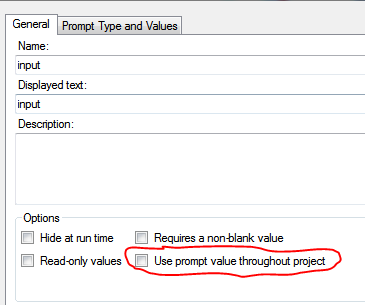
Otherwise the prompt mechanism will clear the macro variables (like a good macro citizen...)
Chris


- Mark as New
- Bookmark
- Subscribe
- Mute
- RSS Feed
- Permalink
- Report Inappropriate Content
The prompts are stored as macro variables, so you can create a data set that contains the values and then save them out however you wish.
ie prompts = date_start date_end time_period
Data Save_Prompts;
Prompt="Date Start";
Value="&date_Start";
output;
Prompt="Date End";
Value = "&date_end";
output;
Prompt = "Time Period";
Value="Monthly";
output;
run;
- Mark as New
- Bookmark
- Subscribe
- Mute
- RSS Feed
- Permalink
- Report Inappropriate Content
Thank you, but this approach doesn't work, I attempted it already. I obtain the note "Apparent symbolic reference ... not resolved". It seems that the macro variables from prompts are not global, so they are not available at the end of the process. And since I use wizard-generated queries and not programs in my process I don't know how I can declare these macro variables as global. :smileycry:

- Mark as New
- Bookmark
- Subscribe
- Mute
- RSS Feed
- Permalink
- Report Inappropriate Content
Suggest you add:
%put _user_ ;
and take a look at the log. It should list all of the user-defined macro vaiables, and the prompts should be there. I'm pretty sure they are global macro variables. But I suppose it's possible that EG is deleting them for you at some point. So you might try adding %put _user_; at multiple points in your project.
Register now at https://www.basug.org/events.
- Mark as New
- Bookmark
- Subscribe
- Mute
- RSS Feed
- Permalink
- Report Inappropriate Content
So put that step into the process somewhere. Best way to do it anyways.
Make sure to use double quotes to get the variables to resolve.
- Mark as New
- Bookmark
- Subscribe
- Mute
- RSS Feed
- Permalink
- Report Inappropriate Content
When you define the prompt, be sure to check the box "Use prompt value throughout project". See the screenshot:
Otherwise the prompt mechanism will clear the macro variables (like a good macro citizen...)
Chris
- Mark as New
- Bookmark
- Subscribe
- Mute
- RSS Feed
- Permalink
- Report Inappropriate Content
Thank You, this is exactly what I looked for 

Catch up on SAS Innovate 2026
Nearly 200 sessions are now available on demand with the SAS Innovate Digital Pass.
Explore Now →Check out this tutorial series to learn how to build your own steps in SAS Studio.

Find more tutorials on the SAS Users YouTube channel.
SAS Training: Just a Click Away
Ready to level-up your skills? Choose your own adventure.
-
6 replies
-
02-26-2014 09:47 AM
-
8647 views
-
8 likes
-
4 in conversation
-


