- Home
- /
- Programming
- /
- Enterprise Guide
- /
- Re: SAS EG Importing Access Tables
- RSS Feed
- Mark Topic as New
- Mark Topic as Read
- Float this Topic for Current User
- Bookmark
- Subscribe
- Mute
- Printer Friendly Page


- Mark as New
- Bookmark
- Subscribe
- Mute
- RSS Feed
- Permalink
- Report Inappropriate Content
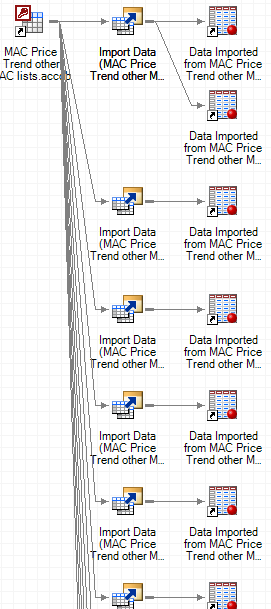
I'm using the import wizard in SAS EG to import tables from an Access database into SAS. The problem I'm having is I've successfully imported 12 tables from Access into SAS. When I try to import another, it's as if it overrides the first import - The import data icon will branch off into 2 output datasets instead of one even though it's an entirely different table in the Access db. So whenever I update something in those Access tables and try to import again, it only imports updates to the one I've most recently imported (the bottom one off the branch). See image below:


- Mark as New
- Bookmark
- Subscribe
- Mute
- RSS Feed
- Permalink
- Report Inappropriate Content
Have you tried importing the data into SAS Views instead of SAS data sets?
- Mark as New
- Bookmark
- Subscribe
- Mute
- RSS Feed
- Permalink
- Report Inappropriate Content
I appreciate the response. What actually happened was kind of silly; the import icon was lying directly on top of the other one, so it looked like the two imported datasets were coming from the same import, when in reality once I dragged it down I saw that it was two separate imports. Weird that it would put it exactly on top of another one.

Catch up on SAS Innovate 2026
Nearly 200 sessions are now available on demand with the SAS Innovate Digital Pass.
Explore Now →Check out this tutorial series to learn how to build your own steps in SAS Studio.

Find more tutorials on the SAS Users YouTube channel.
SAS Training: Just a Click Away
Ready to level-up your skills? Choose your own adventure.
-
2 replies
-
01-13-2017 02:42 PM
-
3436 views
-
1 like
-
2 in conversation
-

