- Home
- /
- Programming
- /
- Enterprise Guide
- /
- Report Formatting
- RSS Feed
- Mark Topic as New
- Mark Topic as Read
- Float this Topic for Current User
- Bookmark
- Subscribe
- Mute
- Printer Friendly Page


- Mark as New
- Bookmark
- Subscribe
- Mute
- RSS Feed
- Permalink
- Report Inappropriate Content
Hello EG Users,
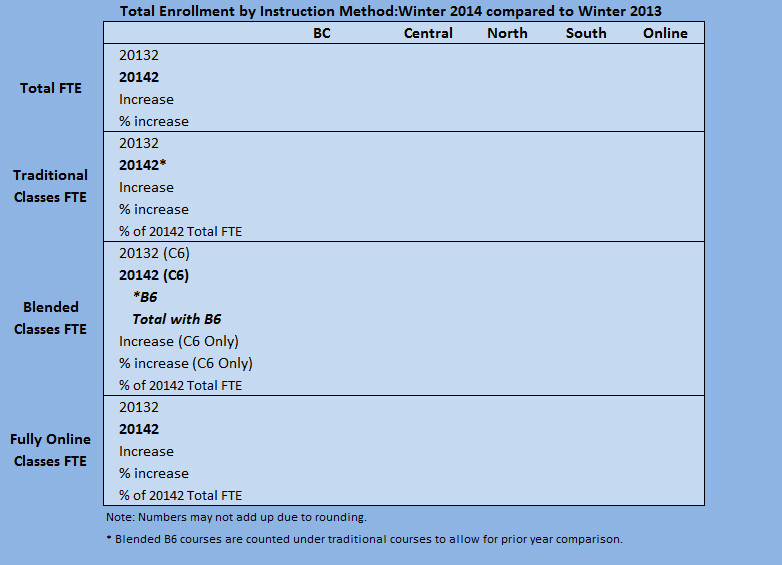
I need advice trying to figure out if it is possible to layout this kind of format using tools available in SAS EG. Attached is snapshot of what I intend to build. It is void data.
But what I would like to stress is the way certain rows are bold and the secondary description (Total FTE, Traditional CLasses FTE, etc). Also way to add the line between each section.
I have been playing around with Summary Tables Wizard and List Data under Tasks but to no avail.
Is this kind of reporting possible in Web Report Studio?
Btw, this has been generated in Microsoft Excel
Thanks,
Dhanashree


- Mark as New
- Bookmark
- Subscribe
- Mute
- RSS Feed
- Permalink
- Report Inappropriate Content
Google "SAS Traffic Lighting". There are ways to do what you want with Formats and Procedure options.


- Mark as New
- Bookmark
- Subscribe
- Mute
- RSS Feed
- Permalink
- Report Inappropriate Content
Yes there are ways to do this, but it usually doesn't happen in EG via the point-click method, you'll have to program the details in yourself.
You should be able to replicate that report exactly, to either Excel, PDF or RTF files using a combination of data steps, proc tabulate and proc report.
You can get pretty close to that by using proc tabulate, but you'll need to organize your data in a specified way.
As always, easier to provide more detailed tips/hints with sample input and output data.

Catch up on SAS Innovate 2026
Nearly 200 sessions are now available on demand in the Innovate Hub.
Watch Now →Check out this tutorial series to learn how to build your own steps in SAS Studio.

Find more tutorials on the SAS Users YouTube channel.
SAS Training: Just a Click Away
Ready to level-up your skills? Choose your own adventure.
-
2 replies
-
04-08-2014 01:29 PM
-
2464 views
-
0 likes
-
3 in conversation
-


