- Home
- /
- Programming
- /
- Enterprise Guide
- /
- Re: Explorer - create library
- RSS Feed
- Mark Topic as New
- Mark Topic as Read
- Float this Topic for Current User
- Bookmark
- Subscribe
- Mute
- Printer Friendly Page


- Mark as New
- Bookmark
- Subscribe
- Mute
- RSS Feed
- Permalink
- Report Inappropriate Content
Hi there,
I would like to use the SAS Enterprise Guide Explorer to create a permanent library. This shall be a conncetion to an Oracle Express database. I managed to assign a library using Tools "Assign Project Library" but if I start SAS Enterprise Guide Explorer I cannot create a new library as the item is greyed out in the menu. I am running Enterprise Guide in a VM - no Server so the connection profile is <<do not use a profile>> EG version is 4.3.
Thanks for your ideas in advance.
Best regards
Hagen
Accepted Solutions


- Mark as New
- Bookmark
- Subscribe
- Mute
- RSS Feed
- Permalink
- Report Inappropriate Content
Hi,
Below is how I create permanent library in EG:
tools-- >options-->SAS programs, check "submit code when serve is connected",then click edit to write the code. please check the attached screen shot.
Linlin
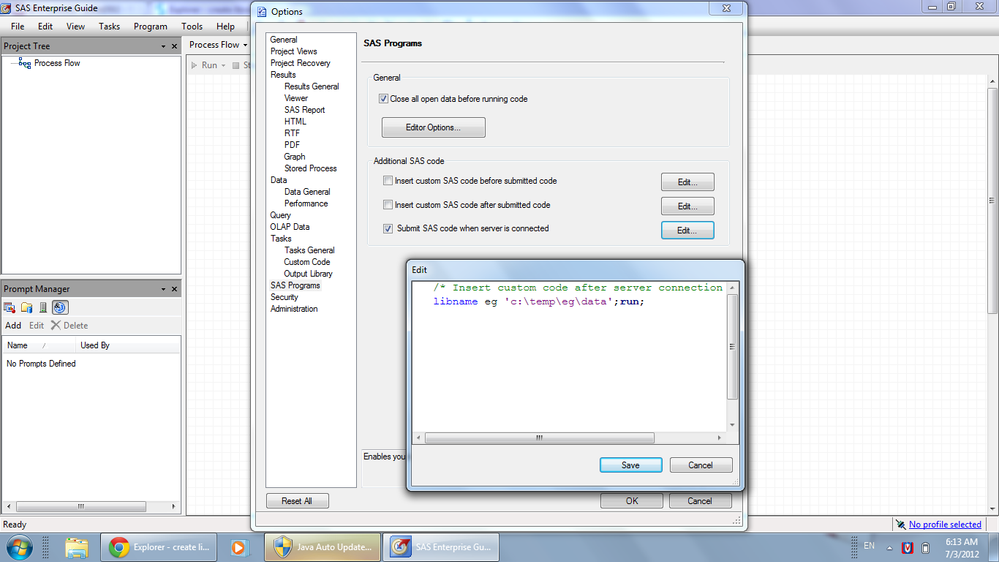
- Mark as New
- Bookmark
- Subscribe
- Mute
- RSS Feed
- Permalink
- Report Inappropriate Content
Hi,
Below is how I create permanent library in EG:
tools-- >options-->SAS programs, check "submit code when serve is connected",then click edit to write the code. please check the attached screen shot.
Linlin


- Mark as New
- Bookmark
- Subscribe
- Mute
- RSS Feed
- Permalink
- Report Inappropriate Content
Hi,
Is you Oracle Server/Schema defined in Management Console.
Thanks,
Shiva
- Mark as New
- Bookmark
- Subscribe
- Mute
- RSS Feed
- Permalink
- Report Inappropriate Content
Hi Shiva,
thanks for your reply. The use of management console goes along with the use of a metadata server right? As I don' t have a metadata server in place I cannot use mgmt console?
Cheers

Call for content now open!
It's your turn to help shape SAS Innovate 2027. Share your expertise and inspire the SAS community.
Check out this tutorial series to learn how to build your own steps in SAS Studio.

Find more tutorials on the SAS Users YouTube channel.
SAS Training: Just a Click Away
Ready to level-up your skills? Choose your own adventure.
-
3 replies
-
07-03-2012 03:29 AM
-
3278 views
-
0 likes
-
3 in conversation
-


