- Home
- /
- Programming
- /
- Enterprise Guide
- /
- Disable message "Open files have been modified by external editor"
- RSS Feed
- Mark Topic as New
- Mark Topic as Read
- Float this Topic for Current User
- Bookmark
- Subscribe
- Mute
- Printer Friendly Page


- Mark as New
- Bookmark
- Subscribe
- Mute
- RSS Feed
- Permalink
- Report Inappropriate Content
hello
my problem seems unrelated to this issue:
I do frequently edit an OPEN program in SAS EG both in SAS EG and via an external editor.
Each time this happens, the following message appears in SAS EG:
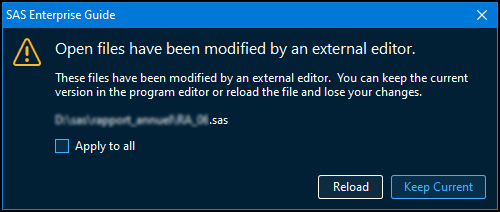
is there any way to disable this message and always automatically accept the modifications, even after opening SAS EG next time?
SAS EG version: 8.3 Update 3 (8.3.3.181) (64-bit)
thanks!!


- Mark as New
- Bookmark
- Subscribe
- Mute
- RSS Feed
- Permalink
- Report Inappropriate Content
AFAIK there is no way to change this behaviour. Personally I'd rather have it and I find it useful as it will pick up accidental changes as well as deliberate ones.
If you are using an external editor as well as EG to modify the same SAS program, if you don't reload in EG you could easily overwrite external changes.
- Mark as New
- Bookmark
- Subscribe
- Mute
- RSS Feed
- Permalink
- Report Inappropriate Content
I think the best bet would be to use autohotkey and automatically confirm and close the window that appears.
Thank you for your help!

Catch up on SAS Innovate 2026
Nearly 200 sessions are now available on demand in the Innovate Hub.
Watch Now →Check out this tutorial series to learn how to build your own steps in SAS Studio.

Find more tutorials on the SAS Users YouTube channel.
SAS Training: Just a Click Away
Ready to level-up your skills? Choose your own adventure.
-
2 replies
-
02-03-2023 06:26 AM
-
2186 views
-
1 like
-
2 in conversation
-


