- Home
- /
- Analytics
- /
- SAS Data Science
- /
- Run time error when running "Save Data" node in SAS EM
- RSS Feed
- Mark Topic as New
- Mark Topic as Read
- Float this Topic for Current User
- Bookmark
- Subscribe
- Mute
- Printer Friendly Page


- Mark as New
- Bookmark
- Subscribe
- Mute
- RSS Feed
- Permalink
- Report Inappropriate Content
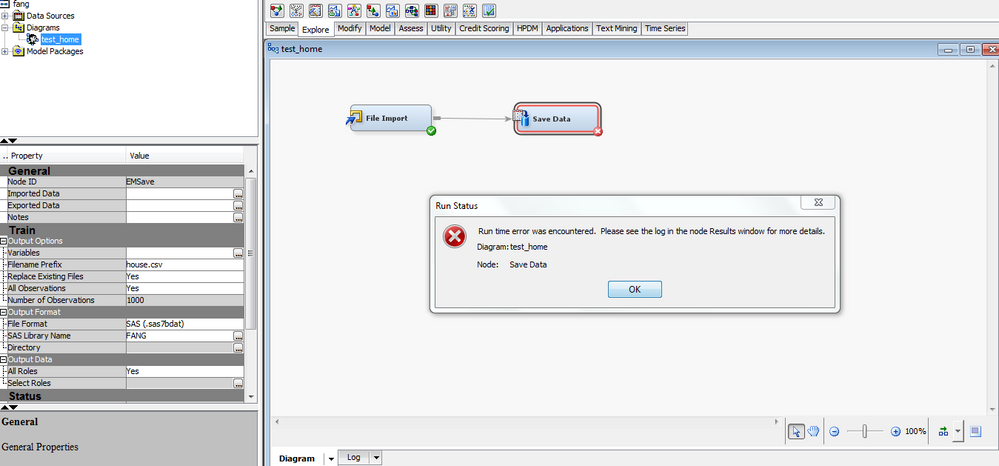
In SAS EM I keep having problem in import file from my PC when I run "Save Data" node, the csv file had been used in other student and was working fine in EM. Attached screen shot and error log. please help.
Fang
Accepted Solutions
- Mark as New
- Bookmark
- Subscribe
- Mute
- RSS Feed
- Permalink
- Report Inappropriate Content


- Mark as New
- Bookmark
- Subscribe
- Mute
- RSS Feed
- Permalink
- Report Inappropriate Content
The log is truncated for me, even when I download it. When you view in Results, can you see the whole log with an error somewhere (usually helps to search on "ERROR:" with the colon) ? If it is truncated there too, you can go to Options>Preferences in EM and change Log/Output Line Numbers to Show All.
- Mark as New
- Bookmark
- Subscribe
- Mute
- RSS Feed
- Permalink
- Report Inappropriate Content

Call for content now open!
It's your turn to help shape SAS Innovate 2027. Share your expertise and inspire the SAS community.
Use this tutorial as a handy guide to weigh the pros and cons of these commonly used machine learning algorithms.

Find more tutorials on the SAS Users YouTube channel.
-
2 replies
-
01-08-2018 07:21 PM
-
4163 views
-
0 likes
-
2 in conversation
-


