BookmarkSubscribeRSS Feed
🔒 This topic is solved and locked. Need further help from the community? Please sign in and ask a new question.
baystanil
Calcite | Level 5

Hi there,

below is code to get ParkType, as Monument or Park.

data np_summary2;
    set pg1.np_summary;
    ParkType=scan(parkname,-1);
    keep Reg Type ParkName ParkType;
run;

 I would be interested to see ParkType, as National Monument or National Park.

How to do it using SCAN or other function?

I can created separate two column and then concatenate, but would want simple or short way to do the same.

Thanks!

1 ACCEPTED SOLUTION

Accepted Solutions
Cynthia_sas
Diamond | Level 26

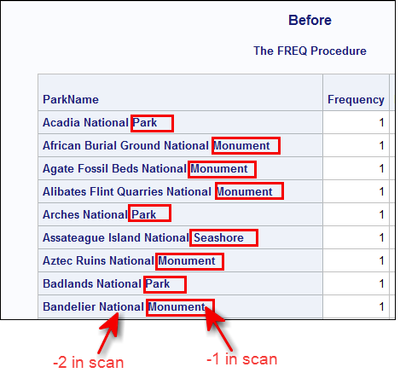
Hi, take a look at the data in pg1.np_summary:

Cynthia_sas_0-1595428646926.png


Assuming that the word "National" is next to the last piece of ParkName, which it is in these records, then this code would do what you're asking:

data np_summary_alt;
set pg1.np_summary;
ParkType=catx(' ',scan(parkname,-2),scan(parkname,-1));
keep Reg Type ParkName ParkType;
run;

proc print data=np_summary_alt(obs=10);
run;

You can scan and concatenate without creating 2 new variables.


Hope this helps,
Cynthia

View solution in original post

2 REPLIES 2
Cynthia_sas
Diamond | Level 26

Hi, take a look at the data in pg1.np_summary:

Cynthia_sas_0-1595428646926.png


Assuming that the word "National" is next to the last piece of ParkName, which it is in these records, then this code would do what you're asking:

data np_summary_alt;
set pg1.np_summary;
ParkType=catx(' ',scan(parkname,-2),scan(parkname,-1));
keep Reg Type ParkName ParkType;
run;

proc print data=np_summary_alt(obs=10);
run;

You can scan and concatenate without creating 2 new variables.


Hope this helps,
Cynthia

baystanil
Calcite | Level 5
Thank You, Cynthia!!

Catch up on SAS Innovate 2026

Dive into keynotes, announcements and breakthroughs on demand.

Explore Now →
LIBNAME 101

Follow along as SAS technical trainer Dominique Weatherspoon expertly answers all your questions about SAS Libraries.

Find more tutorials on the SAS Users YouTube channel.

Discussion stats
  • 2 replies
  • 1932 views
  • 1 like
  • 2 in conversation