- Home
- /
- Programming
- /
- ODS Reports
- /
- Re: proc report help
- RSS Feed
- Mark Topic as New
- Mark Topic as Read
- Float this Topic for Current User
- Bookmark
- Subscribe
- Mute
- Printer Friendly Page


- Mark as New
- Bookmark
- Subscribe
- Mute
- RSS Feed
- Permalink
- Report Inappropriate Content
Hello everybody!
I have a problem. I have that data step:
DATA test;
INPUT kw id A1 A2 ;
DATALINES;
34 50012127 1 6
34 50012128 4 3
34 50012129 1 1
35 50012127 2 7
35 50012128 5 1
35 50012129 2 2
36 50012127 3 8
36 50012128 3 2
36 50012129 23 3
37 50012127 4 9
37 50012128 6 2
37 50012129 3 3
38 50012127 5 10
38 50012128 9 2
38 50012129 2 3
;
Run;
How can I bulid or find under the table with the Proc report:
| ID | KW | |||||
| 34 | 35 | 36 | 37 | 38 | ||
| 50012127 | A1 | 1 | 2 | 3 | 4 | 5 |
| A2 | 6 | 7 | 8 | 9 | 10 | |
| 50012128 | A1 | 4 | 5 | 3 | 6 | 9 |
| A2 | 3 | 1 | 2 | 2 | 2 | |
| 50012129 | A1 | 1 | 2 | 23 | 3 | 2 |
| A2 | 1 | 2 | 3 | 3 | 3 | |
| 50012125 | A1 | 1 | 2 | 3 | 6 | 4 |
| A2 | 1 | 2 | 3 | 6 | 5 | |
| 50012122 | A1 | 1 | 2 | 3 | 6 | 45 |
| A2 | 1 | 2 | 3 | 3 |
thanks,
Celal


- Mark as New
- Bookmark
- Subscribe
- Mute
- RSS Feed
- Permalink
- Report Inappropriate Content
My SAS is busy so I'm unable to create code and test but you could PROC SORT by id, A1, A2 and then PROC TRANSPOSE to make your long table wide like your example and then it would make the PROC REPORT easier to code.
- Mark as New
- Bookmark
- Subscribe
- Mute
- RSS Feed
- Permalink
- Report Inappropriate Content
without ID i can build that table with PROC TRANSPOSE but i need also ID.
i use the Proc Report:
proc report nowd data=test
col id (kw,(A1 A2));
define id /group ;
define kw / across ;
define A1 /sum ;
define A2 /sum ;
run;
Here I think this problem is column. I playing with column but i didn't find a solution.


- Mark as New
- Bookmark
- Subscribe
- Mute
- RSS Feed
- Permalink
- Report Inappropriate Content
Hi:
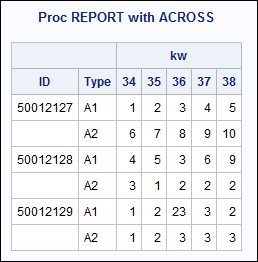
If you have a variable that contained either 'A1' or 'A2' as the value and restructured your data a bit, PROC REPORT can give you the report you want. Screenshot produced with this code.
cynthia
DATA newtest;
** read KW and ID vars.;
** then hold input line;
** in order to write 2 obs out for every;
** dataline that is read in.;
INPUT kw id @;
** create type for A1;
** read val as numeric;
type = 'A1';
input val @;
output;
** create type for A2;
** read val as numeric;
type = 'A2';
input val;
output;
DATALINES;
34 50012127 1 6
34 50012128 4 3
34 50012129 1 1
35 50012127 2 7
35 50012128 5 1
35 50012129 2 2
36 50012127 3 8
36 50012128 3 2
36 50012129 23 3
37 50012127 4 9
37 50012128 6 2
37 50012129 3 3
38 50012127 5 10
38 50012128 9 2
38 50012129 2 3
;
Run;
ods html file='c:\temp\restructure_report.html';
proc print data=newtest;
title 'What is data';
run;
proc report data=newtest nowd;
title 'Proc REPORT with ACROSS';
column ('ID' id) ('Type' type) kw,val;
define id / group ' ';
define type / group ' ';
define kw / across;
define val / sum ' ';
run;
ods _all_ close;
- Mark as New
- Bookmark
- Subscribe
- Mute
- RSS Feed
- Permalink
- Report Inappropriate Content
Great!, thanks a lot
Celal

Call for content now open!
It's your turn to help shape SAS Innovate 2027. Share your expertise and inspire the SAS community.
Learn how use the CAT functions in SAS to join values from multiple variables into a single value.

Find more tutorials on the SAS Users YouTube channel.
SAS Training: Just a Click Away
Ready to level-up your skills? Choose your own adventure.
-
4 replies
-
09-20-2012 02:49 PM
-
3286 views
-
0 likes
-
3 in conversation
-


