- Home
- /
- Programming
- /
- ODS Reports
- /
- Table to Header (and/or Footer) in RTF document
- RSS Feed
- Mark Topic as New
- Mark Topic as Read
- Float this Topic for Current User
- Bookmark
- Subscribe
- Mute
- Printer Friendly Page


- Mark as New
- Bookmark
- Subscribe
- Mute
- RSS Feed
- Permalink
- Report Inappropriate Content
Hi,
I would like to add table with document information and with title to header (and to footer) of generated RTF document.
It should look like this,
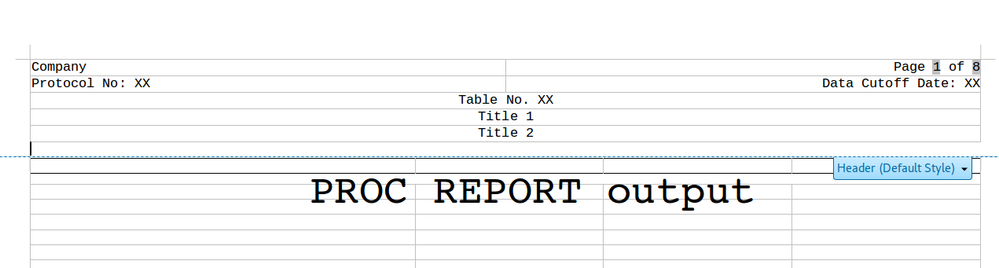
where the table is in header of RTF document.
How do I achieve this?
Thank you for any advice
Accepted Solutions


- Mark as New
- Bookmark
- Subscribe
- Mute
- RSS Feed
- Permalink
- Report Inappropriate Content
Hi:
I don't quite understand from your description what you mean by "add table with document information and with title to header". You also mentioned a footer, but didn't show a footer or footnote text.
Do you mean something like this:
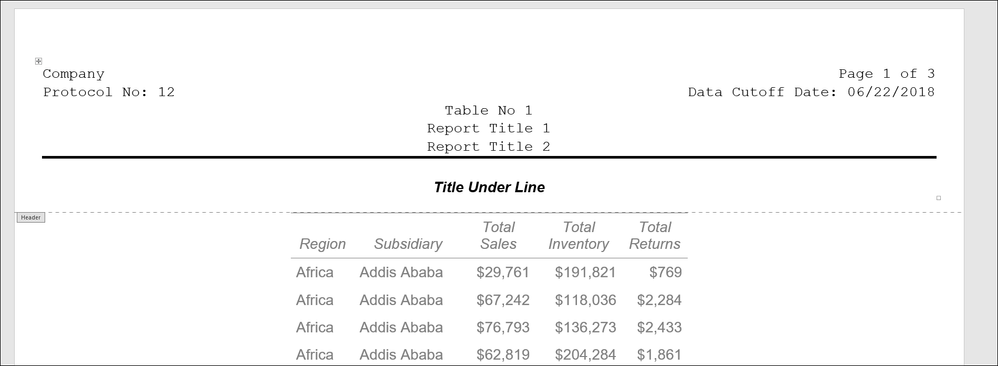
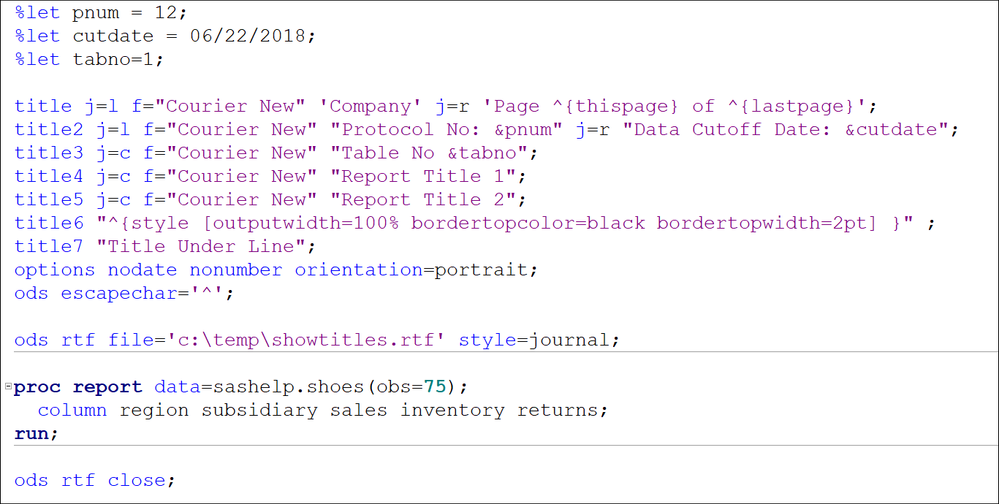
It was all accomplished with SAS TITLE statements, ODS ESCAPECHAR (for the solid line and Page X of Y) and style overrides plus macro variables for the Protocol and date information -- I used the Journal style just because a lot of reports like this are in Journal style.
Here's the code that produced this output:
Hope this helps,
Cynthia
- Mark as New
- Bookmark
- Subscribe
- Mute
- RSS Feed
- Permalink
- Report Inappropriate Content
Hi:
I don't quite understand from your description what you mean by "add table with document information and with title to header". You also mentioned a footer, but didn't show a footer or footnote text.
Do you mean something like this:
It was all accomplished with SAS TITLE statements, ODS ESCAPECHAR (for the solid line and Page X of Y) and style overrides plus macro variables for the Protocol and date information -- I used the Journal style just because a lot of reports like this are in Journal style.
Here's the code that produced this output:
Hope this helps,
Cynthia
- Mark as New
- Bookmark
- Subscribe
- Mute
- RSS Feed
- Permalink
- Report Inappropriate Content
Thank you, thats exactly what I wanted to achieve ...


- Mark as New
- Bookmark
- Subscribe
- Mute
- RSS Feed
- Permalink
- Report Inappropriate Content
to add a footnote to the table you could use:
compute after ;
line @1 " .... footnote ....";
endcomp;

Call for content now open!
It's your turn to help shape SAS Innovate 2027. Share your expertise and inspire the SAS community.
Learn how use the CAT functions in SAS to join values from multiple variables into a single value.

Find more tutorials on the SAS Users YouTube channel.
SAS Training: Just a Click Away
Ready to level-up your skills? Choose your own adventure.
-
3 replies
-
06-23-2018 06:53 AM
-
2848 views
-
1 like
-
3 in conversation
-


