- Home
- /
- Programming
- /
- ODS Reports
- /
- Re: Redlighting negative numbers not working
- RSS Feed
- Mark Topic as New
- Mark Topic as Read
- Float this Topic for Current User
- Bookmark
- Subscribe
- Mute
- Printer Friendly Page


- Mark as New
- Bookmark
- Subscribe
- Mute
- RSS Feed
- Permalink
- Report Inappropriate Content
Something missing?
ods tagsets.ExcelXP file='D:\Admin\CA_NIC.xml' style=printer;
ods tagsets.ExcelXP options(sheet_interval='bygroup' sheet_label='Distrct'
absolute_column_width = '6,10,11,11,25,10,25,6,6,6,30,25,11,11,11,11');
Title 'Current Quarter Assets vs. Previous Quarter';
Proc print data=Admin.Canicmerged noobs label split='*';
by lead_ofc_id;
var id_rssd;
var PctDiff / Style={tagattr='format:0.00;[Red]\(0.00\)'};
var &qtr2 ;
var &qtr1 ;
var idrssd ;
var supr_event_nr ;
Accepted Solutions
- Mark as New
- Bookmark
- Subscribe
- Mute
- RSS Feed
- Permalink
- Report Inappropriate Content
The problem was that the field was formatted as NEGPAREN8.2 in the table.
As soon as I changed it to 8.2 and recreated the table - it worked.
Thanks all!


- Mark as New
- Bookmark
- Subscribe
- Mute
- RSS Feed
- Permalink
- Report Inappropriate Content
Have you tried running your code with and without the / Style option and compared the resulting xml files?


- Mark as New
- Bookmark
- Subscribe
- Mute
- RSS Feed
- Permalink
- Report Inappropriate Content
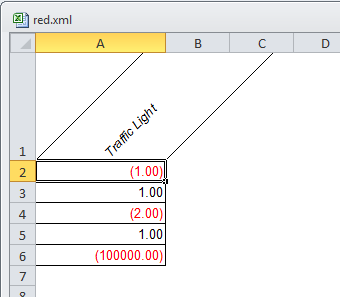
Sometimes style overrides don't work and you have to create new style elements.
define style styles.my_journal;
parent=styles.journal;
style angle_header from header / tagattr = 'rotate:45';
style red_data from data / tagattr='format:0.00;[Red]\(0.00\)';
end;
run;
data test;
do x = -1 ,1,-2,1,-100000;
output;
end;
run;
ods tagsets.excelxp file='~/red.xml' style=my_journal;
proc report nowd list;
columns x;
define x / display style(column)=red_data style(header)=angle_header 'Traffic Light';
run;
ods tagsets.excelxp close;
- Mark as New
- Bookmark
- Subscribe
- Mute
- RSS Feed
- Permalink
- Report Inappropriate Content
Same result. Is the number supposed to be stored by excel as text? Maybe I should change the format in the table.
- Mark as New
- Bookmark
- Subscribe
- Mute
- RSS Feed
- Permalink
- Report Inappropriate Content
The problem was that the field was formatted as NEGPAREN8.2 in the table.
As soon as I changed it to 8.2 and recreated the table - it worked.
Thanks all!

Catch up on SAS Innovate 2026
Nearly 200 sessions are now available on demand with the SAS Innovate Digital Pass.
Explore Now →Learn how use the CAT functions in SAS to join values from multiple variables into a single value.

Find more tutorials on the SAS Users YouTube channel.
SAS Training: Just a Click Away
Ready to level-up your skills? Choose your own adventure.
-
4 replies
-
10-22-2014 05:34 AM
-
3831 views
-
3 likes
-
3 in conversation
-


