- Home
- /
- Programming
- /
- ODS Reports
- /
- Put company name and Page X of Y on the same line NOT using title stat...
- RSS Feed
- Mark Topic as New
- Mark Topic as Read
- Float this Topic for Current User
- Bookmark
- Subscribe
- Mute
- Printer Friendly Page


- Mark as New
- Bookmark
- Subscribe
- Mute
- RSS Feed
- Permalink
- Report Inappropriate Content
Hello,
I am trying to PROC REPORT to output a table/listing, and I want to put the company name and Page X of Y in the same line, but NOT using title statement. Because using title statement will put this info in the real "header" section of the output, say, a RTF file.
This is basically what i need: NOTE: basically all the following info will be in the same "table", especially the first line is also in this "table" not in the RTF "header" section. I appreciate your helps!!!
Company LP Page X of Y
Protocol X
Table 1: X
Statistics treat coontrol
n
mean
sd


- Mark as New
- Bookmark
- Subscribe
- Mute
- RSS Feed
- Permalink
- Report Inappropriate Content
I don't understand what you mean that "basicaly all the following info will be in the same "table" - -do you mean that your report procedure or program already has the company name and page information? If this is the case, then what about your current process is not working?
cynthia
- Mark as New
- Bookmark
- Subscribe
- Mute
- RSS Feed
- Permalink
- Report Inappropriate Content
What I want to do is to Not using title statement but line statement to align the company name and page x of y in the same line.
I checked a lot webpages it seems that this is not possible unless we manually add space between company name and page x of y.
- Mark as New
- Bookmark
- Subscribe
- Mute
- RSS Feed
- Permalink
- Report Inappropriate Content
cynthia
- Mark as New
- Bookmark
- Subscribe
- Mute
- RSS Feed
- Permalink
- Report Inappropriate Content
Thanks, I know the print version is fine 🙂 but I just don't want it to be in the header, actually this is a project for someone who is extremely picky and just wants the company name and page x of y are in the same line and not in the real header section.


- Mark as New
- Bookmark
- Subscribe
- Mute
- RSS Feed
- Permalink
- Report Inappropriate Content
Can you use COMPUTE BEFORE _PAGE_ ?


compute before _page_;
line '~S={just=left} Company Name ~S={just=right} ~{thispage} of ~{lastpage}';
endcomp;
- Mark as New
- Bookmark
- Subscribe
- Mute
- RSS Feed
- Permalink
- Report Inappropriate Content
I copied your codes into my program but it doesn't work, did you try it in your codes?
- Mark as New
- Bookmark
- Subscribe
- Mute
- RSS Feed
- Permalink
- Report Inappropriate Content
I do not believe that RTF respects {thispage} or {lastpage} in the body of the document. This would be a question for Tech Support.
cynthia
- Mark as New
- Bookmark
- Subscribe
- Mute
- RSS Feed
- Permalink
- Report Inappropriate Content
Oh. You need a bunch of code to get it. I can't believe ~{pageof} ,~{thispage},~{lastpage} wouldn't work in the body of RTF.
Why ? How sad it is .

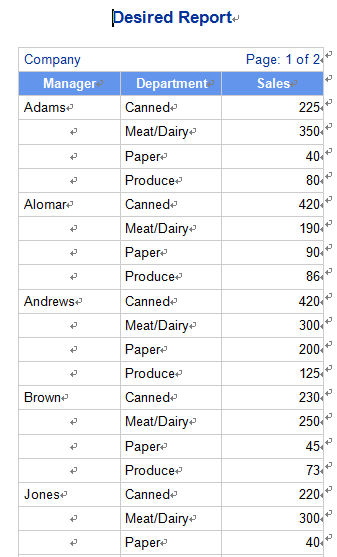
The following is assuming each page of yours contains 29 lines, you can test it to get it . The attachment is what I got .
The full idea is the paper I wrote a couple of years ago .
http://support.sas.com/resources/papers/proceedings12/389-2012.pdf

Good Luck.


data test;
infile datalines expandtabs;
input Manager : $20. Department : $20. Sales ;
datalines;
Adams	Canned	225
Adams	Meat/Dairy	350
Adams	Paper	40
Adams	Produce	80
Alomar	Canned	420
Alomar	Meat/Dairy	190
Alomar	Paper	90
Alomar	Produce	86
Andrews	Canned	420
Andrews	Meat/Dairy	300
Andrews	Paper	200
Andrews	Produce	125
Brown	Canned	230
Brown	Meat/Dairy	250
Brown	Paper	45
Brown	Produce	73
Jones	Canned	220
Jones	Meat/Dairy	300
Jones	Paper	40
Jones	Produce	70
Pelfrey	Canned	420
Pelfrey	Meat/Dairy	205
Pelfrey	Paper	45
Pelfrey	Produce	76
Reveiz	Canned	420
Reveiz	Meat/Dairy	600
Reveiz	Paper	60
Reveiz	Produce	30
Smith	Canned	120
Smith	Meat/Dairy	100
Smith	Paper	50
Smith	Produce	80
Taylor	Canned	120
Taylor	Meat/Dairy	130
Taylor	Paper	53
Taylor	Produce	50
;
run;

/*After testing it, found a page contains 29 lines*/


proc means data=test nway noprint;
 class manager;
 output out=count n=count;
run;
data result;
 merge test count(keep=manager count);
 by manager;
run;
data result;
 set result;
 mod=mod(count,29);
run;
data result; * To decide Page break point;
 set result;
 by manager;
 retain break 1;
 if last.manager then sum_mod+mod;
 if count +sum_mod ge 29 and manager ne lag(manager) then do;
   break+1; sum_mod=0;
 end;
 call symputx('last_page',break);
run;


ods rtf  file='/folders/myfolders/xx.rtf' style=sasweb bodytitle;
ods escapechar='~';
title 'Desired Report';
option nodate nonumber;
proc report data=result  nowd style={rules=none frame=void};
column break manager department sales ;
define break /group noprint;
define manager / order  order=formatted;
compute before _page_;
 line=catx(' ',"Company ",repeat('~_',40),"Page:",break,"of","&last_page");
 line line $200.;
endcomp;
break after break /page;
run;
ods rtf close;
- Mark as New
- Bookmark
- Subscribe
- Mute
- RSS Feed
- Permalink
- Report Inappropriate Content
Hello Ksharp,
thanks for your help! It seems your approach is working but one more thing I need to consult you. Why you use catx function?
I am asking because I need more space between the company name and page x of y. I tried larger numbers but it gives me error msg says something like truncation happened. I guess maybe the string is too long.
- Mark as New
- Bookmark
- Subscribe
- Mute
- RSS Feed
- Permalink
- Report Inappropriate Content
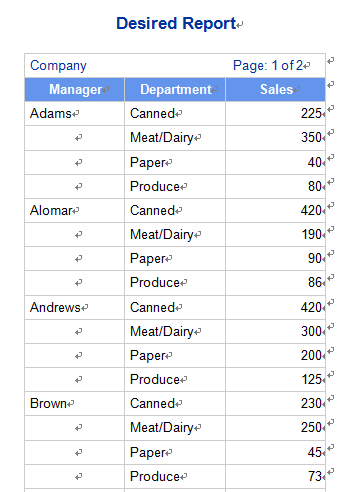
Yes. The reason I use CATX() is try to left align COMPANY and right align PAGE OF .
~S={just=left } don't work in this scenario .

Alternative way is :
line=catx(......);
line @1 "Company Name"  @200 line $40.;
- Mark as New
- Bookmark
- Subscribe
- Mute
- RSS Feed
- Permalink
- Report Inappropriate Content
data test;
infile datalines expandtabs;
input Manager : $20. Department : $20. Sales ;
datalines;
Adams	Canned	225
Adams	Meat/Dairy	350
Adams	Paper	40
Adams	Produce	80
Alomar	Canned	420
Alomar	Meat/Dairy	190
Alomar	Paper	90
Alomar	Produce	86
Andrews	Canned	420
Andrews	Meat/Dairy	300
Andrews	Paper	200
Andrews	Produce	125
Brown	Canned	230
Brown	Meat/Dairy	250
Brown	Paper	45
Brown	Produce	73
Jones	Canned	220
Jones	Meat/Dairy	300
Jones	Paper	40
Jones	Produce	70
Pelfrey	Canned	420
Pelfrey	Meat/Dairy	205
Pelfrey	Paper	45
Pelfrey	Produce	76
Reveiz	Canned	420
Reveiz	Meat/Dairy	600
Reveiz	Paper	60
Reveiz	Produce	30
Smith	Canned	120
Smith	Meat/Dairy	100
Smith	Paper	50
Smith	Produce	80
Taylor	Canned	120
Taylor	Meat/Dairy	130
Taylor	Paper	53
Taylor	Produce	50
;
run;

/*After testing it, found a page contains 29 lines*/


proc means data=test nway noprint;
 class manager;
 output out=count n=count;
run;
data result;
 merge test count(keep=manager count);
 by manager;
run;
data result;
 set result;
 mod=mod(count,29);
run;
data result; * To decide Page break point;
 set result;
 by manager;
 retain break 1;
 if last.manager then sum_mod+mod;
 if count +sum_mod ge 29 and manager ne lag(manager) then do;
   break+1; sum_mod=0;
 end;
 call symputx('last_page',break);
run;


ods rtf  file='/folders/myfolders/xx.rtf' style=sasweb bodytitle;
ods escapechar='~';
title 'Desired Report';
option nodate nonumber;
proc report data=result  nowd style={rules=none frame=void};
column break manager department sales ;
define break /group noprint;
define manager / order  order=formatted;
compute before _page_;
 line=catx(' ',"Page:",break,"of","&last_page");
 line @1 "Company" @50 line $40.;
endcomp;
break after break /page;
run;
ods rtf close;
- Mark as New
- Bookmark
- Subscribe
- Mute
- RSS Feed
- Permalink
- Report Inappropriate Content
Actually , If you don't care about what I referred to in that paper, That could be a lot more easy .


/*After testing it, found a page contains 29 lines*/

data result; * To decide Page break point;
 set sashelp.cars;
 if mod(_n_,29)=1 then break+1;
 call symputx('last_page',break);
run;


ods rtf  file='/folders/myfolders/xx.rtf' style=sasweb bodytitle;
ods escapechar='~';
title 'Desired Report';
option nodate nonumber;
proc report data=result  nowd style={rules=none frame=void};
column break Model Make Length Invoice Cylinders ;
define break /order noprint;

compute before _page_;
 line=catx(' ',"Page:",break,"of","&last_page");
 line @1 "Company" @100 line $40.;
endcomp;
break after break /page;
run;
ods rtf close;

Catch up on SAS Innovate 2026
Nearly 200 sessions are now available on demand in the Innovate Hub.
Watch Now →Learn how use the CAT functions in SAS to join values from multiple variables into a single value.

Find more tutorials on the SAS Users YouTube channel.
SAS Training: Just a Click Away
Ready to level-up your skills? Choose your own adventure.
-
12 replies
-
07-23-2016 12:45 PM
-
5612 views
-
0 likes
-
3 in conversation
-


