- Home
- /
- Programming
- /
- ODS Reports
- /
- Re: PROC REPORT ODS EXCELXP
- RSS Feed
- Mark Topic as New
- Mark Topic as Read
- Float this Topic for Current User
- Bookmark
- Subscribe
- Mute
- Printer Friendly Page


- Mark as New
- Bookmark
- Subscribe
- Mute
- RSS Feed
- Permalink
- Report Inappropriate Content
Hi....I have a dataset that I would like to export to an excel file using the Proc Report and ODS EXCELXP. I would like to create seaparate worksheets for each Region and within each Region worksheet, to have separate tables by each ID. Any suggestions....Thanks.
| Region | ID |
| North | P001 |
| P012 | |
| P015 | |
| South | P112 |
| P165 | |
| P167 | |
| P178 | |
| East | P201 |
| P222 | |
| West | P342 |
| P376 | |
| P380 | |
| P391 | |
| Central | P412 |
| P137 |
Accepted Solutions


- Mark as New
- Bookmark
- Subscribe
- Mute
- RSS Feed
- Permalink
- Report Inappropriate Content
Hi:
If all you want is a separate table for each ID on each sheet, then that may be possible without using a SAS Macro program.
For example, consider this program that uses a subset of SASHELP.SHOES -- I have a sheet for each region and then a table for each product (the equivalent of your ID) on the sheet for each region:
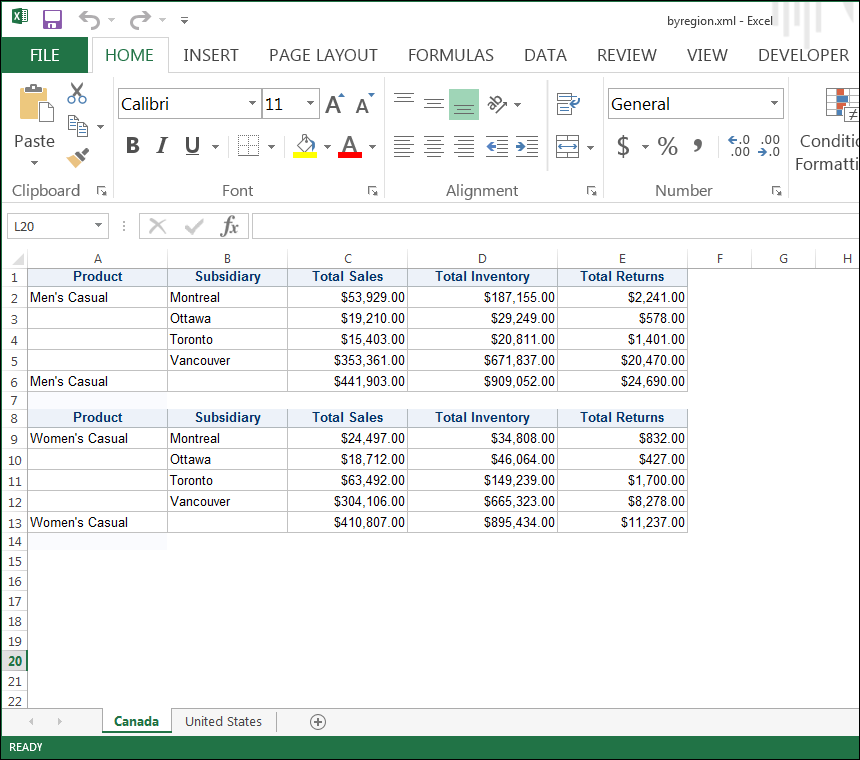
Here's the code that produced the above screen shot:
proc sort data=sashelp.shoes out=newshoes;
by region product;
where region in ('United States', 'Canada') and
      product contains 'Casual';
run;

options nobyline;
ods tagsets.excelxp file='c:\temp\byregion.xml' style=htmlblue
    options(sheet_interval='bygroup' sheet_name='#byval1');

	proc report data=newshoes nowd;
	by region;
	column product subsidiary sales inventory returns;
	define product / group;
	define subsidiary / group;
	define sales / sum;
	define inventory / sum;
	define returns / sum;
	break after product / summarize page;
	run;
ods tagsets.excelxp close;
cynthia


- Mark as New
- Bookmark
- Subscribe
- Mute
- RSS Feed
- Permalink
- Report Inappropriate Content
Since you're changing the page interval - by region switches tabs, by ID creates new tables you'll need a macro unfortunately.
Make sure to put the ODS tagsets outside of the macro loop.
1. Create proc report that works for one Region, using a Where clause to filter the report.
2. Change code from #1 to generate a table per ID
3. Output to Tagsets for single
4. Create a macro loop to wrap code in.
For the macro loop the following is the idea.
%macro loop_reports;
%*create a list of macro variables with each region;
proc sql noprint;
select distinct region :region1-
from mydata;
quit;
%let nobs=&sqlobs.;
*tagset code goes here;
%do i=1 to &nobs;
options tagsets.excelxp(sheet_inteval='none');
proc report code goes here;
BY ID;
Where region = "&&®ion&i";
****rest of code;
run;
%end;
%*tagset close goes here;
%mend loop_reports;

- Mark as New
- Bookmark
- Subscribe
- Mute
- RSS Feed
- Permalink
- Report Inappropriate Content
proc sort data=sashelp.class out=class;
by sex;
run;
options nobyline;
ods tagsets.excelxp file='/folders/myfolders/xx.xml' options(sheet_name='#byval1');
proc report data=class nowd;
by sex;
run;
ods tagsets.excelxp close;
- Mark as New
- Bookmark
- Subscribe
- Mute
- RSS Feed
- Permalink
- Report Inappropriate Content
Hi:
If all you want is a separate table for each ID on each sheet, then that may be possible without using a SAS Macro program.
For example, consider this program that uses a subset of SASHELP.SHOES -- I have a sheet for each region and then a table for each product (the equivalent of your ID) on the sheet for each region:
Here's the code that produced the above screen shot:
proc sort data=sashelp.shoes out=newshoes;
by region product;
where region in ('United States', 'Canada') and
      product contains 'Casual';
run;

options nobyline;
ods tagsets.excelxp file='c:\temp\byregion.xml' style=htmlblue
    options(sheet_interval='bygroup' sheet_name='#byval1');

	proc report data=newshoes nowd;
	by region;
	column product subsidiary sales inventory returns;
	define product / group;
	define subsidiary / group;
	define sales / sum;
	define inventory / sum;
	define returns / sum;
	break after product / summarize page;
	run;
ods tagsets.excelxp close;
cynthia

Catch up on SAS Innovate 2026
Nearly 200 sessions are now available on demand with the SAS Innovate Digital Pass.
Explore Now →Learn how use the CAT functions in SAS to join values from multiple variables into a single value.

Find more tutorials on the SAS Users YouTube channel.
SAS Training: Just a Click Away
Ready to level-up your skills? Choose your own adventure.
-
3 replies
-
04-24-2016 11:35 AM
-
2618 views
-
4 likes
-
4 in conversation
-


